Released: Jul 22, 2026
Atualizações na 2026.2
Recursos
Rider
AI integrations
- GitHub Copilot now built into Rider - GitHub Copilot is now a natively integrated agent in JetBrains IDEs, as the result of a direct partnership between JetBrains and Microsoft. Unlike the previous ACP Registry setup, Copilot is available out of the box and provides a more cohesive experience. You can access Copilot directly from the agent picker in the AI chat. Authentication is handled through OAuth with your GitHub account, and an active GitHub Copilot subscription is required.
- AI completion now supports third-party providers - AI completion is an in-editor code suggestion experience that combines inline completion and edits that go beyond the cursor. Available to all JetBrains AI users out of the box, it's powered by JetBrains-trained models, without spending AI credits. With the recent update, you can now connect your own AI completion model, configured independently from your agent provider. Supported providers include OpenAI-compatible endpoints, such as LM Studio or llama.cpp with models like Zeta or SweepAI, and Mercury by Inception Labs.
Agent skills
- Rider 2026.2 deepens what your AI agents know about your stack. Bundled skills ship with the IDE as built-in workflows, helping agents handle specific tasks without working out every step themselves. Other skills you add through the agent skills manager, so you stay in control of what your agents can do. Both give agents reusable, IDE-grade knowledge for more relevant suggestions and more reliable results.
- Support for .NET Agent Skills - Rider now makes it easy to discover and install official Microsoft Agent Skills directly from the IDE. In 2026.2, Rider includes three Microsoft-maintained skill repositories:
- .NET Skills for common .NET and C# development tasks.
- Aspire Skills for cloud-native application development with .NET Aspire.
- Azure Skills for working with Azure services and infrastructure.
- Code quality check hooks for Claude Code - Rider now ships quality-check hooks for Claude Code in any language supported by Rider. Enable the skill in the Settings, and Rider will validate every change an agent makes before it's allowed to continue, catching code issues, inspection findings, and even formatting inconsistencies. Errors will block the task from being marked complete, while warnings come back as feedback the agent can act on. You and your IDE set the quality bar, not the agent.
- Safer refactoring skills - Agents can now drive Rider's refactoring engine for renaming symbols, moving types, extracting methods, and reorganizing namespaces, working from Rider's understanding of symbols and usages instead of brittle text search. Broad changes become safer to make and easier to review.
- Game-aware skills for Unreal Engine - Rider 2026.2 adds three Unreal Engine skills to the agent skills manager, so your agent approaches Unreal projects as Unreal projects, not just large C++ codebases:
- ue-code-authoring handles UE C++ changes. The agent inspects existing project patterns, edits your .h and .cpp files, and uses Rider's diagnostics, linting, build checks, and formatting to catch Unreal-specific traps around reflection macros, generated headers, module dependencies, includes, API macros, and UObject conventions.
- ue-live-debugging tackles crashes and runtime issues, using Rider's symbol search, call hierarchy, breakpoints, stack and frame inspection, and expression evaluation to investigate what actually happened.
- ue-test-authoring picks the right testing approach, whether Automation, CQTest, Functional, Gauntlet, or LowLevel, and writes tests that follow your project's conventions.
Performance
- Starting up and launching the debugger - Rider 2026.2 makes the early moments of a session quicker on Windows, from opening a solution to hitting the debugger for the first time. JetBrains have optimized how Rider enumerates project files at startup, so the IDE discovers directories and filesystem changes faster. Project model updates become available sooner, and opening large solutions feels smoother. Launching the debugger is quicker, too. In the benchmarks, Rider cuts about 2.8 seconds from debugger launch time for .NET applications on Windows. The difference is especially noticeable in smaller projects, where app startup should feel nearly immediate.
- Switching branches and recovering from big file changes - Once you're working on a project, the slowest moments tend to come when a lot changes at once, such as switching Git branches. Rider 2026.2 improves these in two independent ways. First, branch switching itself is considerably faster thanks to improvements in Rider's Roslyn integration. In tests, it's generally 2-3x faster, with one previously problematic case improving from 8 minutes down to 5 seconds. Second, whenever Rider has a lot of files to take stock of at once, whether after a branch switch or when opening a large project for the first time, it needs to see what's on disk before its project view, search, and navigation are fully reliable again. JetBrains have made file discovery faster, so you spend less time waiting for Rider to sync up. In internal testing on a large solution of around 300 projects, simulating a Git branch switch, this step ran roughly a third faster. File discovery is just one part of the catch-up process, so how much you feel it depends on the workflow. You're most likely to notice it on projects with deeply nested folder structures.
- Lower memory use on the backend - Rider's backend now holds onto less memory, freeing it up for the rest of your work. In internal tests, backend processes used around 7%-8% less, with the relief most noticeable on larger solutions where memory pressure is highest.
- Performance enhancement for Unreal Engine - If you open an Unreal Engine project using the generated .sln, you will see much faster initial indexing times, in line with opening the project through .uproject. In this scenario, Rider now uses the project information from UnrealBuildTool to speed up initial indexing by analyzing only files included in the Unreal Engine project model. Initial indexing of C++ code is twice as fast in 2026.2 compared to 2026.1 when opening the .sln from the Lyra sample solution, with a similar speedup when loading C++ caches from serialized data during a warm IDE startup.
UX/UI
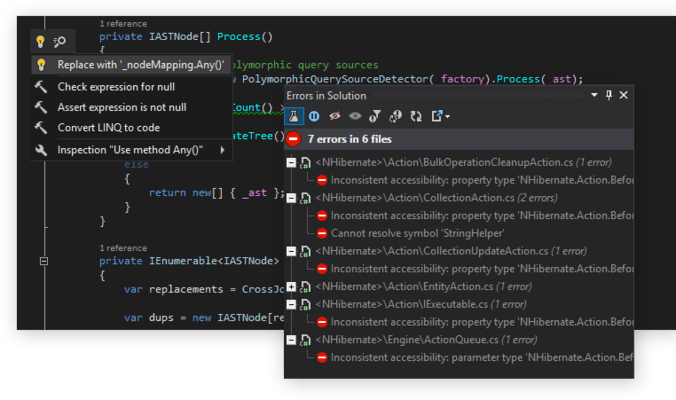
- The ability to preview suggested code changes - Rider now gives you a clearer way to evaluate quick-fixes and context actions before applying them. The new intention previews show what the selected action will change directly from the code actions menu, helping you understand the result at a glance and choose the right fix with more confidence. The preview supports diff-based output with syntax and identifier highlighting, so you can quickly compare the before and after states without interrupting your flow. This is especially helpful for broader changes, including fixes that affect multiple files, where seeing the exact impact upfront makes code actions feel safer and easier to trust.
- Improved NuGet tool window - Rider's NuGet tool window has been redesigned to make dependency management clearer in larger solutions. Browsing for new packages, scrolling and loading them, managing installed dependencies, and reviewing available updates now have separate, more focused paths, so it's easier to see what needs attention and update packages when you're ready.
.NET development
- File-based C# app templates - Rider 2026.2 adds a dedicated C# file-based app template, making it easier to create, edit, and run file-based C# apps directly from the IDE. It's a lightweight workflow for scripts, repo utilities, CI helpers, and quick tasks that don't need a full project setup.
- Hot Reload for WPF projects - Rider 2026.2 introduces WPF Hot Reload, letting you edit XAML while your WPF app is running under the Rider debugger and see saved changes applied in place. You can tweak layouts, styles, templates, and resources without rebuilding, restarting, or navigating back to the same screen.
Code analysis and refactoring
- C# support - Rider's C# code intelligence is powered by ReSharper. Rider 2026.2 includes the latest ReSharper updates for .NET code analysis, refactoring, analyzer configuration, and language support. For the full breakdown, see the What's New in ReSharper 2026.2 page.
- C++ support - Rider 2026.2 introduces initial support for C++26 reflection, the most anticipated addition to the C++ language in recent years. The reflect operator (^^), splicing ([: ... :]), and consteval blocks are now recognized by the editor, providing syntax highlighting, code analysis, and coding assistance for reflection-based metaprogramming. Additionally, Rider extends its constexpr evaluator with support for dynamic memory allocations and exceptions during constant evaluation. Other updates to C++ support include new code inspections and refactoring enhancements. Rider's C++ intelligence is powered by JetBrains ReSharper C++.
- F# support - Rider 2026.2 brings several F# improvements. A new action lets you quickly disable and restore compiler warnings; importing types and other symbols from errors is more reliable; C# 14 interop is smoother; and F# debugging has received additional fixes.
Game development
- Performance breakthroughs: Large Unreal Engine projects should open and become ready to work with faster. Opening a generated .sln now benefits from the UnrealBuildTool project model, with C++ indexing running roughly twice as fast in the benchmarks. See the Performance section.
- Game-aware AI agent skills: Code quality hooks can validate agent-generated changes in game projects, while Unreal Engine-specific skills help agents with UE C++ code authoring, live debugging, and test authoring. See the Agent skills section.
- First-class debugging: Natvis support arrives on Linux and macOS, so inspecting native data structures works consistently across platforms, alongside expression evaluator enhancements. See the Debugging section.
- Better navigation for UInterface - Tracking Unreal Engine UInterface implementations is now more direct. Usage information is shown for the I-prefixed implementation interface, where Unreal interface functions are declared and implemented by gameplay classes. Find Usages also now includes Blueprint usages for Unreal interfaces, not just C++ references, making it easier to track where an interface is used across code and assets.
- Find Unreal Engine Gameplay Tag usages in Blueprints - Gameplay Tags are easier to follow across both C++ and Blueprints. Usages inside Blueprint assets now appear in Code Vision and Find Usages results, so you can see where a tag is used across the project without leaving Rider. This is especially useful for projects built around the Gameplay Ability System, where tags often drive ability activation, blocking, cancellation, effects, and gameplay events. Rider detects tag usages in key Gameplay Ability System Blueprint nodes and GameplayAbility asset properties, and now shows Code Vision for both Gameplay Tag declarations and definitions in C++.
- ISPC support - High-performance CPU code gets first-class editor support with ISPC (Intel SPMD Program Compiler), a language used in game engines, rendering systems, and scientific computing, including Unreal Engine projects. ISPC files now get syntax highlighting, code analysis, navigation, and coding assistance, bringing the same quality of editor support you expect for C++ to your ISPC code.
- Professional Godot support - Godot development in Rider feels more complete, polished, and reliable in 2026.2. The release adds new project templates, better GDScript support and formatting, improvements for working with scenes, and many fixes based on direct feedback from the Godot community.
- New configurable GDScript formatter - Keeping GDScript code consistent is now easier with one of the most capable and configurable GDScript formatters available today. Built directly into the IDE, it handles spacing, indentation, wrapping, tabs, and common GDScript layout rules, with language-specific code style settings available in Rider's standard settings UI. Unlike many external formatters, Rider lets you reformat exactly what you need: a selected fragment, a single file, or the whole project. The formatter also powers smarter editing behavior as you type, including indentation on Enter, smart outdent after control-flow statements, and splitting long string literals across lines. The result is a native GDScript formatting experience that feels consistent, flexible, and ready for real Godot projects.
- Drag Godot scene nodes into code - Referencing Godot scene nodes from GDScript takes less manual wiring. Drag nodes from the Scene Preview tree directly into the editor, and Rider will insert the right node path or variable declaration for you. The behavior follows Godot Editor conventions: drag a node normally to insert its path, hold Ctrl to generate an @onready variable, or hold Alt to generate an @export variable. Multi-selection is supported too, including nested nodes, with paths resolved relative to the script you are editing.
- JetBrains Rider Integration add-on on the Godot Asset Store - The official JetBrains Rider Integration add-on is now available on the brand-new Godot Asset Store. It simplifies setting up Rider as an external editor for Godot projects, giving you direct access to Rider's code insight, navigation, inspections, and debugging support while working on Godot games and add-ons.
- Support for Godot Autoloads and UID references - Godot project-wide APIs and resources are easier to navigate from GDScript. Autoloads and uid:// resource references are now resolved more accurately, with proper highlighting, documentation, and navigation for globals configured in the Godot project settings, so singleton-style project APIs feel like first-class symbols in the editor. Rider also resolves uid:// references in load and preload calls, making resource links created by Godot work more naturally in code insight and navigation.
- Project templates for game development - Getting started with a new game project is now easier in Rider. The New Project dialog features a dedicated Game Development category that brings game-engine-specific templates directly into the IDE. Godot projects and add-ons now have ready-made starting points in the IDE, including templates for Godot Asset Store add-ons such as script-based assets, editor plugins, and native C++ GDExtensions. Each template comes with a preconfigured project structure, build settings, and run configurations, helping you get up and running faster. JetBrains have also added a new CMake game project template for native game development workflows, laying the foundation for a growing collection of game development project templates in future releases.
- CMake support is now out of Beta - Native game development workflows get a more complete CMake experience now that Rider's CMake support is out of Beta. CMake projects benefit from fixes across the workflow and convenient gutter actions for running and debugging targets directly from the editor. JetBrains have also added support for project files that are not explicitly listed in CMakeLists.txt, helping Rider understand more of the code that belongs to your project. Because enabling this for very large projects can increase indexing scope and affect performance, the option is turned off by default and can be enabled manually in settings.
Debugging
- Improved source generator debugging - Debugging source generators should now work more reliably with newer SDKs on Linux and macOS. Starting a debugging session no longer requires a successful build of the target project, and target project files are no longer compiled before startup, which should make the workflow faster.
- Basic Natvis support on Linux and macOS - Rider 2026.2 brings basic Natvis type visualization to the C++ debugger on Linux and macOS, expanding its availability beyond Windows. Existing Natvis files, including visualizers that ship with popular C++ libraries, can now be used with LLDB on Linux and macOS systems. This also improves Godot C++ debugging: Rider now supports the godot-cpp.natvis, making Natvis the recommended visualization path for Godot types in Rider across supported platforms. If you previously registered GodotFormatter manually in .lldbinit, remove that registration and use the Natvis visualizers instead.
- Improved C++ expression evaluation on Windows - Rider 2026.2 improves C++ expression evaluation when debugging on Windows. The update makes more expressions work reliably with watches, conditional breakpoints, and Evaluate Expression operations, including function calls (with parameters) from Natvis visualizers and a number of fixes around comparisons, persistent variables, intrinsics, and function calls. One practical improvement is smoother string comparison during debugging. Unreal Engine string types such as FString and FName, as well as standard library string types, now handle common comparison scenarios (e.g. myFString == "Hello"), including comparisons in conditional breakpoints.
- Debugger stepping improvements - Stepping is more predictable in Rider 2026.2. Step Into now lands where you expect, instead of dropping you into runtime or standard-library code, and clearer highlight ranges make it easier to pick which method to step into. When a statement has several method calls, already-visited ones stay highlighted as you step out, so you can always see where you are in the statement. Return values shown after stepping over or out are cleaner and more accurate, and debugger hints now keep a stable, consistent order instead of reshuffling on each step, so the ones you care about no longer get pushed off the right edge of the screen.
Cloud-based development
- Built-in Azure Functions support - Azure Functions support for local development is moving from the separate Azure Toolkit plugin directly into Rider. You can now work with Azure Functions projects without installing any additional plugins, including creating projects and triggers, running and debugging functions, using Azurite integration, and more. Rider 2026.2 also adds the ability to create an Azure Functions trigger from the project creation dialog. In addition, Azure Functions projects can now be debugged inside a Docker container, extending the Docker debugging workflow that was previously available only for regular .NET projects.
- New in Azure DevOps support: Pull requests - Rider 2026.2 expands Azure DevOps support with the introduction of pull requests. The new Azure DevOps tool window lets you list and filter pull requests, review changed files, vote, complete existing PRs, and create new ones without having to switch to any external tools. You can review PRs in the context of your project with full access to Rider's code insight, navigation, and editing features.
Web development
- TypeScript 7 support for faster workflows with large codebases - Large TypeScript codebases don't have to feel slow. TypeScript 7 rewrites the compiler and language server in Go, and the difference is noticeable immediately. In testing, project load time on the Kibana codebase dropped from 12 seconds to 3 seconds, which means editor responsiveness has improved roughly fourfold. Rider 2026.2 supports TypeScript 7 as the default for projects already using it, with an opt-in upgrade path for those still on earlier versions. You get the full speed benefit immediately - no full project migration required on day one. For teams on large TypeScript monorepos, this is a day-one upgrade.
ReSharper
Preview of ACP agent support in ReSharper starts with Junie
- JetBrains is building an ecosystem where .NET developers control their AI experience in Visual Studio - no vendor lock-in, no forced choices, just the freedom to use the agents and models that work best for you. The goal is to let you connect agents through the Agent Client Protocol (ACP) and pair them with JetBrains' deep code intelligence without being locked into a single vendor.
- ReSharper 2026.2 takes the first step in that direction with preview support for Junie, JetBrains' own LLM-agnostic agent, now available via ACP in Microsoft Visual Studio. You can switch from AI Chat to Agent mode in the AI Assistant tool window and ask Junie to generate and edit code, refactor complex implementations, run terminal commands, manage Git workflows, explain legacy code, and suggest architectural improvements.
- To bring Junie to Visual Studio, be sure to select the AI Assistant plugin for installation when updating ReSharper. A free trial is available if you don't have a JetBrains AI subscription yet.
- Regional restrictions on the availability of AI features in Mainland China apply.
Debugging for VS Code-compatible editors
- The most requested feature for ReSharper in VS Code is here. The latest update introduces the initial version of debugging for VS Code-compatible editors, including VS Code, Cursor, Google Antigravity, Devin Desktop, and Kiro. Built on the same core engine that powers JetBrains Rider, it brings breakpoint management (including conditional, hit-count, dependent, and tracepoints), real-time variable and expression inspection, full step navigation, and launch-and-attach support directly to your editor.
- This makes ReSharper the most complete .NET option available on Cursor, Antigravity, Devin Desktop, and Kiro, as well as other VS Code-compatible editors.
Code analysis and refactoring
- C# support updates - ReSharper 2026.2 improves its C# code analysis with more cases where collection expressions can be used. The new inspections help you keep code concise and, in some scenarios, avoid creating intermediate collections. Support for upcoming C# 15 language features is also being actively developed as the compiler evolves, with complete language understanding planned for the next major release.
- Enhanced Extract Method refactoring - Extract Method now detects exact and parameterized duplicates of the selected code within a file and lets you choose which occurrences to replace as part of the refactoring. This makes it easier to consolidate repeated logic into a single, well-named method without cleaning up each duplicate manually.
- '.editorconfig' and Roslyn analyzer integration - You can now adjust .editorconfig settings for compiler warnings directly from the Alt+Enter menu as warnings appear in the editor. ReSharper's code analysis also follows Roslyn analyzer configuration more accurately, including settings defined in .editorconfig files and suppression rules applied with #pragma directives.
- Enhanced Import missing references popup experience - The Import missing references popup has been revamped for a smoother experience. JetBrains have optimized its placement, got rid of flickering, and ensured it stays out of the way while you type, so it no longer interrupts your workflow.
C++ updates
- C++26 reflection: Initial support for C++26 reflection, laying the groundwork for next-generation compile-time metaprogramming.
- 'constexpr' evaluation updates: Support for memory allocations and exceptions during evaluation of compile-time code.
- ISPC support: Syntax highlighting, code analysis, and navigation for files using the ISPC language.
- Code analysis: New inspections for applying internal linkage, using designated initializers in aggregate initialization, and detecting qualified calls to overridden virtual functions.
Performance
- Processing of .cshtml and .razor files is now faster and more memory-efficient, thanks to cached parsed syntax trees, improving the performance of features such as Find Usages and refactorings. Memory allocations have been significantly reduced in multiple areas, speeding up indexing during startup.
Improved tool support in Out-of-Process mode
- dotTrace, dotMemory, and the Monitoring tool now work when ReSharper runs in Out-of-Process mode.
- With Monitoring available in OOP mode, the transition announced in the previous release is complete: Dynamic Program Analysis (DPA) has been retired in 2026.2, and its core capabilities continue through the new Monitoring experience.
ReSharper now includes integrated profiling and coverage tools
- Starting with ReSharper 2026.2, the tools for performance and memory profiling, and code coverage are installed automatically as part of your ReSharper installation. There's nothing extra to select or download; the tools are set up for you and ready to use inside Visual Studio from the moment you install. You can profile performance, track memory, and check coverage without ever leaving your workflow.
Updated dotUltimate offline installer for Windows
- The dotUltimate offline installer for Windows is intended for administrators who deploy ReSharper and other dotUltimate tools across teams, managed environments, or machines with limited internet access. In 2026.2, this offline installer is distributed as a .ZIP archive instead of a standalone .EXE file. The lightweight online installer remains available for users who do not need the offline package.
- After downloading the offline package, extract the archive and run the included dotUltimate installer. The .ZIP archive contains two files: the dotUltimate installer executable and a companion .dat file. The installer executable contains the product binaries except Rider; Rider binaries are stored in the .dat file. The installation flow and supported scenarios remain the same, but deployment scripts or internal instructions may need to include the extraction step and keep both files together before running the installer.
ReSharper C++
C++ support
- C++26 reflection - ReSharper C++ 2026.2 introduces initial support for C++26 reflection. Reflection is widely considered one of the most transformative features coming to C++, enabling compile-time introspection and code generation. With this update, ReSharper C++ recognizes the core reflection primitives:
- The ^^ (reflect) operator, which produces a std::meta::info value representing the reflected entity.
- The [: ... :] (splice) syntax, which converts a reflection value back into a language construct.
- Compile-time queries on reflected types, members, enumerators, and other entities.
- Note: Of the major C++ compilers, currently only GCC 16 supports C++26 reflection.
- Related C++26 features - Support for reflection is complemented by two related C++26 language features:
- ReSharper C++ now supports consteval { ... } blocks, which are evaluated at compile time and can inject declarations into the enclosing scope. consteval blocks provide a clean way to trigger compile-time side effects, making them particularly useful for practical metaprogramming with reflection.
- User-defined annotations can now be attached to declarations and queried through the reflection API, enabling custom metadata-driven code generation.
- 'constexpr' evaluation - ReSharper C++ 2026.2 extends its constexpr evaluator with two important capabilities:
- The evaluator now supports dynamic memory allocation during constant evaluation - a feature introduced in C++20. This enables correct evaluation of constexpr code that uses new/delete or standard containers like std::vector and std::string.
- The evaluator now supports C++26 constexpr exceptions and handles try/catch and throw expressions during constant evaluation.
ISPC language support
- ReSharper C++ 2026.2 adds support for ISPC (Intel SPMD Program Compiler), a language designed for high-performance parallel programming on CPUs. ISPC is widely used in game engines, rendering systems, and scientific computing, including Unreal Engine projects.
- ReSharper C++ now provides syntax highlighting, code analysis, navigation, and coding assistance for ISPC files, bringing the same quality of editor support you expect for C++ to your ISPC code.
Unreal Engine
- Performance - This release brings major performance improvements during startup in Unreal Engine projects. ReSharper C++ now uses the project information from UnrealBuildTool to speed up initial indexing by analyzing only files included in the Unreal Engine project model. Combined with other optimizations, including improvements in multithreaded indexing, this results in a significant speedup. According to the measurements on the Lyra sample solution, initial indexing of C++ code is up to 55% faster, and loading C++ caches from serialized data during a warm IDE startup is up to 35% faster. You can disable the new indexing behavior by unchecking the Index only files in Unreal Engine project model option on the Code Editing | C/C++ | Unreal Engine settings page.
- Blueprint support - ReSharper C++ now also discovers usages of gameplay tags inside Blueprint assets and shows them in Code Vision and Find usages results, giving you a complete picture of where your gameplay tags are used across the project.
Code analysis
- Internal linkage - The new Entity can have internal linkage inspection detects functions, variables, and classes that are not used outside their translation unit. You can use the provided fixes to mark such entities static or move them into an anonymous namespace, which helps the compiler optimize and prevents unintended linkage conflicts.
- Designated initializers in aggregate initialization - ReSharper C++ now suggests adding designators to braced initializer lists in aggregate initialization. Designated initializers, available since C++20 and C99, make it explicit which member each initializer corresponds to, improving code readability and reducing the chance of errors when members are reordered. A corresponding context action is also available and can be used even when the inspection is disabled.
- Calls to overridden base functions - Another new inspection detects qualified calls to base virtual functions that are overridden in a derived class. Calling a base-class virtual function directly rather than through virtual dispatch can be a source of subtle bugs, and this inspection helps catch such cases.
- [[jetbrains::used_implicitly]] attribute - ReSharper C++ now recognizes the [[jetbrains::used_implicitly]] attribute, which can be applied to symbols to suppress inspections that would otherwise suggest changing their signature or linkage. This is useful for symbols that are used through reflection, code generation, or other mechanisms not visible to static analysis.
Coding assistance
- Refactoring improvements
- Invoking Inline Function on a function declaration now inlines all usages of the function throughout the codebase, not just the usage under the cursor.
- The Extract Method refactoring is now available inside lambda bodies, letting you factor out parts of a lambda into a separate function.
- Context actions
- A new context action lets you easily toggle the const qualifier on a member function.
- You can now quickly insert a #pragma clang diagnostic ignored directive to suppress a specific Clang diagnostic on the current line.
- In Unreal Engine projects, you can now copy the include path for the currently opened header file from the Copy Code Reference menu, making it easy to paste the correct #include directive.