Codejock Docking Pane ActiveX

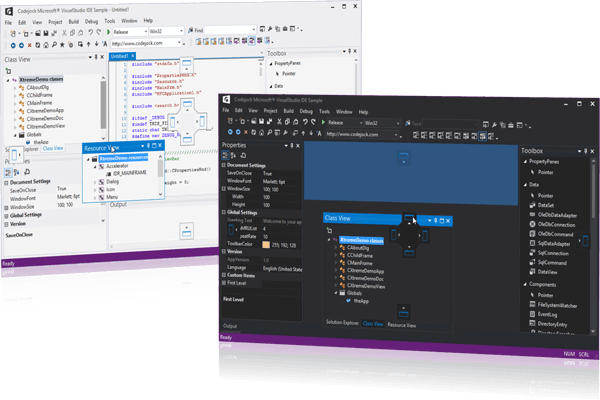
Bietet Windows GUI-Ingenieuren alle erforderlichen Komponenten, um erweiterte Docking-Fenster im Visual Studio-Stil zu erstellen.

Veröffentlicht von Codejock Software
Wird von ComponentSource seit 2003 vertrieben
4.00 Stern Durchschnittliche Bewertung4.00 Stern Durchschnittliche Bewertung4.00 Stern Durchschnittliche Bewertung4.00 Stern Durchschnittliche Bewertung4.00 Stern Durchschnittliche Bewertung (1)

i

Codejock Docking Pane ActiveX is now only available in Codejock Suite Pro.

Codejock Docking Pane ActiveX Releases

Released: Apr 14, 2022

Updates in v20.3.0

Fehlerkorrekturen

  • Wrong floating pane layout after application restart has been fixed.

Released: Nov 17, 2021

Updates in v20.2.0

Fehlerkorrekturen

  • DPI scaling removed from pane layout data exchange.

Released: Sep 1, 2021

Updates in v20.1.0

Funktionen

  • Added DPI support to stickers.

Fehlerkorrekturen

  • Pane resizing has been fixed.

Released: Jun 26, 2021

Updates in v20.0.0

Funktionen

  • Added MDI docking support to docking panes.

Fehlerkorrekturen

  • Initialization crash fixed for both dialog and view clients in cases when setting change messages occur during initialization.
  • Black caption on docking frame fixed for markup themes.

Released: Nov 22, 2019

Updates in v19.1.0

Fehlerkorrekturen

  • Out of range resource IDs fixed.

Released: Aug 20, 2019

Updates in v19.0.0

Funktionen

  • Support for Visual Studio 2019.
  • Utility and Samples - Codejock samples and utilities have been significantly improved and applied a modern look so that you are able to not only work more efficiently with the tools.

Released: Aug 7, 2018

Updates in v18.5.0

Funktionen

  • Stickers made DPI aware.

Fehlerkorrekturen

  • Fixed wrong colors in DockingPaneFrame pane buttons in Office 2013/2016 and VisualStudio 2012/2015 themes.

Released: May 16, 2018

Updates in v18.4.0

Fehlerkorrekturen

  • Spacing between title bar and the pane fixed for Office 2013/2016 themes.
  • Fixed floating DockingPane borders in HiDPI.

Released: Nov 20, 2017

Updates in v18.2.0

Fehlerkorrekturen

  • Drawing vertical captions in the TitleBar in Office 2013/2016 and Visual Studio 2012/2015 themes is fixed.

Released: Jul 31, 2017

Updates in v18.0.1

Funktionen

  • Visual Studio 2017 support added.
  • Office 2016 theme added.
  • CXTPDockingPaneManager::SetClientMargins added for ability to set margins individually.

Fehlerkorrekturen

  • Crash in CXTPDockingPaneTabbedContainer::RemovePane fixed.
  • Drawing behavior for Office 2013 fixed.