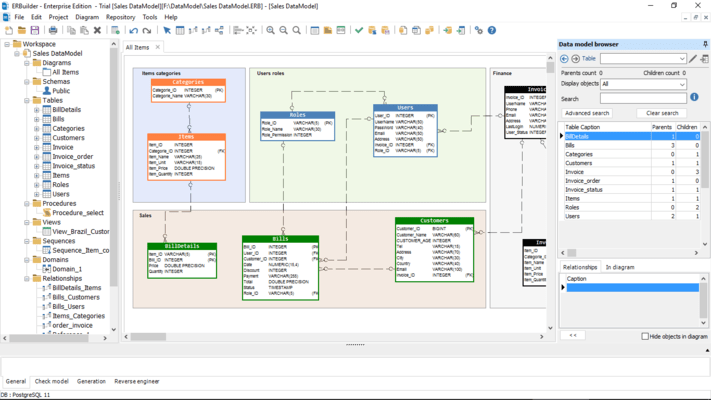
| Define tables, columns, relationships, keys, sequences, indexes, domains, views, procedures and triggers |
• |
• |
| IDEF1X, Crow's Foot, Codasyl and Relational notations |
• |
• |
| Auto-arrange tables in the diagram |
|
• |
| Advanced keys management |
• |
• |
| Reflexive relationships |
• |
• |
| Multiple diagrams |
• |
• |
| Multiple projects management |
• |
• |
| Syntax highlighting |
• |
• |
| Diagram sizing |
12 A0 |
12 A0 |
| Split and merge relationship |
• |
• |
| Oracle database |
• |
• |
| Microsoft SQL Server |
• |
• |
| MySQL |
• |
• |
| MariaDB |
• |
• |
| PostgreSQL |
• |
• |
| SQLite |
• |
• |
| Firebird |
• |
• |
| Microsoft Azure SQL database |
• |
• |
| Azure Synapse Dedicated SQL Pool |
• |
• |
| Amazon Redshift |
• |
• |
| Amazon RDS |
• |
• |
| Ability to manage connections |
• |
• |
| SSL Secure connections (PostgreSQL and MySQL) |
• |
• |
| SSH connection to a remote server using password authentication and public key authentication method |
• |
• |
| Windows authentication method in MS SQL Server connection |
• |
• |
| Model validation |
• |
• |
| Generation of SQL/DDL script from data models |
• |
• |
| Generation of databases from data models |
• |
• |
| Support for Before and After scripts at both project and database table levels |
• |
• |
| Import from local and remote databases (Reverse engineering) |
• |
• |
| Version management |
• |
• |
| Export model as an image |
• |
• |
| Data model printing |
• |
• |
| Model documentation settings |
• |
• |
| Generating navigable model documentation in HTML format |
• |
• |
| Generating model documentation in MS Word format |
|
• |
| Generating model documentation directly into Confluence |
|
• |
| Validate a model using a database sandbox |
• |
• |
| Data forms |
• |
• |
| Data grids |
• |
• |
| Test data generation |
Generate maximum 10 000 rows per table |
Generate unlimited rows per table |
| Automatically generate entity relationship diagrams (ERDs) from natural language inputs such as data model descriptions, user stories, or requirements, using the generative AI feature |
• |
• |
| Use the generative AI feature to update an existing data model by auto-generating tables & relationships from descriptions, user stories, or requirements |
• |
• |
| Advanced Metadata Query Assistant powered by ChatGPT API: Ask and get answers as reports and statistics from your data model |
• |
• |
| Expert mode into the Advanced Metadata Query Assistant: See the SQL query extracted from the natural language question and the ability to fine-tune and edit the query as needed |
• |
• |
| AI-Powered description generation for Procedures, Views, and Triggers |
• |
• |
| Collaborative modeling with Git: Configure ERBuilder data modeler to work with Git. Browse different versions of the model from the repository, merge and compare with the local model |
|
• |
| Advanced exploration of a data model |
• |
• |
| Advanced search in the data model browser |
|
• |
| Generate web user interface for CRUD applications |
|
• |
| Switch to another target database |
• |
• |
| Compare model to model |
• |
• |
| Compare model to database |
• |
• |
| Compare database to database |
• |
• |
| Generate compare HTML report |
• |
• |
| Generate database/model synchronization script |
• |
• |
| Update model from database |
• |
• |
| Build an enterprise data dictionary automatically |
• |
• |
| Generate data dictionary/documentation report using the ERBuilder command line |
|
• |
| Requirements management: Ability to create and assign requirements to tables, columns, constraints, triggers, procedures and relationships |
|
• |
| Document a database with user-defined metadata fields |
|
• |
| Ability to find objects by name |
• |
• |
| Global search and replace |
• |
• |
| Replacing data type |
• |
• |
| Treeview contextual menu |
• |
• |
| Copy/Paste |
• |
• |
| Undo/Redo |
• |
• |
| Options management |
• |
• |
| Reach objects from treeview |
• |
• |
| Subscription Period |
12 months |
12 months |
| Email Support |
• |
• |
| Minor Updates |
• |
• |
| Major Updates |
• |
• |