Diese Seite wurde archiviert und wird nicht mehr aktualisiert.

Dieses Produkt wird nicht mehr von uns vertrieben.

NetAdvantage for Visual Studio LightSwitch

Erstellen Sie benutzerdefinierte Geschäftsanwendungen mit LightSwitch.

Veröffentlicht von Infragistics
Wird von ComponentSource seit 1996 vertrieben
i

New licenses of Infragistics NetAdvantage for LightSwitch are no longer available. However, if you are an existing customer with a valid subscription you will be automatically upgraded to an Infragistics Professional subscription by the publisher.

If you have any queries please contact us.

Über NetAdvantage for Visual Studio LightSwitch

Erstellen Sie benutzerdefinierte Geschäftsanwendungen mit LightSwitch.

NetAdvantage Silverlight Line of Business Controls ermöglicht Ihnen, Ihre vorhandenen Web-basierten Anwendungen auf Hochglanz zu polieren. Dies verleiht Endbenutzern einen Eindruck, der das, was mit bloßem HTML möglich ist, um Welten übertrifft. Diese Steuerelemente wurden von Grund auf für die Silverlight-Plattform neu entwickelt und ziehen vollen Nutzen aus dessen unglaublichen Möglichkeiten. NetAdvantage Silverlight Line of Business Controls sind Teil des NetAdvantage for Web Client-Toolsatzes, der ebenfalls ASP.NET sowie das komplette NetAdvantage for .NET-Paket enthält – das wiederum alle vier .NET-Plattformen umfasst – Windows Forms, WPF, ASP.NET und Silverlight. Mit NetAdvantage Silverlight Line of Business Controls erstellen Sie attraktive und wirkungsvolle Web-2.0-Anwendungen. NetAdvantage Silverlight Line of Business Controls umfasst xamWebGrid (ein Silverlight-Datengitter), xamWebTree (eine Silverlight-Baumstruktur für eine natürliche Navigation), xamWebChart (Silverlight-Diagramme), xamWebOutlookBar (Navigation für Silverlight im Outlook-Stil), xamWebDialogWindow (modulare und nicht modulare Dialogfenster), xamWebEditors (Dateneintragskomponente), Infragistics.Excel (eine Klassenbibliothek, die komplett unabhängig von Microsoft Excel ausgeführt wird), xamWebMenu (Menüs mit mehreren Ebenen), xamWebSpellChecker (Silverlight-Rechtschreibkorrektur), xamWebTagCloud (Tag-Anzeige-Komponente), xamWebTileView (ein animierter Fensterbereich) u.v.m.

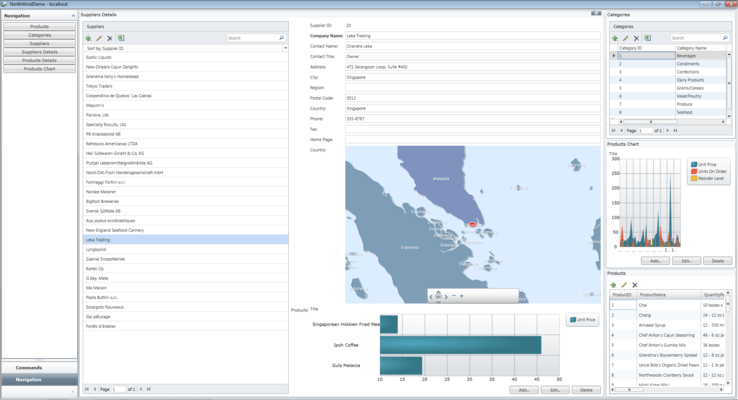
UI Control Extensions - NetAdvantage for Visual Studio LightSwitch extends applications built in Visual Studio LightSwitch with custom shells, themes and controls for creating code-free dashboards, interactive maps, and other eye-catching data visualizations.

  • Map control – Present rich geospatial data with interactive which features like panning, zooming, image tiling, mouse over effects and tooltips. This control supports Open GIS standards for creating polygon-based shapes (lots, states, countries), polyline-based shapes (roads, rivers, transmission lines), point-based shapes (cities, points of interest), geometry and geography data, and tiled geo-imagery.  Additional features includes: Map Layers, Map Tile Source, Navigational panes, Color Swatch panes, Scale panes.
  • Gauge control – Create multi-scale, round or semi-round dashboard dials with the look and feel of an automotive dashboard or aircraft cockpit. You can also create linear Gauges with straight line measurement scales that can orient vertically or horizontally. You can even build digital displays with up to seven numeric segments or 14 alphanumeric segments.
  • Data Chart control – Build dashboards and chart types for every business scenario. This control is designed for high performance, particularly with large data sets ranging into the millions of data points. It is also capable of updates every few milliseconds. The Data Chart offers zooming, range selection and the stacking of chart layers to the popular Area, Column, Line, Spline, Step and Pie charts with ease and elegance.
  • Bullet Graph Control – Deliver a simple and concise view of your key performance indicators (KPIs) and business intelligence with the Bullet Graph. This control will allow you to compare multiple measurements. You can even enliven its look and feel with visually impressive animations, “template” and style its look and feel, and data bind this control to a particular value.
  • Slider Control -To provide users with a far more compelling editing experience than simple edit boxes, and to prevent errors in data entry, Infragistics are including the Slider control with this toolset. Similar to the Silverlight xamSlider control, this Slider presents an extensible range of features including datetime, numeric, datetime range, and numeric range sliders that will quickly relegate traditional edit boxes to the dust bin.
  • Editor Controls - The Numeric Editor control extension simplifies the entry and editing of numeric data to any number of decimal places and reduces erroneous input by confining data within programmable upper and lower bounds. It also includes fun-to-use spin buttons for both serially and arbitrarily adjusting data values. When your application calls for formatted or text data with more stringent constraints, the Mask Editor extension couldn't be more timely. Its input mask will help your users “intuitively” fill-in values.
  • Custom Shell Extensions – Elevate your application to a rich, modern, visually stunning delight. The stylish Outlook / TileView shell allows you to aggregate activity and data from multiple Microsoft Visual Studio LightSwitch screens into one view allowing for faster switching between screens in an intuitive, visually pleasing manner. 
  • Themes – Build custom interfaces with simplicity and beauty. Easy to implement, and NeoMetro and Office 2010 compatible, the intuitive style guidelines are the result of years of User Design and User Experience work. Benefit from the IG Theme, Metro Theme, Orange Theme, and Office 2010 Blue Theme styles that will allow you to represent your application in a visually appealing, modern and “natural” way.