Über SqlBak

Sichern, Überwachen und Wiederherstellen von Datenbanken aus dem Internet.

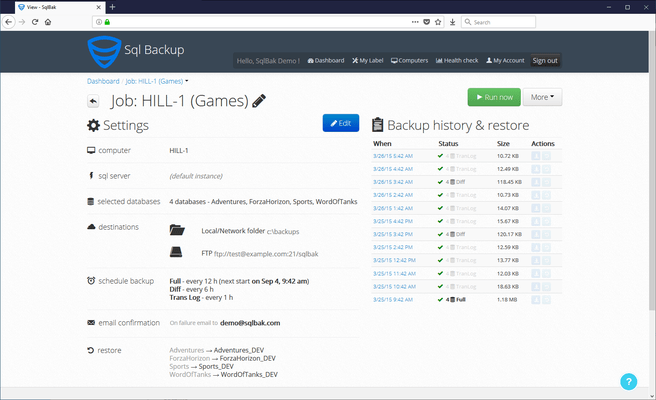
SqlBak helps you schedule and restore SQL backups from any web browser on any device. You can send backups to a folder, FTP, Dropbox, Google Drive, OneDrive or Amazon S3. You can also monitor SQL Server performance and receive email alerts.

SqlBak Features

  • Schedule SQL Backups - Create and restore full, differential, transaction log and incremental backups according to the schedule.
  • Send to Cloud Storage - Your backups are kept in the cloud storage of your choice, SqlBak doesn't keep your data.
  • Watch Server Health - The health and performance of your SQL Server is checked every few minutes.
  • Be Notified - It will send you an email if there is a problem with the backup or the performance of your SQL Server.

What's unique about SqlBak?

  • It only requires the installation of a tiny SqlBak application on a computer with SQL Server.
  • No firewall configuration is required.
  • The communication is secure (https) and initiated only from SQL Server to SqlBak.com.
  • The database backups can be stored on any backup storage (local/network folder, NAS, External HDD drive, FTP, Dropbox, Google Drive, OneDrive or Amazon S3).
  • Built in white label (private label) solution for your customers using SQL Server.

What can SqlBak do?

  • Backup Microsoft SQL Server/Microsoft Azure SQL/MySQL/PostgreSQL/Amazon AWS SQL Server/MongoDB databases installed on an unlimited number of remote servers.
  • Send backups to a local/network folder, FTP, Amazon S3, Google Drive, Dropbox, OneDrive, S3 Compatible, Microsoft Azure,Backblaze B2, Box, Wasabi, Google Cloud, Aruba Cloud, OneDrive for Business, Yandex.Disk and SSH.
  • Restore SQL backups.
  • Monitor SQL Server health.
  • Send email alert notifications on backup success/failure or SQL server outage.

How SqlBak works

  • Install an app - Install a lightweight app on your Windows or Linux server and connect to your database and SqlBak account. Then forget about it – it will run as a background service.
  • Schedule a backup job online - Create a new backup job on SqlBak.com. Set encryption, compression and notifications. Select any of your cloud storages to send your backups there.
  • Manage backups on multiple servers - Connect to any number of servers and see all your backups on a single page.
  • Integrate SqlBak into your product - Users can check the status of their backups with the REST API and access the options for connecting new servers and setting up new jobs via the command-line interface.
  • Perform the backups for your customers - The Private Label option is available for partners. The app, website, emails and backup history will feature your company name and logo exclusively.

SqlBak Standard

  • Destinations: Local/Network folder, External HDD/NAS, FTP, Box, Backblaze B2, Yandex.Disk, FTPS, SFTP, Dropbox, Google Drive, OneDrive, OneDrive for Business
  • SQL down alerts every 10 min
  • Backup History 6 months

SqlBak Professional

  • Destinations: Local/Network folder, External HDD/NAS, FTP, Box, Backblaze B2, Yandex.Disk, FTPS, SFTP, Dropbox, Google Drive, OneDrive, OneDrive for Business, Amazon S3, Microsoft Azure Storage, S3 Compatible
  • Server down alerts every 5 min
  • Backup History 12 months
  • AES Encryption
  • Server health check every 60 min
  • Extended support
  • White Label
  • Public API