








Fournisseur officiel
Comme nous somme les distributeurs officiels et autorisés, nous vous fournissons des licences légitimes directement à partir de 200+ éditeurs de logiciels.
Voyez toutes nos marques.

Spread.NET by MESCIUS is a versatile spreadsheet component for .NET applications, enabling developers to integrate Excel-compatible functionalities into Windows Forms, WPF, ASP.NET, and Blazor. With features like advanced data visualization, pivot tables, conditional formatting, and customizable formulas, Spread.NET handles large data sets efficiently and allows seamless Excel import/export. This tool is ideal for applications needing robust data analytics and reporting, such as financial software and business intelligence solutions, enhancing user experience with a familiar spreadsheet interface.
In this blog post, MESCIUS Product Marketing Specialist Mackenzie Albitz shows you how to use Spread.NET to efficiently manage data within your applications when you encounter text that needs to be split into columns. Steps include:
Detailed sample code is included that you can use as a foundation for your applications.
Read the full blog to get started using this powerful capability of Spread.NET.
Spread.NET is licensed per developer and is available as a Perpetual License with a 12 month support and maintenance subscription. We can supply any Spread.NET license including new licenses, maintenance renewals, and upgrade licenses. See our Spread.NET licensing page for full details.
For more information, visit our Spread.NET product page.

The VectorDraw Developer Framework (VDF) is a comprehensive software library developed by VectorDraw that provides tools for creating, managing, and visualizing 2D and 3D vector graphics across a variety of applications. Designed primarily for developers, VDF includes a robust set of APIs for handling complex graphics, rendering CAD-style drawings, and supporting vector-based designs. With features such as Delaunay triangulation, advanced rendering capabilities, and support for diverse formats (including DWG, DXF, and SVG), VDF enables high-performance graphics processing in engineering, architectural, and design applications. This all-in-one framework integrates seamlessly with .NET and other development environments, allowing for efficient customization, rendering, and manipulation of graphics for both desktop and web-based solutions.
The VectorDraw Developer Framework (All in one) v11.3.1 update improves Delaunay triangulation performance and adds a new method to calculate the outline boundaries of a points collection. This results in a significant reduction in computation time for triangulating large point sets. For example, processing 261,000 points now takes approximately 150 milliseconds, compared to the 15 minutes required in previous versions. This improvement enhances the efficiency of applications that rely on Delaunay triangulation for tasks such as mesh generation, surface modeling, and spatial analysis.
To see a full list of what's new in v11.3.1, see our release notes.
VectorDraw Developer Framework (All in one) is licensed per developer, per year. During the annual license period you will receive all major and minor upgrades of the VDF libraries plus support from the VDF support team. To continue to use the software you will need to renew your license each year. See our VectorDraw Developer Framework (VDF) (All in one) licensing page for full details.
Learn more on our VectorDraw Developer Framework (VDF) (All in one) product page.

Actipro Avalonia UI Pro is a suite of professionally designed UI controls, themes, and components specifically built for the Avalonia UI framework. It empowers developers to craft beautiful, modern cross-platform applications while leveraging their existing C# and WPF skills. Actipro offers a range of controls from essential navigation and data visualization components to advanced charting and scheduling features, all adhering to its signature high-quality design and seamless integration with Avalonia.
The Actipro Avalonia UI Pro 25.1.0 release introduces new ribbon layout modes, designed to enhance user interface versatility. The Classic layout, with large buttons and multi-row controls, suits applications with numerous commands, while the streamlined Simplified layout, featuring a single row with overflow support, offers a clean, modern interface. Instant mode toggling allows developers to adapt the UI dynamically, providing users with a tailored experience. This update is ideal for applications needing both comprehensive functionality and a sleek design, benefiting both developers and end-users with greater customization and usability.
To see a full list of what's new in 25.1.0, see our release notes.
Actipro Avalonia UI Pro is licensed per developer and is available as a Perpetual license with 1 year support and maintenance. See our Actipro Avalonia UI Pro licensing page for full details.
Learn more on our Actipro Avalonia UI Pro product page.
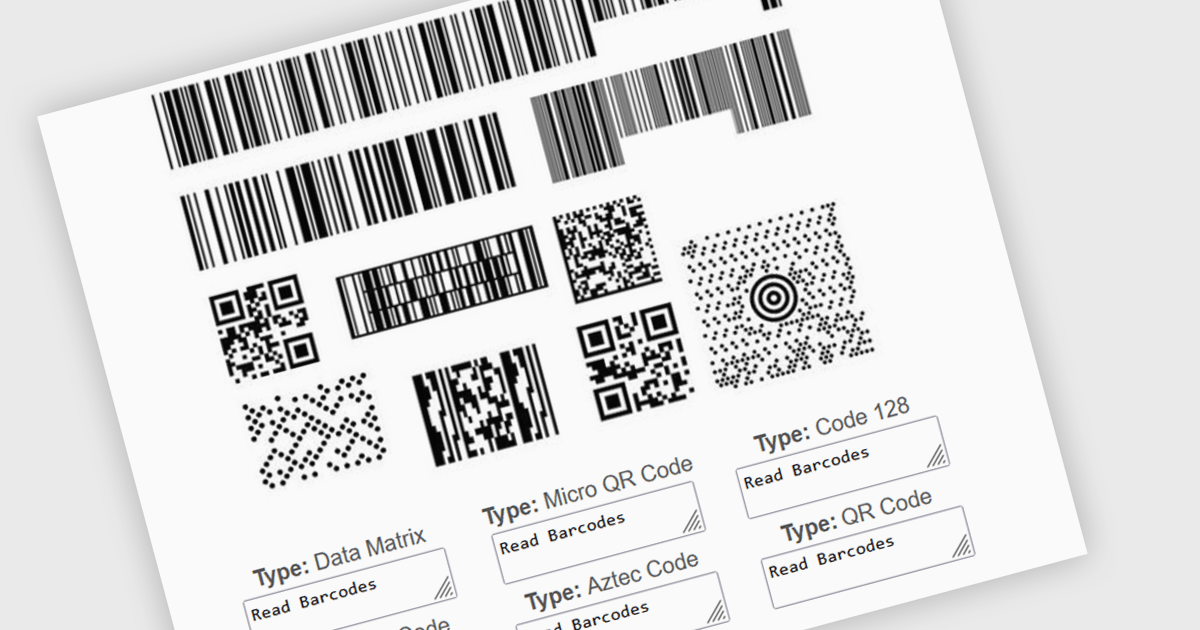
Multiple barcode detection within a barcode component refers to the capability of a system to identify and process multiple barcodes simultaneously within a single image or document. This functionality enables efficient and accurate data extraction from various sources, such as product packaging, shipping labels, and inventory documents. By automating the process of detecting and decoding multiple barcodes, developers can significantly improve the speed and reliability of data input, reduce human error, and enhance overall system performance.
Several .NET barcode components support multiple barcode detection including:
Explore our range of .NET barcode products with multiple barcode detection within Barcode Components.
Need help to find the right software license, upgrade or renewal? Call, Email, or Live Chat with our experts.
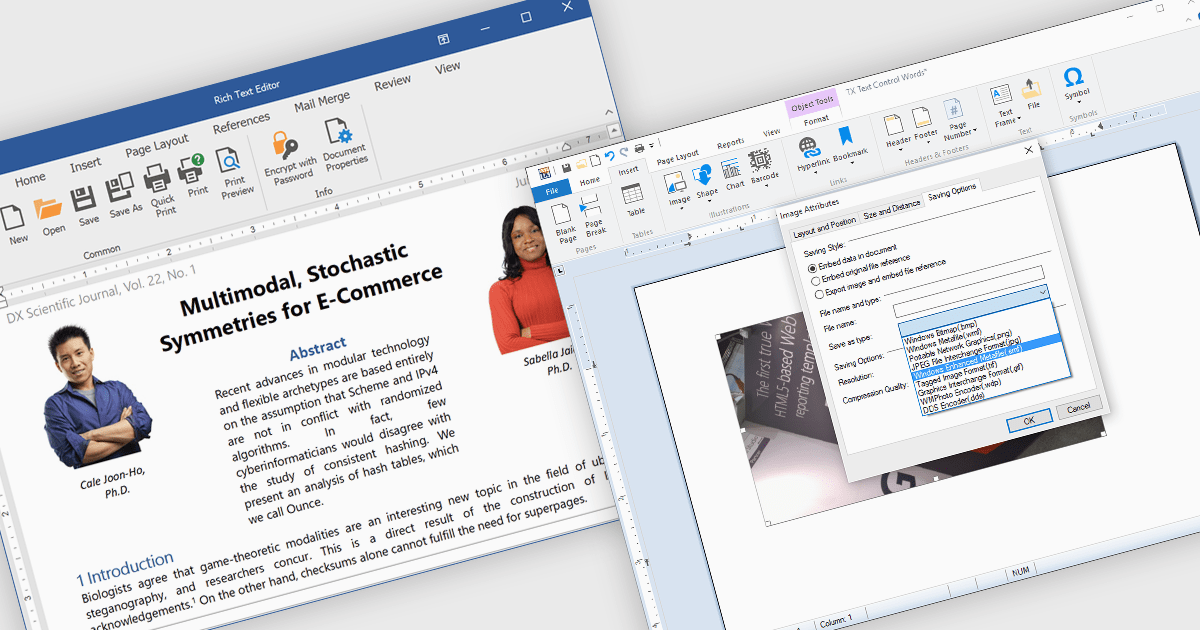
The integration of images within a rich text component enhances the flexibility and visual appeal of digital content by allowing users to embed and format images directly alongside text. This functionality supports a more immersive, informative experience, as images can clarify complex ideas, provide visual examples, or highlight key points within a block of text. For instance, in a blog post, users can insert images to illustrate steps in a tutorial, while marketers may use embedded images to create visually engaging product descriptions within a text editor. This approach streamlines workflows by eliminating the need for separate image and text components, offering a unified platform for visually enriched content creation. The rich text component's support for embedded images facilitates a dynamic presentation, fostering greater user engagement and enhancing readability.
Several .NET WinForms products offer image insertion within rich text components including:
Explore our range of .NET WinForms rich text editors within Word Processing Components.
Need help to find the right software license, upgrade or renewal? Call, Email, or Live Chat with our experts.





Tél : (888) 850 9911
Fax : +1 770 250 6199


