Architecture News

XPath Analyzer를 사용하여 구조화된 컨텐츠 간소화

8월 11, 2023
XPath 분석 기능이 있는 도구를 사용하여 XPath 식을 디버깅하고 테스트합니다.

An XPath analyzer is a tool used for examining XML or HTML documents by interpreting XPath expressions. This enables streamlined data extraction and manipulation processes, proving particularly useful for tasks such as Web scraping, data mining, and XML parsing. By interpreting the specified XPath queries, the analyzer locates specific elements, attributes, or patterns within documents, contributing to efficient data retrieval and structured analysis.

Here are some XML tools that provide an XPath analyzer:

  • Altova XMLSpy Enterprise XML Editor features a dedicated XPath analyzer window, allowing users to input XPath expressions and evaluate results in real-time. Its user-friendly interface and debugging capabilities make it a powerful tool for developers and data analysts.
  • Oxygen XML Author Enterprise (by Syncro Soft) is another product with an XPath analyzer. It assists users in interpreting complex XPath expressions through an intuitive graphical interface, simplifying the process of querying and navigating XML content.
  • Stylus Studio XML Enterprise Suite offers an XPath analyzer which aids users in testing and fine-tuning XPath queries, ensuring accurate data retrieval from structured documents.

For an in-depth analysis of features and price, visit our comparison of structured document tools.

Compare Structured Document Tools

jQuery를 사용하여 차트에 주석 달기

8월 10, 2023
주석을 사용하여 주요 데이터 포인트와 추세를 강조 표시하여 차트의 명확성을 높입니다.

Chart annotation involves adding labels, markers, or other visual cues to data points on a chart. It enhances data visualization, providing context and insights to users, improving chart readability, and conveying information effectively.

Here is a selection of individual jQuery chart components that offer the ability to add annotations:

  • Highcharts Core (by Highsoft) allows you to create interactive charts by seamlessly incorporating annotations. Highlight key data points, create callouts, and draw shapes and lines to enhance your visualizations.
  • TeeChart JS (by Steema Software) offers versatile and extensive annotation support. Add context to your charts through text, images, custom HTML, and shapes, enhancing data interpretation.
  • AnyChart JS allows you to elevate your charts with a rich array of annotations. Emphasize trends using text, images, shapes, lines, and arrows, making your data-driven insights more impactful and interactive.
  • ZingChart provides various annotation options. From text and images to shapes and lines, annotations add depth to your visualizations, improving communication of insights.

Many multi-function component suites provide charting components with annotation support, including:

  • DevExtreme Chart (part of DevExtreme Complete by DevExpress) allows you to add annotations to charts that can be animated and interactive. Enrich your charts with text, images, shapes, and lines for dynamic data visualization.
  • Ignite UI jQuery Chart (part of Ignite UI by Infragistics) allows you to seamlessly incorporate annotations into your charts. Add text, images, shapes, and lines to communicate key insights, making your visualizations more engaging and informative.
  • Kendo UI for jQuery Chart (part of Kendo UI by Telerik) allows you to harness extensive customization options, including animated and interactive annotations. Enhance your charts with text, images, shapes, and lines, delivering data-driven insights effectively.
  • Syncfusion JavaScript Chart (part of Syncfusion Essential Studio Enterprise) offers versatile annotation features, such as customizable text, images, shapes, and lines.

For an in-depth analysis of features and price, visit our comparison of jQuery charts.

Compare jQuery Charts

React 그리드 비교에 BestReactGrid 추가

8월 10, 2023
BestReactGrid의 기능을 React의 다양한 대체 데이터 그리드와 비교하세요.

As the premier marketplace for software components and development tools, we are pleased to announce the addition of BestReactGrid to our React Grids Comparison. This further enhances the comparison tool, providing developers with a broader selection of high-performance datagrid components for their React projects.

BestReactGrid is a modern Enterprise-grade grid solution for React UI that includes a wide range of features to help you build powerful and flexible data grids. Its high-performance architecture ensures that your data grids will be fast and responsive, even with large datasets.

Our updated React Grids Comparison allows users to evaluate BestReactGrid with over 15 other popular grid components. It provides an in-depth analysis of each control's features, including cell types, export formats, data sources, and JavaScript framework support, as well as pricing and community reviews. With extensive sorting and filtering options, our comparison makes it easy to shortlist products and find the best grid solution for your specific needs.

Adding BestReactGrid to this comparison ensures that developers have a complete overview of the leading grid components on the market. This empowers them to make an informed choice based on their specific needs, saving time and effort in the selection process.

For an in-depth analysis of features and price, visit our comparison of React grids.

Compare React Grids

유닛 테스트를 통한 코드 품질 향상

8월 10, 2023
버그를 근절하고 IDE 내에서 코드의 유닛 테스트를 직접 실시하여 유지 관리를 개선합니다.

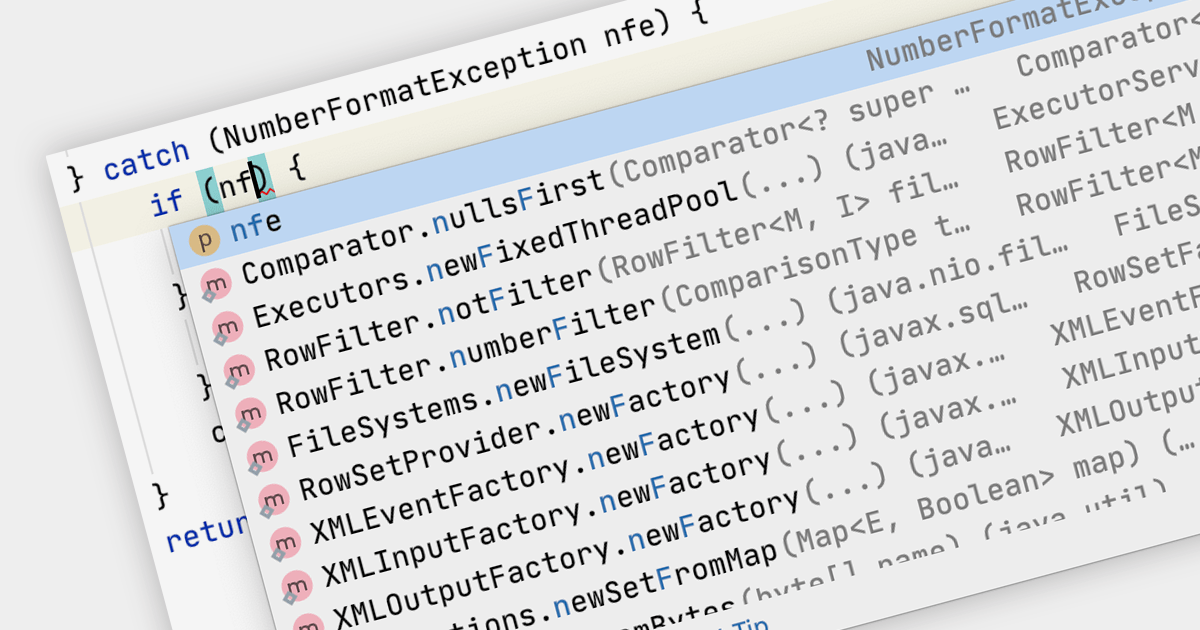
Unit testing involves testing individual units of code to ensure their correctness and functionality. It focuses on testing small, isolated parts of a program, typically individual functions or methods, in isolation from the rest of the system. Unit testing helps identify bugs early in the development cycle, promotes code reusability, and improves overall code quality and maintainability.

Several IDEs offer unit testing including:

  • IntelliJ IDEA (by JetBrains) offers a robust testing framework, enabling developers to write and execute unit tests seamlessly. With its intuitive interface, it aids in catching bugs early.
  • Delphi Enterprise (by Embarcadero) provides an integrated testing environment for efficient unit testing. It assists developers in creating and running tests effortlessly, ensuring reliable and bug-free code.
  • EiffelStudio (by Eiffel Software) incorporates a comprehensive testing suite, enabling developers to test their code section by section. Its feature-rich tools facilitate the creation and execution of unit tests, contributing to software stability.
  • RemObjects Elements offers unit testing capabilities across various programming languages. Its integrated approach simplifies the testing process, promoting code reliability and maintainability.

For an in-depth analysis of features and price, visit our comparison of IDEs.

Compare IDEs

ASP.NET Core에서 셀 유형 활용하기

8월 10, 2023
다양한 데이터 처리를 위해 동적 셀 유형을 ASP.NET Core 애플리케이션에 통합합니다.

Cell types allow different data formats to be added to cells or ranges within a spreadsheet. Examples include text, number, date, formula, and sparkline. Cell types determine how data is displayed, validated, and interacted with in the spreadsheet. By using specific cell types, developers can customize the behavior and appearance of cells, allowing users to input and manipulate data accurately and efficiently in their applications.

Here are some ASP.NET Core spreadsheet controls that allow you to use multiple cell types:

  • DevExpress ASP.NET Core Spreadsheet (part of DevExpress ASP.NET and Blazor) allows you to effortlessly design dynamic spreadsheets enriched with diverse cell types. From  simple text to complex formulas, DevExpress offers a comprehensive toolkit for crafting interactive and data-rich sheets.
  • Telerik ASP.NET Core Spreadsheet (part of Telerik UI for ASP.NET Core) equips you with the tools to build interactive Web-based spreadsheets that support various cell types. Seamlessly integrate text, numbers, dates, and formulas, creating versatile solutions for data presentation and manipulation.
  • Syncfusion ASP.NET Core Spreadsheet (part of Syncfusion Essential Studio Enterprise) provides a broad range of varied cell types. From basic content to advanced functions, Syncfusion provides the flexibility to tailor your sheets to specific data needs.

For an in-depth analysis of features and price, visit our comparison of ASP.NET Core spreadsheets.

Compare ASP.NET Core Spreadsheets