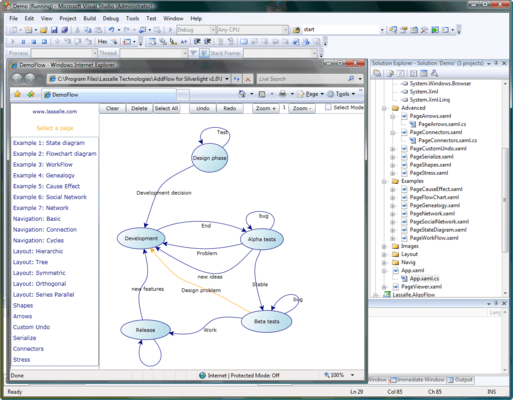
Features of AddFlow for Silverlight Standard
AddFlow for Silverlight is a Silverlight 4 control for creating flowchart diagrams. AddFlow for Silverlight offers the following advantages:
- A small deployment assembly: The size of the Lassalle.Silverlight.Flow.dll file is less than 150 Kb.
- A light programming interface, great flexibility and full integration with the Silverlight environment
- Separation between visual appearance (defined in xaml) and logic: Every visual elements can be customized: nodes, links, connectors, resizing handles, etc...
- Runtime royalty free
AddFlow for Silverlight Professional Edition also include a set of graph layout components
AddFlow for Silverlight Main Features
General
- Drawings can be made interactively or programmatically.
- Distinct shapes, styles, colors, font can be defined on a per item basis (for a node or a link) or as default properties for the control.
- Use of the LINQ technology allowing you to traverse the graph in many ways.
- Many properties allowing customizing the control (CanDrawNode, CanMoveNode, CanMultiLink, etc...) or an item (IsXSizeable, IsYSizeable, IsXMoveable, IsYMoveable, IsSelectable, IsStretchable, etc...)
- A node is a ContentControl: it may contain anything.
Interactivity and display facilities
- Multi selection
- Multi-level Undo/Redo
- Nodes stay connected when moved or resized
- Zooming
- Scrolling
- Alignment to grid
Nodes
- A node may contain anything and any other Silverlight control
- The node content is fully customizable (styles, templates)
- 43 Predefined shapes (and the list can be easily increased)
- Ability to display a text and an image in a node
- Text positioning options
- Image positioning options
- Shadows, transparency, zorder, etc...
Links
- 15 predefined arrow styles (and the list can be easily increased: it is easy to define your own custom arrows)
- The style of a link can be redefined.
- Stretchable links. A link can be composed of many segments. The user can interactively add or remove segments
- Curved links (Bezier and Spline)
- Reflexive links
- Possibility to interactively change the origin node or the destination node of a link
Automatic Graph Layout (Professional version only)
AddFlow provides a set of several graph layout algorithms:
- Hierarchic layout
- Orthogonal layout
- Symmetric (force-directed) layout
- Series Parallel layout
- Tree layout
- Radial Layout
Each of these graph layout algorithms performs a layout on a graph. Performing a layout automatically positions its nodes (also called vertices) and links (also called edges).