
Progress Column
SharePoint 목록에 진행률 표시줄를 추가합니다.
ArtfulBits사에서 공개
2011년 부터 ComponentSource에서 판매중
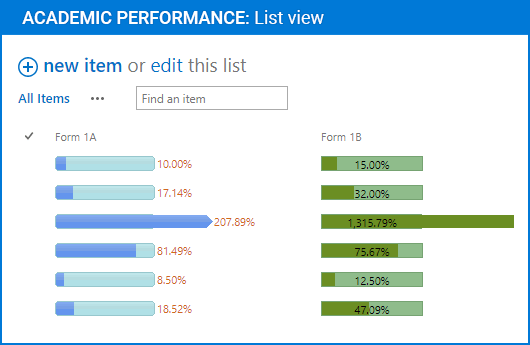
SharePoint 목록에 진행률 표시줄를 추가합니다.
Progress Column provides users with the ability to make SharePoint lists more visual by displaying numerical data using a percentage-based progress bar. Progress Column is typically used when an application performs tasks such as project progress or sales activity. Users of an application might consider an application non-informative if there is no visual cue. By using Progress Column in your Microsoft SharePoint lists, you can provide the user with rich and live information related to the status of values in your lists.
ArtfulBits Progress Column provides users with the ability to make SharePoint lists more visual by allowing numerical data to be displayed as a percentage-based progress bar. Column settings are specified in order to adjust the column (background color, progress color, text color, progress width, etc.). You can easily convert ArtfulBits Progress column into standard numerical column and vice-versa in a single click.
Progress Column Feature List
Why ArtfulBits Progress Column?
ArtfulBits Progress Column allows you to display percentage value as progress bar. Full customization allows you to set the look and feel of the progress bar to match your site theme.
전화 : 00798 14 800 6332
팩스 : +1 770 250 6199


