
SharePoint List Collection
브라우저에서 지정한 보기 내 다른 SharePoint 사이트의 목록 및 항목을 표시합니다.
BoostSolutions사에서 공개
2009년 부터 ComponentSource에서 판매중
브라우저에서 지정한 보기 내 다른 SharePoint 사이트의 목록 및 항목을 표시합니다.
BoostSolutions사에서 공개
2009년 부터 ComponentSource에서 판매중
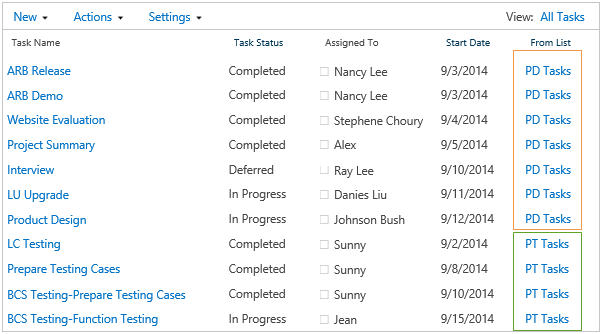
브라우저에서 지정한 보기 내 다른 SharePoint 사이트의 목록 및 항목을 표시합니다.
The SharePoint List Collection web part can combine lists from different SharePoint sites into one single view. In the view, you can work with the data and then export it to a spreadsheet. To create a SharePoint List Collection Web Part, firstly, you should select a site, a list in the site and a list view of the list. Then choose list columns to collect data, select or input new column names for original ones so these columns will be aggregated and displayed in the SharePoint List Collection Web Part. Repeating above actions, you can get SharePoint combined lists.
SharePoint List Collection
The SharePoint List Collection web part can congregate lists from different SharePoint sites into one single view. In the view, you can work with the data and then export it to a spreadsheet.To create a SharePoint list collection web part, firstly, you should select a site, a list in the site and a list view of the list.
Then choose list columns to collect data, select or input new column names for original ones so these columns will be aggregated and displayed in the SharePoint list collection web part. Repeating above actions, you can get SharePoint combined lists. Eventually. all the SharePoint combined list items will be displayed in the list collection web part.
You can create Standard view, Gantt view and Calendar view for SharePoint list collection Web part to filter, sort or group data. These SharePoint list collection views are also created to re-organize data of the list collection. You can create public or personal list collection view to determine which list or list view will be filtered, which list columns will be displayed, and which column will be sorted and grouped.
Creating and manipulating list items in SharePoint list collection web part is the same as operating in SharePoint list view web part. You can display, edit and delete item, manage permissions, start workflow, view item version, manage alert, open document, check out/in etc. in SharePoint list collection web part.
Why was it Built?
SharePoint is attractive for organizations to build sites for departments to manage documents. Along with the increasing amount of data, SharePoint users need to easily keep track of data and manipulate cross site list items from a single data view. SharePoint List Collection Web part helps users easily cross-site combine lists and manipulate list items in List Collection Web part as in default list view web part.
전화 : 00798 14 800 6332
팩스 : +1 770 250 6199


