
Ribbon Designer for Microsoft SharePoint and Office 365
自定义您 SharePoint 和 Office 365 解决方案的功能区 UI。
由以下开发商制作:Add-in Express
ComponentSource开始代理销售的日期:2006年
我们已经停止贩售这个产品。
自定义您 SharePoint 和 Office 365 解决方案的功能区 UI。
由以下开发商制作:Add-in Express
ComponentSource开始代理销售的日期:2006年
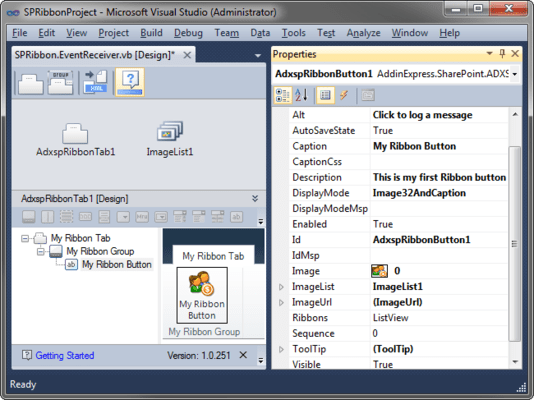
Ribbon Designer for Microsoft SharePoint and Office 365 lets you create custom ribbons for SharePoint and Office 365 solutions without learning the Ribbon XML schema. Using the Ribbon Designer you can build custom SharePoint Ribbons and add new Ribbons to your existing projects. The components are fully integrated into Visual Studio and they simplify the creation of Ribbons whether you develop for SharePoint or Office 365.


图像1/8
Dirk Loehn, CEO, Locatech IT Solutions GmbH
Ribbon Designer for Microsoft SharePoint and Office 365 Features & Benefits
Visual designers will handle all routine tasks letting you focus on the functional code that implements your business rules. Use visual design to:

透过Live Chat与我们的Add-in Express 专家联络!



联系电话: (888) 850 9911
传真: +1 770 250 6199


