FileUp Professional

Desbloqueie o potencial completo de transferência de arquivos com flexibilidade e controle do lado do cliente.

Publicado por SoftArtisans
Distribuído pela ComponentSource desde 2003
Versão: V6.0.0 Atualizado: Jun 22, 2016 5.00 Comentário com média em estrelas5.00 Comentário com média em estrelas5.00 Comentário com média em estrelas5.00 Comentário com média em estrelas5.00 Comentário com média em estrelas (1)

i

Please note that in November 2019 SoftArtisans decided to sunset SoftArtisans FileUp Professional Edition.
Existing FileUp Professional customers with valid maintenance will be supported until the end of their maintenance agreement at which time they may elect to purchase maintenance on FileUp Standard Edition.

Sobre o FileUp Professional

Desbloqueie o potencial completo de transferência de arquivos com flexibilidade e controle do lado do cliente.

FileUp Professional Edition (FileUpPE) is a powerful file transfer bundle that adds flexible file management and an ActiveX control (XFile) to the dependability of FileUp Standard Edition. With FileUp PE you get powerful server-side code for processing requests, with a rich client-side component for making the requests. FileUp Professional will enhance your applications and help overcome inefficiencies with browsers that aren't fully compliant with RFC1867 (Form-based File Upload in HTML). It includes server-side and client-side components for performing uploads and downloads. The server-side component is a COM object that will run in IIS.

FileUp Professional Key Features:

  • ActiveX upload & download.
  • Drag & drop.
  • Progress indication.
  • FileUp can handle transfer requests for up to 4GB, but browser web forms are limited to 2GB. XFile unlocks the full potential of FileUp.
  • Resumable uploads & downloads.
  • Setting up an application to handle Unicode in file names or multilingual support is very easy on both client and server.

FileUp Features:

  • Unique file names. Set FileUp to create unique file names for uploads in order to avoid the risk of replacing old files with the same names.
  • Supports foreign character sets, including file names.
  • Transactional Uploads offer the following important advantages:
    • Guaranteed synchronization between upload processing and database transactions.
    • Vastly simplified error handling and guaranteed integrity when uploading multiple files.
  • Server-side Progress Indicator lets your clients monitor the progress of their uploads. * This much requested feature allows monitoring the progress of an upload from any location: another window, a different user, or even a completely different application.
  • Full COM+/MTS integration.
  • Performance Monitor Counters allow you to precisely monitor upload and download performance. Upload size and duration can be precisely monitored.
  • MacBinary Decoding. For Macintosh clients, MacBinary is supported. Files uploaded from a Macintosh can be saved with MacBinary format or with only extracted data fork.
  • Recursive Directory Uploads. When used in conjunction with our client-side tool (XFile), entire directory trees can be uploaded in a single operation.
  • Uploads to memory. Uploads can be stored in memory, rather than disk, for better performance and security.

XFile - Powerful ActiveX client-side tool.
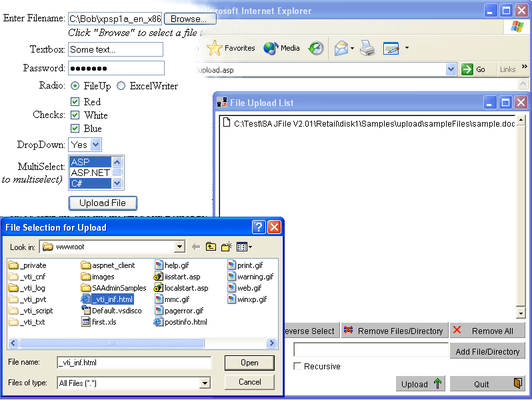
XFile conveniently allows users to preset a list of files to send and then manipulate files before or after the transfer. SoftArtisans XFile is a client-side tool that will work in any client that supports COM, such as an HTML file, an ASP or ASP.NET page, within MS Office applications, Visual Basic or C++, as an ActiveX control or through the Windows Shell Extension.

Just drag-and-drop to transfer your files while XFile's progress indicator accurately shows the file's estimated size and transfer time. XFile conveniently allows users to preset a list of files to be sent and then manipulate files before or after the transfer.

XFile Features:

  • Visual (ActiveX) product
    • Can be used from Internet Explorer, Visual Basic.
    • Supports drag-and-drop.
    • List of files to transfer can be preset.
    • Accurate progress indicator.
    • Shows estimated size and transfer time.
  • Non-visual COM component file transfer engine
    • Allows multiple HTTP GET, POST, PUT in a single operation.
    • Generates events for capture by IE or VB.
    • Supports SSL, proxies, multiple authentication mechanisms.
    • Can be used from Internet Explorer (optional silent operation), Visual Basic or ASP.
  • Receive files
    • Download multiple files to preset locations.
    • Download to a string or to a file.
  • Send files
    • Upload via RFC1867 POST (compatible with SoftArtisans FileUp) or HTTP PUT.
    • HTTP Content of POST can be a file or a string.
  • Multilingual support
    • XFile supports Unicode file names and form values, including in directory uploads, on Windows NT 4.0 or higher.
    • SoftArtisans recommends using XFile with SoftArtisans FileUp, a server-side product that is Unicode compliant.
  • Shell Extension allows uploads directly from Windows Explorer.
  • Integration
    • Can be used in conjunction with SoftArtisans FileManager to preset list of files or manipulate files before or after transfer.
    • Can be used with SoftArtisans Archive to compress files before or after transfer.
    • Fully compatible with SoftArtisans FileUp to receive files on the server.

Bonus controls included with FileUp Professional:

  • Archive - Easy to use tool for creating and extracting ZIP and Microsoft CAB format archives.
  • FileManager - Easy-to-use file management control that enhances file manipulation.
  • SMTPmail - Full-featured SMTP e-mail client control.