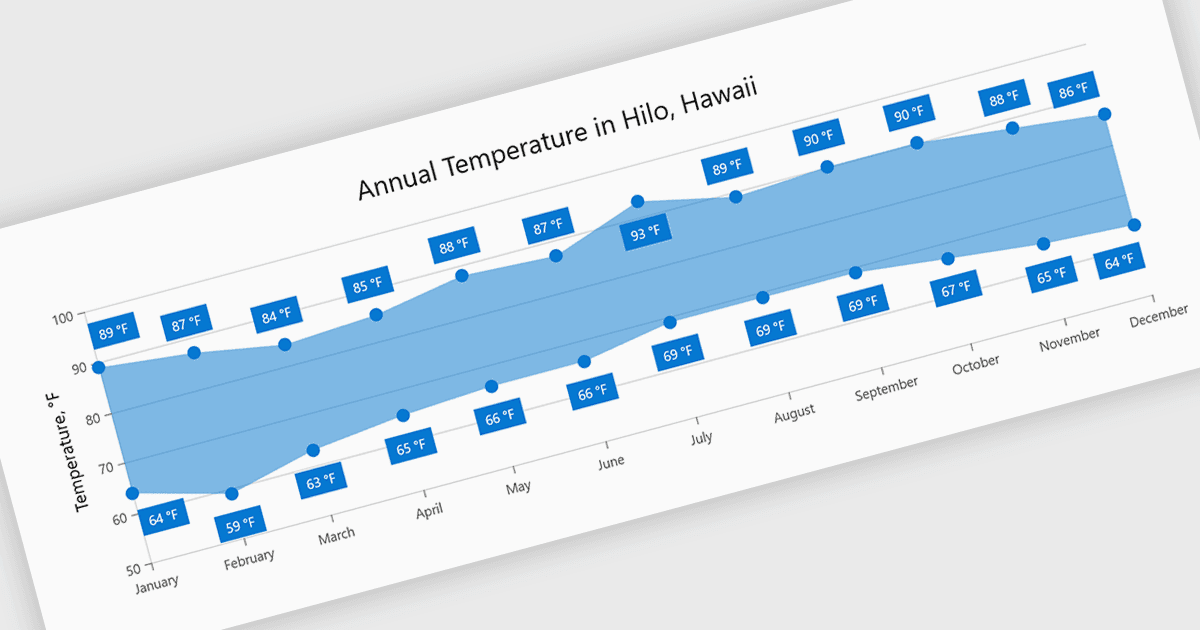
用范围图可视化数据变化

5月 5, 2026
用揭示模式的直观视觉效果高亮显示价值区间,从而使比较和趋势更清晰,解读一目了然。

继续用英语阅读:

Range charts visualize the difference between minimum and maximum values for each data point using a filled area to represent variation. This makes it easier to understand fluctuations, compare ranges and identify patterns without the clutter of multiple lines. By focusing on value distribution rather than individual points, they improve readability and highlight trends and inconsistencies at a glance. They are useful for scenarios such as tracking temperature ranges, monitoring performance thresholds or comparing variations across datasets.

Several .NET Blazor charting components provide you with range charts, including:

  • Telerik UI Blazor Chart (part of Telerik UI for Blazor) lets you visualize value ranges with filled areas, enabling clear comparison of variations and trends.
  • Infragistics Ignite UI for Blazor Chart (part of Infragistics Ignite UI) allows you to display minimum and maximum values effectively, highlighting fluctuations.
  • TeeChart .NET for Blazor by Steema Software facilitates range-based visualizations, helping you represent value differences clearly while identifying trends and inconsistencies.
  • Syncfusion Blazor Charts (part of Syncfusion Essential Studio Enterprise) lets you present data ranges using intuitive visuals, making it easier to compare results.

For an in-depth analysis of features and price, visit our .NET Blazor chart controls comparison.

Compare .NET Blazor Chart Components