













官方供应商
我们作为官方授权经销商,直接提供超过200家开发厂家所发行超过1000个的产品授权给您。
查看我们的所有品牌。
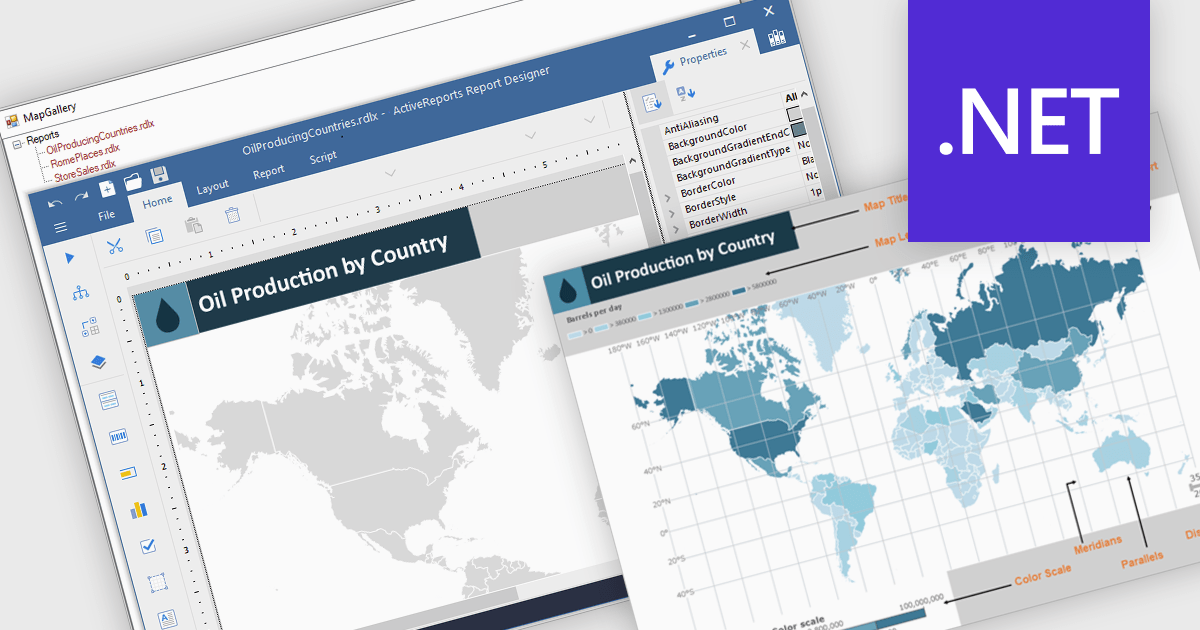
Maps in reports are visual tools that display geographic data, allowing users to see where activities, trends, or values occur across specific regions. By translating complex location-based information into clear and intuitive visuals, maps enhance understanding, highlight spatial patterns, and reveal insights that might be missed in tables or charts. This added layer of geographic context supports more informed decision-making and more compelling data storytelling. Common use cases include tracking regional sales performance, mapping customer distribution, analyzing service coverage, and presenting market expansion opportunities. Whether static or interactive, maps make reports more engaging and impactful for both technical and non-technical audiences.
Several .NET reporting controls offer maps, including:
For an in-depth analysis of features and price, visit our comparison of .NET reporting controls.

ComponentOne WinUI and MAUI Edition is a comprehensive suite of UI components designed for cross-platform .NET development, supporting WinUI, MAUI, UWP, and Xamarin with a single license. It empowers developers to create modern and high-performance applications for business and enterprise use. With versatile controls and seamless integration, the suite simplifies the development process, enhances productivity, and ensures compatibility with the latest .NET platforms, making it an essential tool for delivering exceptional user experiences.
The ComponentOne Studio WinUI & MAUI Edition 2025 v1 update introduces support for FlexViewer and FlexReport in WinUI, enabling developers to seamlessly embed advanced reporting functionality directly into their Windows 11 (WinUI 3.0) applications. With this update, developers can now display FlexReports, SQL Server Reporting Services (SSRS) reports, and PDF documents within a single viewer control, improving document handling and enhancing the end-user experience. FlexReport’s support for .NET Standard further improves cross-platform compatibility, allowing for consistent report generation and rendering across different .NET environments. This release simplifies the development of data-driven desktop applications by providing a reliable and fully integrated reporting solution built specifically for modern Windows UI frameworks.
To see a full list of what's new in 2025 v1, see our release notes.
ComponentOne Studio WinUI and MAUI is licensed per developer on a perpetual basis and includes a 12 month subscription. See our ComponentOne Studio WinUI and MAUI licensing page for full details.
Learn more on our ComponentOne Studio WinUI and MAUI product page.

ComponentSource has helped extend access to DEXTSolution’s innovative IT solutions by making them available to developers around the world. The .NET-based DEXTUpload component integrates seamlessly into web applications, offering robust file management capabilities that complement ComponentSource’s expansive catalog of developer tools.
As they mark fifteen years of working together, ComponentSource and DEXTSolution continue to support developers with accessible, enterprise-grade file management and document processing solutions. This collaboration has created a reliable channel for developers to obtain DEXTSolution's products.
Today, DEXTSolution’s offerings span .NET consulting and the development and distribution of software such as their flagship product, DEXTUpload .NET Pro, which helps developers to integrate file upload and document processing functionality.
DEXTSolution products are licensed server, and are available as perpetual licenses that include major upgrades and technical support. See our DEXTUpload .NET Pro licensing page for full details.
For more information, visit our DEXTSolution brand page.
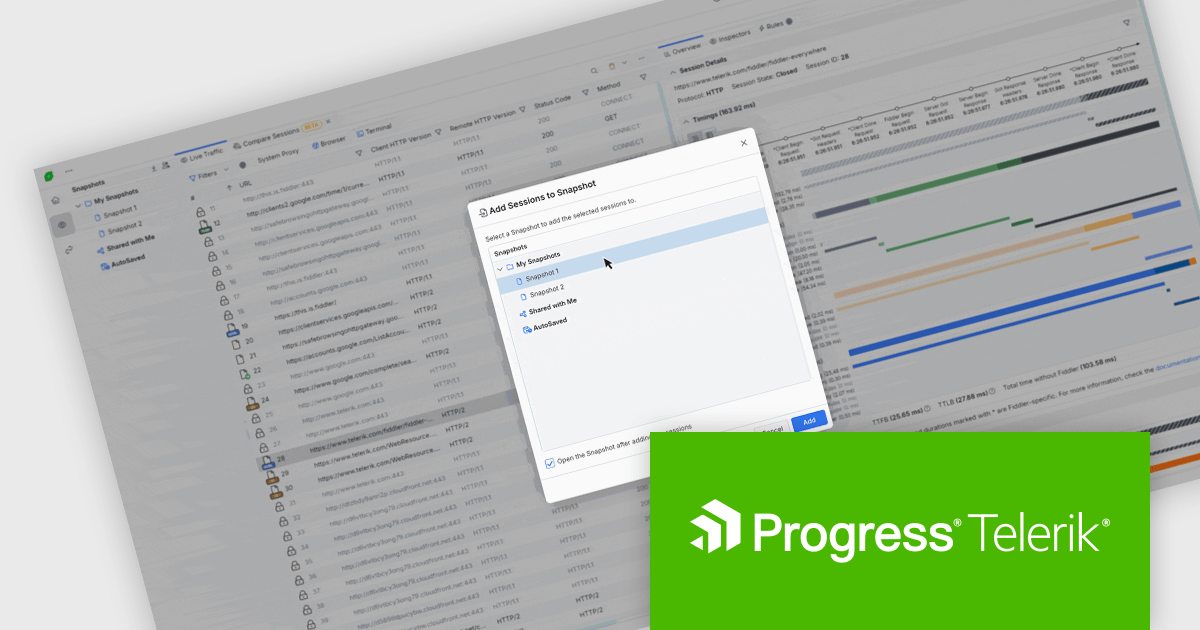
Fiddler Everywhere by Telerik is a cross-platform web debugging proxy designed to help software developers monitor, inspect, and modify HTTP and HTTPS traffic between their applications and the internet. It provides comprehensive tools for troubleshooting network-related issues, analyzing application performance, and testing web applications under different network conditions, streamlining the development and debugging process.
In Fiddler Everywhere, sessions represent individual HTTP or HTTPS request-response transactions captured in real time, allowing developers to inspect each interaction's full details. Snapshots are saved collections of these sessions that can be stored locally or in the cloud, providing a persistent record of traffic for later review, collaboration, or export. Developers now have the ability to add live or saved sessions to an existing snapshot, or add a session from one snapshot to another. This means you are no longer limited to static captures as you can update a snapshot incrementally as new relevant traffic is recorded. Such functionality supports iterative debugging and makes it easier to build a complete picture of a complex issue over time without starting from scratch or disrupting the flow of related sessions.
Fiddler Everywhere is licensed per developer and has two licensing models: an annual Subscription License and a Perpetual License. The Subscription license provides access to the latest product updates, technical support, and exclusive benefits for a flat annual fee, and must be renewed to continue using the software. The Perpetual license is a one-time purchase granting access to the current released version and includes a one-year subscription for product updates and technical support. After this initial period, users can choose to renew the subscription element to continue receiving updates and support; otherwise, they may continue using the installed version available during their active subscription term but will forgo future updates and support. See our Fiddler Everywhere licensing page for full details.
For more information, see our Fiddler Everywhere product page.
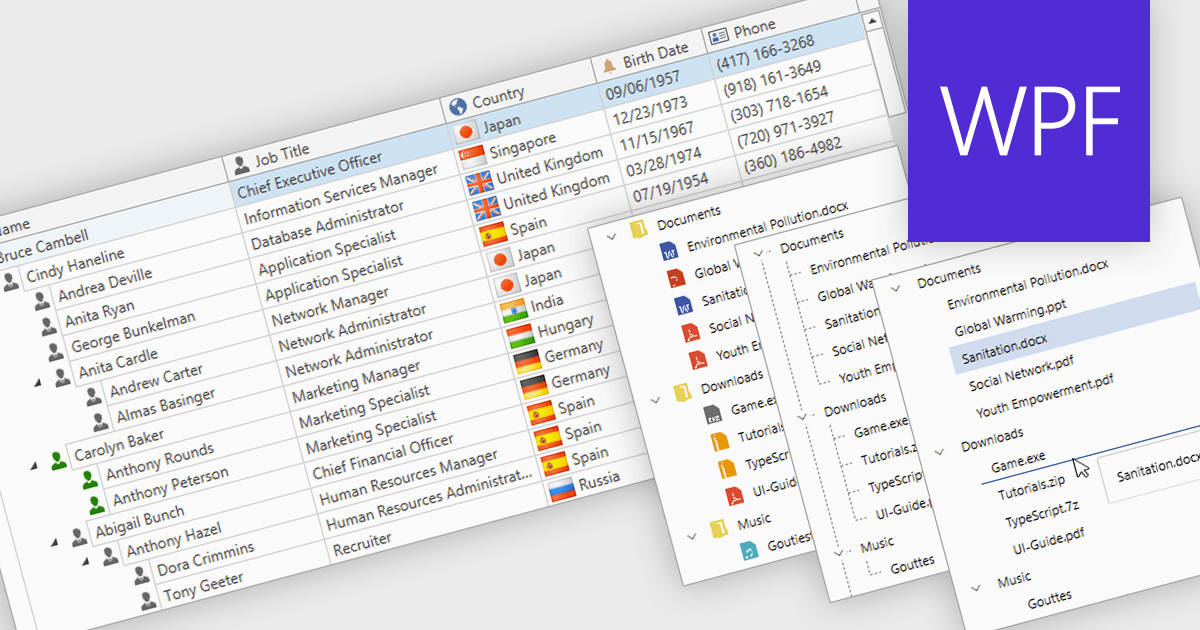
Tree lists, commonly included in professional UI component suites, are advanced controls designed to display hierarchical data in a structured and expandable format. They present parent-child relationships clearly, allowing users to navigate through multiple levels of data with ease. With features such as collapsible nodes, dynamic data loading, and customizable templates, tree lists improve both performance and user experience, particularly when working with large or complex datasets. In user interface development, they are frequently used for file explorers, category navigation, permission settings, project management views, and organizational charts. By integrating tree lists, developers can provide a more intuitive, scalable, and interactive way to manage structured information.
Several WPF UI suites offer tree list components including:
For an in-depth analysis of features and price, visit our WPF UI suites comparison.
联系电话: (888) 850 9911
传真: +1 770 250 6199


