Altova MapForce Professional Edition 2018 Release 2
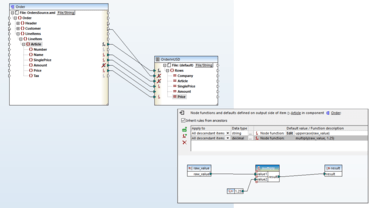
定义数据处理函数和/或默认值并将其分配给一个或多个节点。
4月 17, 2018
新版本
特性
Node functions - It is now possible to define data processing functions and/or default values and assign them to one or more nodes without repeating the same function multiple times - and without drawing mapping lines.
Quick insert of functions and constants - MapForce includes a comprehensive library of data processing functions that can be dragged and dropped into a data mapping project. Now, to make inserting functions even easier, developers can double-click in any blank space in a mapping project to open a menu for searching for and selecting a function to insert.
Support for Teradata 16 and MariaDB 10 databases - MapForce supports relational databases as the source or target of any data mapping project. Teradata and MariaDB have been added to the long list of supported database types.
Detailed network proxy settings - The Tools / Options dialog in MapForce now includes Network Proxy tab for manually configuring proxy settings, which affect how the application connects to the Internet. By default, MapForce uses the system’s proxy settings, and now you can also configure them manually.