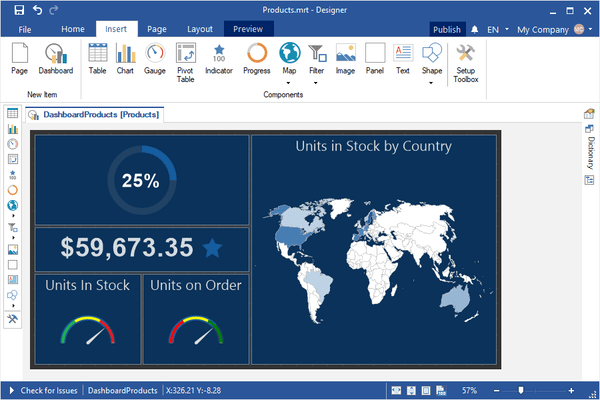
Stimulsoft Dashboards.WIN 新版本发表
Released: Sep 11, 2020
2020.4.2 中的更新
特性
- Added caching mode to speed up rendering of the Region Map element in the designer.
- Added the Trend Line Color property for the chart style.
- Added a new Box and Whisker chart.
- Added Conditions to the Progress dashboard element.
- Added an extended checking of regions in the Regional Map element.
- Added the ability to remove the Recent Data Source tab.
- Added filtering optimization for multiple data rows.
- Improved rendering of labels in the Outside mode of the Gauge dashboard element.
- Improved...
Released: Aug 7, 2020
2020.4.1 中的更新
特性
- Support for .NET Core 3.1 in WinForms - Now you can use these components to create, edit and view reports and dashboards in .NET Core applications.
- Sparklines in reports - In this release Sparklines can now be used as a data visualization component in reports. You can add a component to a report page or a Data band, specify a data column, and select a type. Data values can be displayed as Line, Area, Column, or Win/Loss.
- Viewing data for elements - Now you can view data from the current...
Released: Jun 19, 2020
2020.3.2 中的更新
特性
- Gauge Element
- Added Labels property to customize the display of signatures.
- Now all types have titles with the ability to enable them.
- TickMark and TickLabels colors of are now taken from the theme of the element.
- Improved DataColumnCollection and DataParameterCollection editor.
- Improved the application of report styles during undo and redo operations.
- Enabled the visibility of headers when a Table element has data.
- Improved datetime request from user variable during editing.
修补程序
Released: Jun 11, 2020
2020.3.1 中的更新
特性
- Added new properties: Axis.StartFromZero, Axis.ShowEdgeValues and Axis.Range.
- Added ShowNulls and ShowZeros properties to Chart element.
- Improved rendering of maps. Now, when zooming in, if possible, hidden titles will appear dynamically.
- Gauge element now has Mode property, which enables/disables automatic data setting mode.
- Added MinimumColor and MaximumColor properties to Table element.
- Added new system variables: Line, LineABC and LineRoman.
- Added new Position property to ConstantLine of...
Released: Apr 28, 2020
2020.2.3 中的更新
特性
- LineStyle and LineWidth properties added in chart elements.
- Improved conditions for selecting the "and/or" operation on dashboard element filters.
Released: Mar 16, 2020
2020.2.2 中的更新
特性
- Added WPF Designer V1 control for .NET Core Framework.
- Added new maps - Asia and Southeast Asia.
- Added Visible property for YAxis and XAxis in Charts.
- Added Step property for Chart labels.
- Hyperlinks can now be used in text elements and tooltips.
- Added filter operation type to the Filters window of each element.
- Added support for bubble charts in maps.
- Improved rendering of Indicator and Gauge elements when using large fonts.
- Disabled pages will now be displayed in grey in the designer.
Released: Feb 5, 2020
2020.2.1 中的更新
特性
- New Waterfall Chart - A waterfall chart is used to display a running total when you add or remove values.
- New Sunburst Chart - Each level of the hierarchy is represented by one ring or circle, and its top is the circle closest to the center.
- Regional Map Scaling - This release improves the Region Map element in Dashboards, and adds the ability to scale and drag the map.
- Overall Results for Stacked Area Charts - This release adds the ability to display the total for each argument in a...
Released: Dec 19, 2019
2020.1.1 中的更新
特性
- Support for .NET Core 3.0 - The new version adds support for .NET Core 3.0 to Stimulsoft Reports.Net, Stimulsoft Reports.Wpf and Stimulsoft Dashboards.WIN. Now you can create, edit and view reports and dashboards in .NET Core desktop applications.
- Mobile Editing Mode - The new version adds mobile editing mode to the WinForms and HTML5 dashboard designers. In the viewer, mobile mode is be activated automatically when the width of the device is reduced to a specific value.
- Online Heatmap - This...
Released: Nov 14, 2019
2019.4.2 中的更新
特性
- Added map of France with 18 departments.
- Redesigned Localization menu. Now the list is displayed with columns.
- Redesigned menu for selecting styles. Now the entire list is displayed as columns.
- 'Legend.Direction' and 'Legend.Columns' properties added to the Chart Element.
- Added support for retrieving data from Data.World online service.
- Automatically enable totals for numeric values in Table Element editor.
- Updated dashboard object creation code in the Publish wizard.
- Improved localization...
Released: Oct 21, 2019
2019.4.1 中的更新
特性
- New installer - You can install each Stimulsoft application as a separate distribution.
- Printing reports from a Web browser - Report printing now works correctly in any browser, on any operating system.
- New CosmosDB Data Adapter - You can now retrieve data using the Azure CosmosDB server.
- HiDPI support - The 2019.4 release adds HiDPI support in the standalone report designer.
- The Get Started window - When you run the report designer first time, you will see the Get Started window. From there...