3DBrowser Pro Funktionen

3DBrowser Pro is a highly customizable explorer dedicated to 3D files.
File Explorer for 3D Files
Access your scenes in a flash and understand their structure.
Built-In OpenGL Viewer
Polygon Cruncher simplifies your mesh.
Generate LOD from Hi-res Mesh
3DBrowser Pro offers a wide range of useful day-to-day functions.
Boost Productivity
3DBrowser Pro is a highly customizable explorer dedicated to 3D files.

3DBrowser Pro is a highly customizable explorer dedicated to 3D files.

3DBrowser is a powerful browser for exploring 3D files and images. The aim is to save the considerable amount of time spent just accessing files. You have at your disposal a large panel of functions dedicated for browsing efficiently your files:

  • Thumbnail preview for 3D files, images, even when they are in zip archives.
  • Flat folder view that enables you to view all the contents of a folder's sub-folders at once.
  • Fast file filtering or folder tree filtering.
  • Customizable display mode to display the file information you need, such metadata (materials, number of polygons, EXIF…).
  • Advanced integration in Windows Shell : previews for Windows explorer, contextual menu.
  • Fast third party application access.
  • Automation and batch processing (image reduction, 3D conversion...).
  • Creation and organization of favorite directories.
  • Advanced search to quickly find a specific file among your collections.
  • User specific sorting and grouping files according to a specific property.

3DBrowser also provides rich features to quickly rename a set of files, hide useless parts of the folder tree structure, display folder and sub-folders sizes, create zip files.

Access your scenes in a flash and understand their structure.

Access your scenes in a flash and understand their structure.

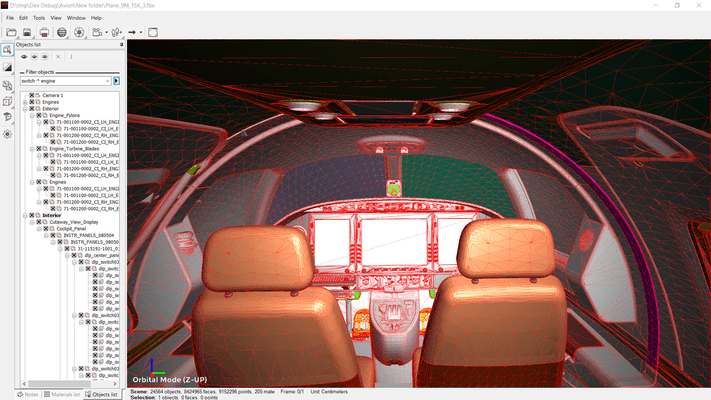
3DBrowser integrates a powerful 3D viewer including an intuitive navigation tool. You can inspect a complex model very easily: targeted zoom, orbital rotation around a particular object or point, fly mode, quick re-centering, provides very effective navigation. You can save specific points of view and get them back later if necessary.

The viewer supports PBR textures, vertex colors, user normals. Many display modes are available to highlight your content (vignetting, mirroring, shadows) or bring out the relevant information (normal map, wireframe or cutting plan view).

You can get information on any data (points, normals, faces) and get detailed information on topology, material assignation, UV mapping... This makes 3DBrowser Pro a comprehensive diagnostic tool that can unravel many of the problems encountered every day by 3D users.

Export simplifies interoperability between software as most of the common 3D formats are supported (fbx, gtlf, collada, wavefront, sketchup, cinema 4D, modo and others).

It includes advanced functions to prepare your 3D assets: mesh optimization, LOD normal baking, scene merging, mesh merging using different strategies, object disconnection when not topologically connected, etc.

This is not exhaustive list and you will discover by many other useful features: reset XForm, confused point welding, triangulation, 3D view printing, animated gif exportation.

Polygon Cruncher simplifies your mesh.

Polygon Cruncher simplifies your mesh.

3DBrowser Pro includes Polygon Cruncher which reduces the number of faces without loosing details. You keep all textures, vertex color information, and every important data that makes up your object.

You can simplify a million polygon scenes in seconds and choose the best level of optimization with an interactive feedback.

If you prefer automation, MagicCruncher feature automatically determines the ideal optimization level for each object in a scene. Be lazy, everything is done for you.

Once optimized, the baking tool generates the normal maps in few clicks and nothing is more simple to export the final result to the web, using GLB format and embedded textures for example.

You can process a set of files with the batch module or a whole directory tree and automatically generate LOD scene, with different levels of optimization, all in single pass.

Polygon Cruncher feature is plugged into 3DBrowser Pro but it is also available as a whole standalone application, included in the licence, for a better productivity.

3DBrowser Pro offers a wide range of useful day-to-day functions.

3DBrowser Pro offers a wide range of useful day-to-day functions.

3D projects can be made up of hundreds of files, and finding your way through this mass is essential.

3DBrowser Pro offers a range of tools to give you quick access to this data: information on topology and materials, an image viewer to see textures and a UV viewer.

All the tools you need to document your files are at your disposal: file description, assignment of categories and keywords, advanced searches, creation and sending of zip files of your folders, etc.

You'll also find a range of tools for sharing: scene annotations, contact sheet generation, screen capture, animated gif creation, slide show and much more.