













官方供应商
我们作为官方授权经销商,直接提供超过200家开发厂家所发行超过1000个的产品授权给您。
查看我们的所有品牌。

Actipro Avalonia UI Pro is a suite of professionally designed UI controls, themes, and components specifically built for the Avalonia UI framework. It empowers developers to craft beautiful, modern cross-platform applications while leveraging their existing C# and WPF skills. Actipro offers a range of controls from essential navigation and data visualization components to advanced charting and scheduling features, all adhering to its signature high-quality design and seamless integration with Avalonia.
The Actipro Avalonia UI Pro 24.1.0 update introduces the Card control, designed to present information about a single subject in a visually grouped and actionable way. This control offers flexibility through optional cover, thumbnail, header, and footer sections, allowing developers to effectively organize content within the card. Additionally, cards can be made interactive, enabling users to directly engage with the presented information.
To see a full list of what's new in 24.1.0, see our release notes.
Actipro Avalonia UI Pro is licensed per developer and is available as a Perpetual license with 1 year support and maintenance. See our Actipro Avalonia UI Pro licensing page for full details.
Learn more on our Actipro Avalonia UI Pro product page.

Incorporating a PDF component with search functionality into your application offers significant advantages. Users can locate specific information within complex documents with ease, streamlining their experience and enhancing productivity. This translates to a more user-friendly and efficient app, reducing frustration and allowing users to find what they need quickly, without the needing to install additional software.
Several WPF PDF Viewer controls allow you to search for text in PDF files including:
For an in-depth analysis of features and price, visit our WPF PDF Viewer controls comparison.
Aspose.PDF for .NET empowers developers to seamlessly integrate PDF generation, manipulation, and conversion functionalities within their applications. It eliminates the dependency on Adobe Acrobat by providing a programmatic interface for working with PDF documents, allowing for tasks like creating PDFs from scratch, editing existing ones, adding elements like images and watermarks, and managing security features.
Aspose.PDF for .NET V24.5 adds the ability to flatten a layered PDF file, streamlining document sharing and archiving by converting editable layers into a static, unalterable format. This ensures consistent presentation and prevents unintended modifications.
To see a full list of what's new in V24.5, see our release notes.
Aspose.PDF for .NET is offered as Developer Small Business, Developer OEM, Site Small Business, and Site OEM licenses catering to a range of business needs. Licenses are perpetual, and include 1 year of support and maintenance. Subscription renewals are also available. See our Aspose.PDF for .NET licensing page for full details.
Aspose.PDF for .NET is available in the following products:
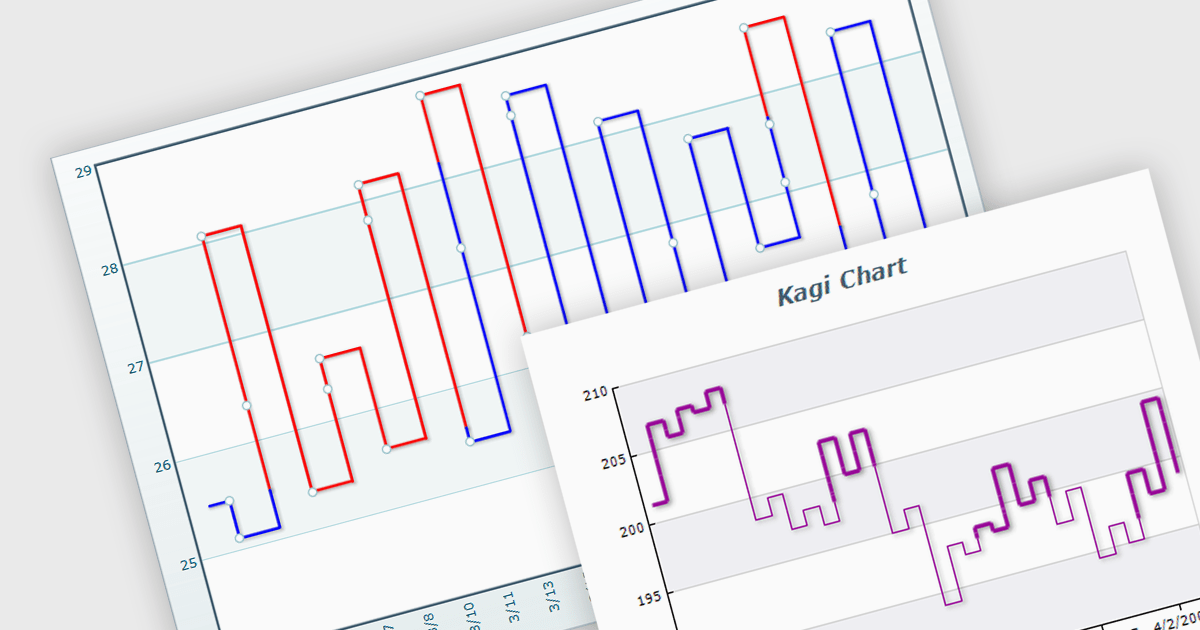
A Kagi chart is a type of financial chart used to track price movements, with a focus on significant trends and reversals rather than minor fluctuations, to inform stock purchasing decisions. It features a series of vertical lines that reflect changes in price. The direction of these lines shifts only when the price moves by a predetermined amount, known as the reversal amount. Thin lines indicate that the price has fallen below the previous low while thick lines indicate that the price has surpassed the previous high. By filtering out minor price fluctuations it emphasises substantial price movements, offering a clearer perspective on market trends.
Several WinForms chart components provide Kagi charts, including:
For an in-depth analysis of features and price, visit our WinForms charts comparison.

Polyline annotations in PDFs are interactive elements that enable the creation of free-form shapes defined by connected straight line segments. This functionality offers a versatile tool for reviewers or editors to precisely highlight specific areas, connect elements visually, or trace paths within the PDF document, promoting better communication and clarity for readers. They are particularly beneficial for creating dynamic and interactive documents as they help in embedding more complex graphical data, which can improve the usability and readability of PDFs in technical fields such as engineering, architecture, and design.
Several .NET PDF components allow you to move, resize, remove or edit the appearance of polylines in PDF files, including:
For an in-depth analysis of features and price, visit our comparison of .NET PDF components.
联系电话: (888) 850 9911
传真: +1 770 250 6199


