SpreadJS 12 SP1

添加双击自动填并充改进数据验证,并添加两种类型的剪贴板粘贴。
4月 29, 2019
新版本

特性

Runtime Features

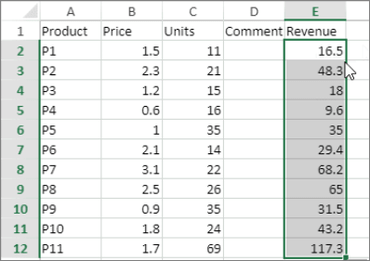
  • Double-Click Auto-Fill - Filling data was already a part of SpreadJS, but now users can double-click on fill indicators in order to auto-fill data.
  • Data Validation - Different cell highlighting types have been added to the data validation in SpreadJS. This includes circle, dogear, and icon.
  • Number and Date Display Enhancement - The way that numbers and dates are displayed in SpreadJS has been enhanced. When these are too big to fit in a cell, the number will be changed to fit properly in the cell.
  • Clipboard Paste - Two types of clipboard pasting have been added, allowing users to copy and paste only values and formatting, or only formula and formatting.

Designer Features

  • Subtotal Function - Excel-like Subtotal functionality has been added to the Designer, allowing users to insert subtotals into their sheets.
  • Data Validation Highlight Style - With the runtime data validation highlight style this new version also added a menu in the designer to support it.
  • Clipboard Option Enhancement - The new clipboard pasting options have been added the designer in the ribbon menu as well as the context menu.
  • Blank Table Style - A blank table style has been added to the list of table styles that can be applied.
  • Status Bar - A status bar has been added to both the runtime and designer implementations. In addition to display information about the selected cells, there is also a context menu. In addition, the status bar can be customized to fit specific needs.
  • Angular 7 - SpreadJS has now been tested with the latest version of Angular 7. This release includes support for all SpreadJS properties and events, as well as the Angular CLI.
Double-Click Auto-Fill

SpreadJS

用于 JavaScript 应用程序的完整电子表格解决方案。

有任何疑问吗?

透过Live Chat与我们的MESCIUS (formerly GrapeCity) 专家联络!