
AddFlow Suite
创建交互式流程图和工作流关系图, 并包含一组图形绘制算法。
由以下开发商制作:Lassalle Technologies
ComponentSource开始代理销售的日期:2002年
创建交互式流程图和工作流关系图, 并包含一组图形绘制算法。
由以下开发商制作:Lassalle Technologies
ComponentSource开始代理销售的日期:2002年
Please note that this product is no longer supported by the publisher. As a legacy product it is available for purchase but is no longer eligible for product support or maintenance.
创建交互式流程图和工作流关系图, 并包含一组图形绘制算法。
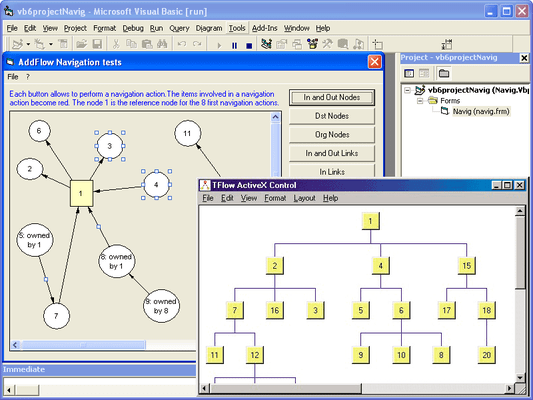
AddFlow Suite is a suite of components that includes AddFlow and LayoutFlow, a collection of 4 layout components: HFlow (hierarchical), SFlow (symmetric), TFlow (tree) and OFlow (orthogonal). AddFlow Suite includes complete sample applications. A demonstration of each of these products is available in the LayoutDemo sample provided with AddFlow. Royalty free redistribution.
AddFlow Suite includes both AddFlow and LayoutFlow
Following is a list of the main AddFlow features. Note that all those features are encapsulated in a small (375 Kb only), robust, fast and easy to use ActiveX component.
General
Input/output
Interactivity
Display facilities
Data
Links
Nodes
Following is a list of the main LayoutFlow features
LayoutFlow
LayoutFlow is a set of four graph layout controls:
A demonstration of each of these products is available in the LayoutDemo sample provided with AddFlow.
HFlow, OFlow, SFlow and TFlow are AddFlow extensions and you cannot use them without AddFlow. Typically, you can first create your nodes and links inside AddFlow, using the AddFlow API, giving each node a random or a (0,0) position. Then you call the layout method of the graph layout control of your choice. This method will position the nodes and the links in a reasonable manner in the AddFlow control, following some aesthetic rules that depend on the chosen control (hierarchical with HFlow, symmetric with SFlow, orthogonal with OFlow...)
If the AddFlow LogicalOnly property is true, then only the logical vertices of the AddFlow control are involved in this layout. This will allow you to apply the layout only to important vertices. For instance, you will be able to exclude a node just used to display a label by setting its Logical property to false.
1) HFlow
The HFlow layout algorithm arranges vertices in horizontal layers. The orders of the vertices are chosen so that the number of crossings is kept small.
HFlow just produces a reasonable solution, not the optimum solution.
2) OFlow
The OFlow layout algorithm allows performing an orthogonal layout on a graph. The layout is orthogonal since it produces an orthogonal drawing where each edge is drawn as a polygonal chain of alternating horizontal and vertical segments.
OFlow works with any graphs, connected or not. In the resulting drawing, if the graph is a graph of maximum degree four, then each node has the same size. If the degree of a node is higher than four, then the height of the node is expanded.
3) SFlow
The SFlow layout algorithm allows performing a symmetric layout on a graph. The symmetric layout produces a high degree of symmetry and is particularly useful for undirected graphs, where the directions of the edge are not important.
The resulting layout is often good. However it requires considerable computational resources and therefore should be used for small graphs (less than 300 nodes).
Using the animation mode you can see of SFlow is working.
4) TFlow
The TFlow layout algorithm allows performing a tree layout on a graph. The tree layout applies only to a specific subset of graphs: rooted trees. In such a graph, no vertice may have more than one parent.
The drawing of the tree occupies as little space as possible while satisfying certain aesthetics. If the DrawingStyle property is "Layered":
If the DrawingStyle property is "Radial":
联系电话: (888) 850 9911
传真: +1 770 250 6199


