dbForge Query Builder for MySQL 关于

无需代码即可直观地创建 MySQL 查询。

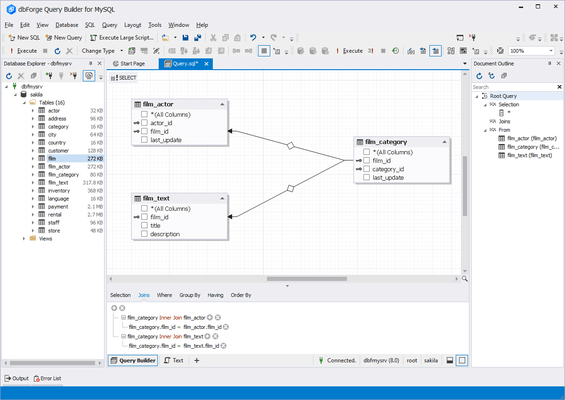
dbForge Query Builder for MySQL is a solution for quickly creating MySQL queries and extended data management. It allows you to effortlessly create any complex queries. The main component of dbForge Query Builder for MySQL is a visual diagramming system where you can "draw" your query. Adding tables, creating joins, or editing conditions will be as simple as a few clicks of the mouse.

dbForge Query Builder for MySQL Features

  • AI Assistant
    • Context-aware query generation.
    • Conversion of natural language to SQL.
    • Query optimization.
    • SQL explanations.
    • SQL troubleshooting.
    • Error analysis and clarifications.
    • AI chat.
    • Web search.
  • Visual query building
    • Creation of basic and advanced MySQL queries.
    • State-of-the-art diagrams with zooming and keyboard support.
    • Diagram preview and printing.
    • Easy addition of sub-queries to any part of the main query.
    • Query outline (displayed in Document Outline window).
    • Expression builder for complex conditions.
    • Graphical MySQL query builder with undo/redo options.
    • Quick conversion of SELECT statements into INSERT, UPDATE, or DELETE.
  • Query optimization
    • SHOW PROFILE, EXPLAIN results and STATUS variables.
    • Query plans displayed in the tree view for easy examination and evaluation.
    • Profiling history that can be saved for further data analysis.
    • Comparison of profiling results with highlighted differences.
    • Printing of profiling results.
    • Detailed information on the most frequently used command types.
  • Completion-aided SQL development
    • SQL editor with syntax coloring, bookmarks, and text search.
    • Context-aware code auto-completion.
    • Instant MySQL syntax validation.
    • Quick information about schema objects.
    • Instant code formatting.
    • Predefined and custom formatting profiles.
    • CLI-powered automated formatting.
    • Document Outline window for quick navigation through large scripts.
    • Execution of entire scripts, selected code fragments, and individual statements.
    • History of executed queries.
  • Versatile data management
    • Asynchronous data fetching with the ability to cancel.
    • Batch table update mode where changes are accumulated and applied explicitly.
    • Copying of data with column headers.
    • SQL query manager with server-side data filtering and column-hiding features for complex queries.
    • Data Viewer and Editor for large objects.
    • Foreign key lookup editor, full card view.
    • Full-text and incremental search through the data grid.
    • Grouping by arbitrary columns.
    • Editing of multi-table query result sets.
    • Paginated data browsing for large result sets.
    • Visible column picker.
    • Editing of microseconds in columns with TIME, DATETIME, and TIMESTAMP.
  • Data analysis
    • Data aggregation in pivot tables.
    • Visualization of data relationships with pivot charts.
    • Reordering of fields.
    • Data sorting and filtering by predefined conditions.
    • Calculation of grand totals using summary functions.
    • Visualization of relationships between tables in Master-Detail Browser.
    • Export of diagrams to images.
    • Quick sending of tables to Query Builder.
    • Easy switching between Data and Design Views.
  • Data reports
    • Easy creation of simple, data-aware, and master-detail reports.
    • Export of SQL data to text files.
    • Rich customization options.
    • Rearrangement and addition of new bands to insert different data.
    • Search by entire words.
    • Report scaling.