
Pine BI Excel Add-In
在几秒钟内创建 Excel 高级图表和可视化功能。
由以下开发商制作:Pinexl
ComponentSource开始代理销售的日期:2024年


From the Layout section, users can add a workbook navigation menu in seconds, change worksheet background colors and hide/show the workbook sheet tab, for an immersive dashboard experience.
The navigation menu will add a navigation pane to the left of all visible sheets, allowing for easier and logical navigation in the workbook, just like in a modern dashboard tool. The navigation menu can later be automatically removed from the same tool.


With the Pine BI Chart Editor users can modify one or multiple charts at the same time, split data series, arrange them in a grid and copy formats, thus saving time from tedious tasks allowing users to spend more time on the actual data analysis.
The Chart Editor works with normal and Pivot charts and all charts edited with it will remain dynamic and shareable.

From the Pine BI Gauges menu, users can create donut-based gauges and three different types of speedometers. All visualizations remain dynamic and can be shared with other users or in PowerPoint.

From the Pine BI Actual vs. Target Charts menu, users can create 7 different AvT charts. Two of them are with dynamic colors, which change based on the result.
All visualizations remain dynamic and can be shared with other users or in PowerPoint.

From the Pine BI Variance Charts menu, users can create 4 different variance charts with different levels of complexity.
All visualizations remain dynamic and can be shared with other users or in PowerPoint.

From the Pine BI Forecast Charts menu, users can create 2 different forecast charts with different levels of complexity.
All visualizations remain dynamic and can be shared with other users or in PowerPoint

From the Pine BI Waterfall Charts menu, users can create 3 different waterfall charts with different levels of complexity.
All visualizations remain dynamic and can be shared with other users or in PowerPoint.

From the Pine BI Project Management Charts menu, users can create 3 different project management charts: Gantt chart, Milestone chart and RAG Chart.
All visualizations remain dynamic and can be shared with other users or in PowerPoint.
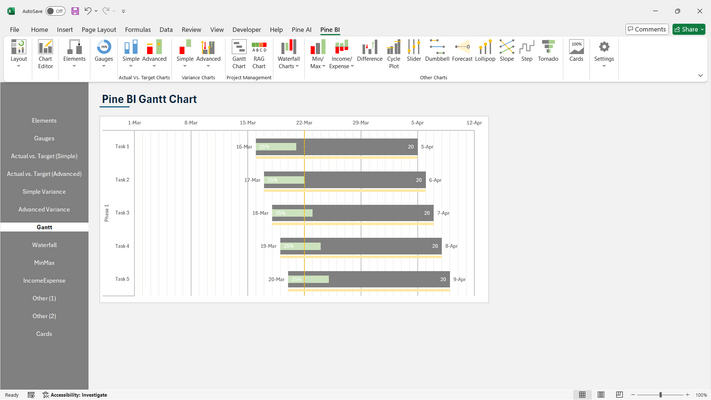
From the Pine BI Other Charts menu, users can create 5 different charts for wide application of use cases. The charts are Min/Max, Income/Expense, Butterfly and 2 types of Bullet Charts.
All visualizations remain dynamic and can be shared with other users or in PowerPoint.

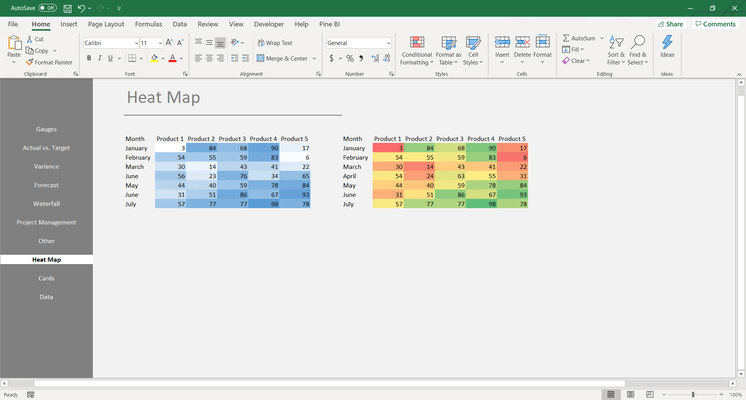
From the Pine BI Heat Map menu, users can create 2 different types of heat maps – sequential or diverging. Simply select the data you want to create the heat map on and choose the best suitable one.
All visualizations remain dynamic and can be shared with other users or in PowerPoint.
From the Pine BI Cards menu, users can create 2 different types of cards.
All visualizations remain dynamic and can be shared with other users or in PowerPoint.

联系电话: (888) 850 9911
传真: +1 770 250 6199


