此页已归档,不再被更新。

我们已经停止贩售这个产品。

TeeGrid for .NET

轻量级和全功能数据网格控件。

由以下开发商制作:Steema Software
ComponentSource开始代理销售的日期:1998年

版本:2023 更新: Jan 23, 2023

i

October 2nd 2025: TeeGrid for .NET is now free to use under MIT license conditions.
TeeGrid for NET is now de-restricted via an MIT license. With this version, the TeeGrid component is "license liberated" and may be used without restriction or need for registration, see the license here.

Access the NuGet package download from https://www.nuget.org/packages/Steema.TeeGrid.NET.

TeeGrid for .NET 关于

轻量级和全功能数据网格控件。

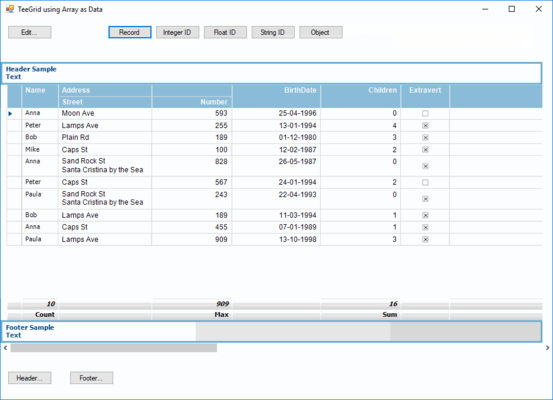
TeeGrid for .NET offers a very fast data grid for your Visual Studio projects. The feature-packed .NET data grid provides features such as sorting, grouping or filtering grid data, resizable columns, master-detail view, draggable selections, grid scrolling. These built-in features can be enabled using just a few property settings. TeeGrid can be linked to any sort of database, like a Dataset, DataSource, arrays of objects or records, pure 'Virtual Mode' or any other source.

Features:

  • IDE's Supported - Visual Studio NET.
  • Huge data - TeeGrid is capable of handling a very big number of cells. For example 1 billion cells ( 1000 columns by 1 million rows ). The only limit is the available memory, (compile for the 64bit platform).
  • Virtual data - VirtualData or derived class to automatically create columns and provide cell values.
  • Grid strings - TeeGrid can be used to easily tabularise string lists.
  • Sub-columns - any column can have children columns.
  • Individual row heights - per-row custom height.
  • Row groups - Any row can be expanded to show its detail sub-grid rows. The grid Data class must support master-detail relationships.
  • Totals and SubTotals - Automatic summary "grid bands" can be added to a header or footer, also for "detail" subgrids.
  • Custom cell rendering - Default class for cell rendering is CellRender. Other classes can be used or created to override the default behavior, e.g. to show check-boxes in columns with boolean (true/false) values.
  • Cell text format - float, date-time formatting strings.
  • Column Visible and Expanded - for sub-columns.
  • Automatic column width - or fixed, in pixels or % percent of grid width.
  • Column mouse drag resizing - Dragging the left mouse button in a column header edge resizes it.
  • Automatic scroll bars visibility - Scrollbars are automatically displayed when necessary.
  • Export - Export to web table. Supports output to JSGrid tables.
  • Column ordering - Columns and sub-columns can be re-positioned:
  • Grid Header formatting - font, back fill, stroke.
  • Grid Header mouse-hover
  • Grid "indicator" column - left-most column with symbol for current row.
  • Row highlighting - mouse-hover and selected row formatting.
  • Multi-cell range selection - by mouse and arrow keys.
  • Copy selected cells to clipboard in CSV format, pressing Ctrl+C or Ctrl+Insert key and also by code.
  • Full selected row highlight
  • Grid and Columns ReadOnly
  • Rows and Columns lines separators - stroke settings.
  • Cell mouse-hover - highlights cell under mouse cursor.
  • All coordinates as floats - For sub-pixel finetuning, Firemonkey only.
  • Alternate row background filling - back brush, stroke settings.