ActiveReports.NET Overview
- High performance reporting engine streamlined for optimal memory consumption.
- Customize and maintain control with the extensive API and advanced feature library.
- Pixel-perfect rendering, printing, and exporting every time.
- Three designers: Visual Studio Designer, End-user report designers for web and desktop applications* and a standalone designer app*.
- Multiple report types to fit reporting needs in C# or VB.NET.
ActiveReports.NET Frameworks
- ASP.NET
- C#
- VB.NET
- WinForms
- WPF
- Blazor
- Azure
- AWS
- Linux
Popular C# .NET Reporting Features
- Designers and Viewers for Every Use Case - ActiveReports.NET offers flexible tools for designing, viewing, and generating reports across web and desktop platforms for both developers and end-users.
- Web Options
- Embeddable Web Designer & Viewer: Browser-based report design and interactive viewing using ASP.NET and JavaScript. Supports MVC, Blazor, Razor Pages, React, Angular, and Vue.
- Code-Based Design: Programmatically create reports with C# or VB.NET.
- Desktop Options
- Embeddable Designer and Viewers: Desktop-based report designer for WinForms and viewer for WinForms and WPF.
- Standalone Designer: Embed report viewers in WinForms or WPF applications.
- Visual Studio Integration: Design reports directly within Visual Studio.
- Code-Based Design: Build reports in code using C# or VB.NET.
- Versatile Report Layouts - ActiveReports.NET supports multiple layout types to handle everything from data-heavy lists to interactive dashboards—all fully customizable for your needs.
- Continuous Page (RDLX): Ideal for dynamic, data-driven reports like tables and lists with vertical expansion.
- Fixed Page (RDLX): Best for pixel-perfect formats such as invoices or compliance documents.
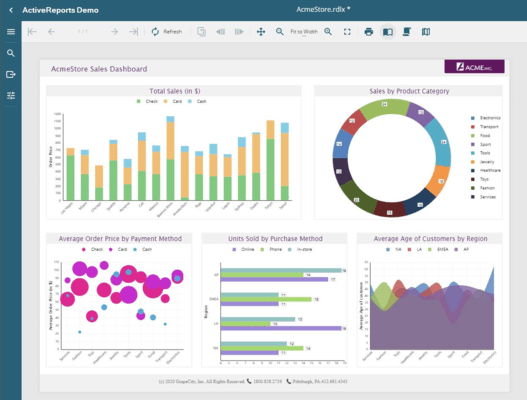
- Dashboard (RDLX): Build interactive dashboards with charts, KPIs, and gauges.
- Banded List (Section - RPX): Classic header-detail-footer structure for organized reporting.
- Code-Based Banded List (Section - C#/VB.NET): Define section reports in code for full layout and data control.
- Interactive Reports and Dashboards - ActiveReports.NET allows you to turn static data into actionable insights with interactive reports and dashboards designed for intuitive exploration and analysis.
- Filtering, Sorting & Parameters: Let users refine their view with interactive controls.
- Drilldown & Drillthrough: Explore data hierarchies or jump to detailed reports.
- Animations: Add smooth transitions and dynamic chart updates.
- Bookmarks: Enable quick navigation within complex reports.
- Together, these features create a dynamic, user-driven reporting experience that brings your data to life.
- Customizability and Extensibility - ActiveReports.NET gives developers the tools to tailor reports to any business need with flexible customization and deep integration options.
- Designer & Viewer Customization: Match your app's branding and UX.
- Themes & Styles: Apply consistent, reusable styling.
- Custom Data Providers: Connect to virtually any data source.
- Custom Logic: Use expressions, .NET functions, or scripts for advanced behavior.
- .NET Integration & API: Embed in any workflow and extend with a full-featured API.
- These capabilities ensure your reporting solution scales with your application.
- Comprehensive Export Options - ActiveReports.NET makes it easy to share reports in multiple formats with powerful export features.
- Formats: Export to PDF (with encryption/signatures), Excel, CSV, Word, HTML, various image files (PNG, JPEG, etc.), and more.
- Export Features: Customize resolution, compression, and page ranges; automate and schedule exports; add editable PDF fields, watermarks, and branding.
- These options make reports easy to distribute, customize, and integrate into business workflows.
C# .NET Reporting Top Features
- Popular Reporting Features
- Dynamic Reporting - Use expressions and custom code to control report behavior at runtime. Use events to dynamically bind reports to data.
- Parameterized Reports - Another way to create dynamic reports is to use Parameters. Parameters are prompts to take user input and filter the data to the desired volume.
- Charts - ActiveReports offers a total of 85 chart types across different chart technologies. Some of those charts include Area Charts, Bar Charts, Bubble Charts, Column Charts, Financial Charts, Line Charts, Pie Charts, Scatter Charts, and other complex charts.
- Drill-Down Reporting - Drill down functionality allows you to present an overview of your report while giving your users the ability to drill down into the more granular levels of data by clicking '+' icon. Drill Down reporting is as simple as setting the 'Toggle' property in Active Reports.
- Drill-Through Reporting - The Drill-Through feature is a way of presenting the same data, or a subset of data, in a different layout and with different controls. Add another layer of efficacy by passing parameters to filter the child report.
- Sparklines* - Embed Sparklines in your .NET reports to show data trends in a simple chart. Sparklines can show data as Line, Column, Whisker, Area, or StackedBar type.
- Layers - Group controls within Layers to ensure WYSIWYG output or to make minor changes to the layout at runtime.
- Subreports - Re-use your reports, or use data from multiple disparate data sources in a single report with subreports. Changes in subreport will automatically show everywhere it is used.
- Sorting - Sorting is a basic interactive feature most useful with tabular reports. Setting an interactive sort is as easy as setting the 'Sort Expression' property in ActiveReports.
- Grouping - Table, Tablix, Charts, and other data regions support grouping. Create from simple tabular report to a complex multi-level grouped, sorted, and drill-down reports. Setting grouping, sorting, and drill-down is done by setting a single property.
- Barcodes - ActiveReports has over 120 barcode symbologies available to use in your .NET projects.
- Designers & Viewers
- Web Report Designer - Enable your end-users to create ad hoc reports effortlessly within your web applications with the fully embeddable ActiveReports.NET Ad Hoc Designer. This component allows non-technical users to design professional-grade, data-driven reports without writing a single line of code. Its intuitive drag-and-drop interface improves the report-building process, while built-in wizards guide users step-by-step, ensuring a smooth and efficient experience.
- Web Report Viewer - The ActiveReports.NET Web Report Viewer is a versatile, embeddable component designed for modern web applications, supporting a wide range of frameworks, including ASP.NET, Blazor, Angular, React, and Vue.
- Desktop Report Designer - The WinForms Desktop Report Designer in ActiveReports.NET provides a comprehensive design tool for building powerful, data-rich reports.
- Desktop Report Viewer - The Desktop Viewer for offers a user-friendly solution for embedding report viewing functionality into WinForms and WPF applications.
- Standalone Desktop Designer - The Standalone Desktop Designer for ActiveReports.NET is a fully independent report authoring tool that allows users to design complex, professional-grade reports without requiring additional software.
- Visual Studio Integrated Report Designer - The Visual Studio-based Report Designer easily integrates with the leading .NET Integrated Development Environment (IDE), providing a familiar and efficient design experience for developers.
- Create Reports in Code - With ActiveReports.NET, developers can create powerful, dynamic reports programmatically using its extensive API. This approach is ideal for scenarios requiring custom logic or dynamic generation of layouts and data at runtime.
- Platform Benefits
- Offer Ad-Hoc Reporting to End-Users - By embedding the customizable End-User Report Designer* component in your desktop or web solution, you can give your users a tailored ad hoc report-creation experience.
- Extensible APIs - Control runtime report rendering using the extensible API. Customize report viewers, designers, and report data regions for a complete white-labeled experience.
- Branch Out With Multiple Report Types - Pick from layout-driven page reports, scrolling RDL reports, and event-driven section reports to create a full-featured report library.
- Design Once, Use Everywhere - Reports designed with any of the designers can be used in web or desktop applications.
- Cross-Platform Reporting - Elevate your .NET reporting capabilities with ActiveReports.NET by delivering dynamic, interactive reports under cloud services like Azure and AWS. Designed for modern developers, ActiveReports.NET eliminates reliance on GDI+, enabling smooth deployment across Linux and macOS environments without the need for complex system configurations.
- Rich Report Controls - Transform your data into powerful insights with ActiveReports.NET's extensive library of feature-rich controls. Whether you need to display trends, comparisons, or detailed metrics, these tools have you covered. Choose from a wide range of visualization options, including charts, tables, tablix, barcodes, sparklines, and maps, to bring clarity and impact to your reports. These controls enable you to present data in meaningful, engaging formats that cater to diverse audiences and business goals.
- Royalty-Free Deployment - Easily distribute reports within your JavaScript, ASP.NET, WPF, or WinForms applications without incurring extra licensing costs.
- Plug and Play Connectivity - Simplify your reporting process by creating reusable connections to various data sources, such as ODBC, OLEDB, XML, Web Services, Data Objects, and more. All without requiring database query expertise.
- Report Templates - Create dynamic templates called Master Reports to improve report creation and ensure consistency across your organization.
- Interactive Runtime Report Filtering - Enable users to interact directly with reports, making data exploration more intuitive and responsive.
- Customize Components - Take control of your application's user experience by customizing the end-user report designers* and .NET report viewers to fit your specific requirements.
- Additional Reporting Components
- WYSIWYG Report Layout - With defined boundaries for each report item, Page reports generate a pixel perfect, WYSIWYG, report.
- Bookmarks - Bookmarks allow your users to jump to a section of your report. They are, essentially, hyperlinks that move the user to another area within the same report. Bookmarks are most useful with long reports such as ledgers and catalogs.
- Table of Contents* - Display an organized hierarchy of report heading levels and labels, along with their page numbers, in the body of your report.
- Aggregates - Create financial .NET accounting reports with ActiveReports using a table and Tablix controls that have built-in support for aggregates and calculated fields to summarize accounting data.
- Nested Controls - Group one control inside another. Controls, such as a textbox, table, Tablix, and shapes, allow you to place other controls inside them. You can nest a chart, image, or even a table inside another table.
- Watermark - Create real-world reports for .NET with ActiveReports. This report shows how to add a watermark to a legal and sensitive document such as government forms, agreements, acquisitions, and mergers.
- Master Reports - Create dynamic templates for maintaining branding, layout, themes, data sources, code, and apply them across all reports. Control what areas of the report users can modify and lock the rest.
- Mail Merge - Embed HTML text in your .NET reports using ActiveReports FormattedText control. As a versatile reporting control, Formatted Text is frequently used to create mail merge reports.
- Maps* - Use maps in your .NET reports to deliver regional information. ActiveReports maps use multiple layers (Polygon, Point, Line, and Tile) to display data.
- Bullets* - Bullet graphs, or bullet charts, are a great way to show progress towards a certain goal and serve as an alternative to dashboard gauges and meters.
- AcroForms - Creating editable PDFs, or PDF Forms, is easy with ActiveReports' InputField control. The InputField can be set to Textbox or Checkbox.
- Hierarchical Layout - Create hierarchical, tree-view type, reports using the List, Table, Tablix, and BandedList controls. Embed one or more controls within each data region with grouping enabled and optionally set drill-down functionality.
- RTL and Localization - ActiveReports supports both Left-To-Right and Right-To-Left text direction. Localize, Active Reports controls, designers, and viewers to the Culture and Language Name property as defined by MSDN.
- List - Easily build a free-form layout for repeating data records using the List control. With the Detail Grouping property, the List control will iterate its layout until the grouped data is exhausted.
- Multi-Column Reports - You can divide your report page into multiple columns, similar to MS Word. This demo shows a report with a 2-column layout and the table filling both columns.
End-User Report Designer for Desktop* - These embeddable components enable you to build complete design-based reports code-free and offer ad hoc report design for your end-users in your web and desktop apps:
- Easily create new reports with the drag-and-drop interface.
- Customize to fit your needs.
- Toolbox, properties, report explorer, and grouping panels built-in.
- Familiar, user-friendly, UI.
Visual Studio Integrated Report Designer - The Visual Studio-based designer includes full integration into the best .NET IDE:
- Toolboxes and properties windows.
- Drag and drop controls to the design surface.
- Build code-based functions in the code behind.
- Available in ActiveReports Professional and Standard.
*These features aren't available in the Standard Edition.
ActiveReports.NET Standard Features
ActiveReports Engine
- Flexible, extensible API
- Multi-language support
.NET Report Designers
- Visual Studio-Integrated Report Designer
.NET Report Viewers
- WebViewer Control
- WinForms Viewer
- WPF Viewer
ActiveReports.NET Professional Features
ActiveReports Engine
- Flexible, extensible API
- Multi-language support
.NET Report Designers
- Visual Studio-Integrated Report Designer
- Standalone Report Designer App
- End-User Report Designer for Web
- End-User Report Designer for Desktop
.NET Report Viewers
- JavaScript Viewer
- WebViewer Control
- WinForms Viewer
- WPF Viewer
- WPF Viewer With Touch
- Blazor Viewer
.NET Report Features
- Advanced PDF Encryption and Rendering
- Master Reports
- Report Parts
- Maps
- Table of Contents
- HTTP Handlers
- DocX Export
- Bullets and Sparklines
- InputField



 (10)
(10)