













官方供應商
我們作為官方授權經銷商,直接提供超過200家開發廠家所發行超過1000個的產品授權給您。
請參閱我們所有的品牌。
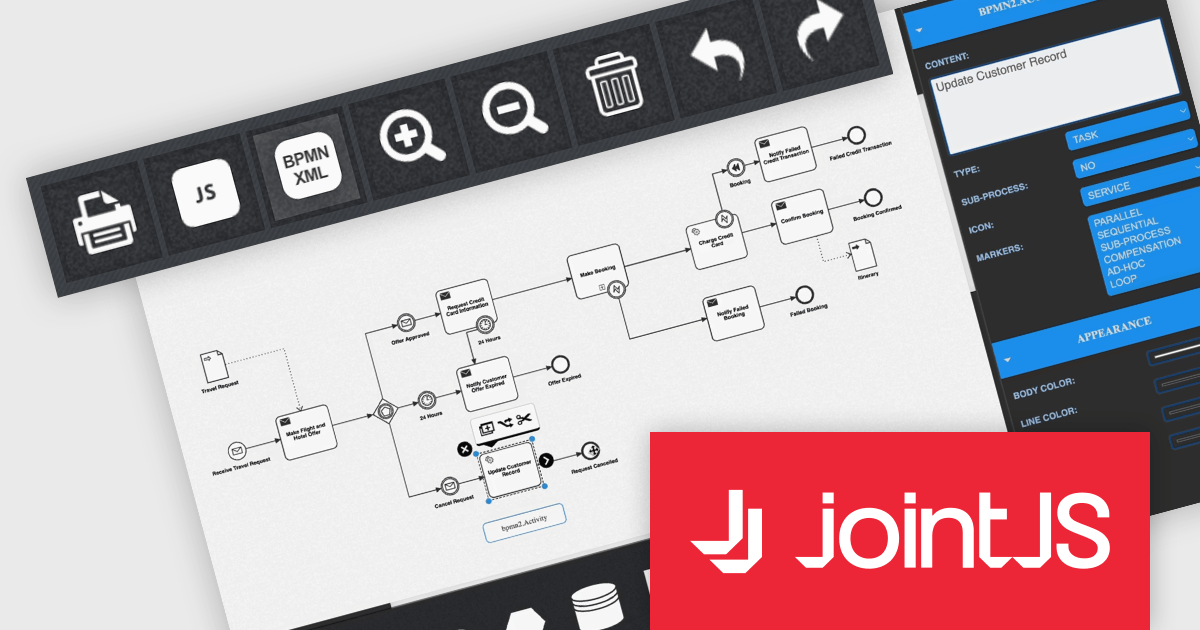
JointJS+ is a diagramming library that offers advanced features like custom shapes, data binding, and advanced layout algorithms, enabling you to create complex, interactive, and visually appealing diagrams. It includes a ready-to-use demo application that showcases its functionality and serves as a starting point for your own diagramming projects.
The JointJS+ 4.0 release introduces a significant advancement in business process management: seamless Business Process Modelling Notation XML import and export. This innovative feature empowers users to effortlessly translate BPMN diagrams into the BPMN XML format and vice versa, fostering interoperability across diverse tools and platforms, including editors and automation engines. JointJS+ 4.0 empowers process analysts, developers, and stakeholders alike to contribute and leverage BPMN diagrams with ease, paving the way for smoother and more efficient process management across the entire organization.
To see a full list of what's new in v4.0, see our release notes.
JointJS+ is licensed per developer and is available as a Perpetual license with 1 year support and maintenance. See our JointJS+ licensing page for full details.
Learn more on our JointJS+ product page.

Oxygen Content Fusion by Syncro Soft is a cloud-based collaboration platform for managing and publishing DITA documentation. It allows authors, reviewers, and publishers to work together on the same content in real time, and to track changes and feedback throughout the documentation process. Oxygen Content Fusion also provides a variety of tools for generating and publishing DITA content in a variety of formats, including WebHelp, PDF, and EPUB.
The Oxygen Content Fusion V6.1 release adds the ability to control what content reviewers have access to. This allows you to tailor the collaboration experience to specific needs. Granting full edit access empowers subject-matter experts to directly contribute content, while comment-only access leverages diverse perspectives without jeopardizing content integrity. Restricting to comments fosters feedback without altering a document's structure, ideal for initial reviews or legal compliance scenarios.
To see a full list of what's new in V6.1, see our release notes.
Oxygen Content Fusion is licensed per user and is available as an Annual license with 1 year support and maintenance. See our Oxygen Content Fusion licensing page for full details.
Learn more on our Oxygen Content Fusion product page.
Aspose.ZIP for Java is a robust and user-friendly library that streamlines your Java application's ability to work with ZIP archives. It empowers you to effortlessly compress and decompress files and folders without delving into the complexities of compression algorithms or file formats. Advanced features like password protection using traditional and AES methods alongside comprehensive API documentation ensure a secure and efficient development experience.
The Aspose.ZIP for Java V24.1 release adds support for RAR files. This enhances its versatility in archive management by enabling direct reading, extracting, and compressing of RAR files alongside its existing ZIP capabilities.
To see a full list of what's new in V24.1, see our release notes.
Aspose.ZIP for Java is offered as Developer Small Business, Developer OEM, Developer SDK, Site Small Business, Site OEM, and Site SDK licenses catering to a range of business needs. Licenses are perpetual, and include 1 year of support and maintenance. Subscription renewals are also available. See our Aspose.ZIP for Java licensing page for full details.
Aspose.ZIP for Java is available in the following products:
GroupDocs.Metadata for .NET is a powerful API that grants developers granular control over the hidden information within various document formats, like Word, Excel, PDFs, and even images and audio. It seamlessly enables reading, editing, and removal of metadata properties, empowering you to organize, categorize, and extract valuable insights from your file collection with ease. This metadata manipulation capability unlocks enhanced document searchability, automated classification, and streamlined information retrieval, boosting the efficiency and organization of your data ecosystem.
The GroupDocs.Metadata for .NET V24.2 release adds support for the following additional 3D formats: STL, 3DS, DAE and FMX. This expands its utility for professionals working with 3D models and allows them to extract, view, and manage critical metadata directly within these file formats, streamlining workflows in areas like design analysis, version control, and intellectual property protection.
To see a full list of what's new in V24.2, see our release notes.
GroupDocs.Metadata for .NET is offered as Developer Small Business, Developer OEM, Site Small Business, and Site OEM licenses catering to a range of business needs. Licenses are perpetual, and include 1 year of support and maintenance. Subscription renewals are also available. See our GroupDocs.Metadata for .NET licensing page for full details.
GroupDocs.Metadata for .NET is available in the following products:

Actipro Avalonia UI Pro is a suite of professionally designed UI controls, themes, and components specifically built for the Avalonia UI framework. It empowers developers to craft beautiful, modern cross-platform applications while leveraging their existing C# and WPF skills. Actipro offers a range of controls from essential navigation and data visualization components to advanced charting and scheduling features, all adhering to its signature high-quality design and seamless integration with Avalonia.
The Actipro Avalonia UI Pro 23.1.3 release adds new Avatar and AvatarGroup controls. Avatars provide diverse visualization options - images, glyphs, initials, or text - catering to various use cases. The AvatarGroup efficiently arranges multiple avatars with overlap, hover expansion, and overflow handling, improving space utilization and visual hierarchy. These new controls enable developers to create modern, user-friendly interfaces with clear visual cues for identification and interaction.
To see a full list of what's new in 23.1.3, see our release notes.
Actipro Avalonia UI Pro is licensed per developer and is available as a Perpetual license with 1 year support and maintenance. See our Actipro Avalonia UI Pro licensing page for full details.
Learn more on our Actipro Avalonia UI Pro product page.
聯繫電話: (888) 850 9911
傳真: +1 770 250 6199


