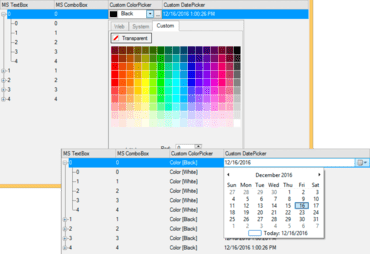
Improved TreeView for WinForms - The addition of default editors makes TreeView a more intelligent control: if the value is datetime, DatePicker will automatically come up; a numeric value will use NumericEdit, and so on.
Bitmap for WinForms - Load an image from a file, stream or another bitmap object with the new C1Bitmap object. Image manipulations include:
Clip
Scale
Flip
Rotate
Change pixel format
Apply any combination of these transformations
Bitmap can be loaded from the following container formats:
BMP
GIF
ICO
JPG
JPEG-XR
PNG
TIFF
You can also save to any of these formats (except for ICO).
Bitmap supports conversion to and from platform-specific bitmap objects. For example, in a Windows Store app, you can easily convert C1Bitmap to a WriteableBitmap or SoftwareBitmap. You can also import a WriteableBitmap as afragment into the existing C1Bitmap, or create a new C1Bitmap from the given instance of SoftwareBitmap.
New Funnel Chart released for WinForms allows users to visualize stages of process in a funnel shape, and are most often used for sales.
TreeView for WinForms now includes default editors.