UltraCompare v17.00

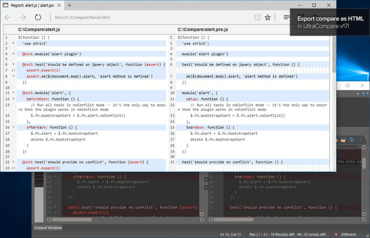
用 HTML 格式保存比較結果報告。
6月 19, 2017
新版本

特性

  • Save result report in HTML format
    • File » Save result report » Save HTML result
    • Saves current view of compare as an HTML file
    • Available for all modes (text, binary, folder, table)
    • Header includes compare settings, file information, ignore options, etc.
    • Toggle header in Settings » Backup & Save
    • Optionally show spaces / tabs
    • Respects "View" setting (all / just differences / matching)
    • Override default styling and colors by saving custom CSS in %APPDATA%\IDMComp\UltraCompare\report\
  • Improved / expanded ignore options for text mode
    • Ignore differences in comments, strings, etc., with new "Ignore everything between" rule
    • Use "$" to represent end-of-line for "Ignore everything between" rule
    • Set an unlimited number of "Ignore lines containing / starting / ending with" rules
    • New "Ignore options" tab in session properties
    • Set default ignore rules in Settings » Ignore Options » Text
  • Configure line matching algorithm for text compare
    • New "Logical line matching" option in text mode session properties
    • If checked, set how many lines UltraCompare scans to "pair" similar lines and find matching blocks
    • Setting a higher value results in more accurate compare results (but may also use more memory and time)
    • Disabling can improve text compare performance
    • If unchecked, UltraCompare will match up lines 1-to-1

修補程式

  • Other minor improvements and fixes.
UltraCompare.

UltraCompare

檔比較、資料夾比較和合併差異。

有任何疑問嗎?

Live Chat現在與我們的UltraEdit 專家即時聊天詢問。