Rich Comments - With Rich Comments you can apply text formatting right inside the code editor in comments. The following Markdown-like syntax is supported:
**Bold**
*Italic*
_Underline_
~Strike-through~
Unit Test Runner - With this release, you can now execute a single test case of a parameterized test directly from code. Click a CodeRush test icon and choose the desired option from the 'Run test', 'Debug test', or 'Run test with coverage' submenu.
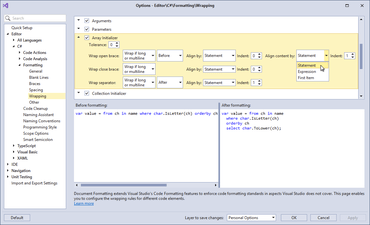
Code Formatting - Enhanced formatting options to allow you specify how you would like to align code blocks. The "Align content by" and "Indent" options are available on the 'Braces' option page in 'Editor - C# - Formatting'. On the 'Wrapping' option page you can also align content for Initializers.
Coding Assistance - With this release, Selection to Template has become more intelligent - it generates cleaner templates and uses type links, text links, or regular links intelligently depending on the element type. The 'Create Template From Selection' dialog options have also been enhanced, allowing you to fine tune a template before committing it and quickly specify which elements should be substituted by links.
JS and TS Support - Now in JavaScript (and Typescript) you can:
Turn on Structural Highlighting.
Quickly select and expand/reduce that selection by logical code blocks with Selection Expand/Reduce .
Press Ctrl+W to expand selection and Ctrl+Shift+W to reduce it.
Easily navigate through references with Tab to Next Reference.
修補程式
AddCopyrightHeaderProvider raises NullReferenceException in VB.
DeclareProvider creates duplicated code and then crashes.
NUnit + TestCases causes issues in test runner.
Rename Refactoring - Rename all the files of a partial class.