SimplifiedRibbon - The Simplified Ribbon has been updated to use C1Icon (with support for image, font, or vector graphics can be used for buttons) and has improved theme support.
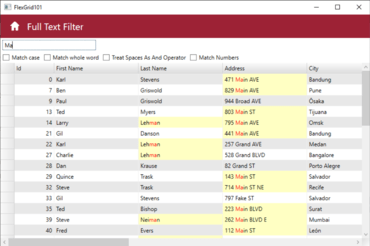
FlexGrid - Full text filter behaves similarly to a search box. It allows you to highlight any matches that are contained within the FlexGrid. It gives you the option to match case, match whole word, match numbers, and treat spaces as an "And" operator.
FlexGrid now allows you to use C1Icon to also configure the GroupExpanded, GroupCollapsed, NewRow, DetailCollapsed, and DetailExpanded icons.
New ComponentOne Control Panel - provides a new way to install, update, license, and maintain your ComponentOne libraries. It also provides fast access to samples, and support.
Adds support for Microsoft Visual Studio 2019.
Additional Enhancements
FlexSheet adds the ability to update and delete comments, as well as VLOOKUP, HLOOKUP, and NOW functions. The FlexSheet.CalcEngine property is also now public and allows custom expressions.
C1Zip adds a new ZipEncoding class. The ZipEncoding.Encoding property specifies encoding used for zip entry names and comments and the default encoding is UTF8.