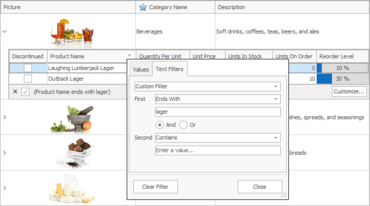
Excel-inspired Filtering - v19.1 introduces new Microsoft Excel-inspired column/row filter dropdowns for the Grid and TreeList controls. New filter dropdowns provide two tabs:
The first tab allows users to select from among all available cell values.
The second tab allows users to create a filter expression using filter operators (Equals, Between, Contains, etc.)
Use the dxDefaultFilterPopupWindowMode global constant in the source code to make the new filtering UI active for all Grid and TreeList controls.
Filter Box Support - Much like the VCL Grid Control, the TreeList control now provide the Filter Box to allow end-users to customize, temporarily disable, and reapply recently used filter criteria.
Skins Library
New SVG Microsoft Office 2019 Colorful Skin - This release ships with a new vector-based skin and associated color palettes - Office 2019 Colorful.
Spreadsheet
API Enhancements
Evaluate any formula expressions, not only those stored in a document (the EvaluateExpression function).
Pass cell ranges in the A1 reference style as string parameters to any cell management method.
Track visibility changes of cell comments and prevent their display (the OnCommentShow and OnCommentHide events).
Quickly reset a cell, row, or column to its default style (the IsDefault property).
Read/write the rich text formatted content directly from/to a cell (the GetAsRTF and SetAsRTF functions).
Layout Control
End-users can now collapse/expand splitter items to temporarily hide a part of a layout with a mouse click or drag and drop.
Splitter items now provide an event (OnCanResize) that allows you to dynamically control size operations.