
官方供應商
我們作為官方授權經銷商,直接提供超過200家開發廠家所發行超過1000個的產品授權給您。
請參閱我們所有的品牌。
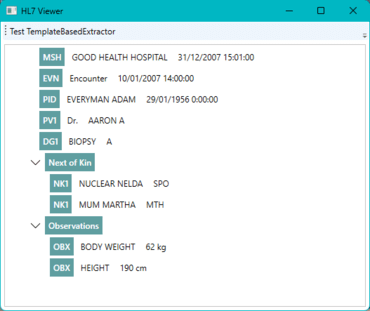
This article will demonstrate how to parse a file in the Health Level Seven (HL7) version 2 (V2) format and show its contents in a tree view in a Windows Presentation Foundation (WPF) application. It uses GrapeCity ComponentOne libraries, from ComponentOne Studio Enterprise, to parse the HL7 file and for its representation in a tree view, making it much easier to read and interpret. Health Level Seven (HL7) refers to international criteria for transferring clinical and administrative data between software applications used by various healthcare providers.
The ComponentOne TextParser library supports three different extractors for different scenarios, including plain text, a specialized HTML extractor, and a template-based extractor. The template-based extractor is the most generic, as it allows users to parse data structures following a declarative XML template. Since the template can be provided as a separate file, it allows you to provide both the template and source to parse.
HL7 V2 is not a simple data format, but using the TemplateBasedExtractor class, which relies on the XML template, you can parse the file so that further processing becomes easier. Representing the data in a tree view is made easier with the c1:C1TreeView component. The data binding is straightforward, and you can easily style everything.
Using the TemplateBasedExtractor class simplifies the process because it reads the file and makes it available in an easy-to-use object model. In the InterpretExtractedData method, you need only interpret the different fields according to their segment type. If you elaborate on the XML template further, extending the object model and simplifying the InterpretExtractedData method is possible. Adding a button to the application allows you to test this conveniently.
Read the complete blog post to get started now.
適用於移動、Web 和桌面的高性能、可擴展的 .NET UI 控制項的完整集合。
Live Chat現在與我們的MESCIUS (formerly GrapeCity) 專家即時聊天詢問。

自 1996 的官方分銷商
聯繫電話: (888) 850 9911
傳真: +1 770 250 6199


