AdminStudio Standard

將應用程式遷移到 Windows Installer,帶有對 MSI 打包、自訂和分發活動的控制。

由以下開發商製作:Flexera
ComponentSource 開始代理銷售的日期:2002年
版本: 2025 R3 更新: Dec 11, 2025

i

New licenses for AdminStudio Standard are no longer available, however you may continue to renew your existing maintenance for perpetual licenses. If you are interested in new licenses please see AdminStudio Professional or AdminStudio Enterprise.

On 01-Sep-2021, Revenera/Flexera changed the licensing model of the InstallShield and AdminStudio product lines. All new licenses are now 3 year non...

Show more

New licenses for AdminStudio Standard are no longer available, however you may continue to renew your existing maintenance for perpetual licenses. If you are interested in new licenses please see AdminStudio Professional or AdminStudio Enterprise.

On 01-Sep-2021, Revenera/Flexera changed the licensing model of the InstallShield and AdminStudio product lines. All new licenses are now 3 year non-perpetual Timed Subscription licenses. Perpetual licenses are no longer available for purchase. At the end of the Timed Subscription, you have to renew the Subscription to continue to create new/edit existing installation scripts. If you have an existing Perpetual License with Maintenance Plan that was purchased before 1-Sep-2021 AND that Bronze/Silver/Gold Maintenance Plan has not expired, you can renew that active Maintenance Plan for an additional year. If you let that Perpetual License Maintenance Plan expire, you will be required to buy a new Timed Subscription (non-perpetual) license to continue to receive upgrades and support.

AdminStudio Standard 2018

Released: Apr 26, 2018

2018 中的更新

特性

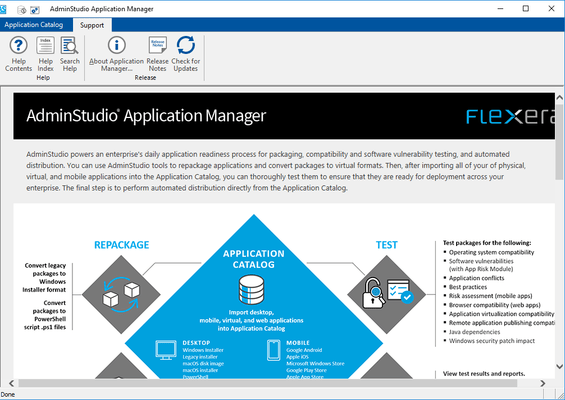
  • Application Manager User Interface Redesign - In AdminStudio 2018, the Application Manager user interface has been redesigned and updated to provide a clean, modern look that makes it easy to navigate through application readiness tasks:
    • Redesigned Ribbon Interface
    • Updated Deployment Type, Status, and Subnode Icons
    • New Pie Chart Display on Group View of Analyze Tab
    • New Supportability Risks and Security Risks Test Category Groups 
    • Simplified Compatibility Test Results
  • Consolidation of Functionality in Application Manager - In AdminStudio 2018, the focus has shifted to make Application Manager the central application in the entire AdminStudio toolkit. All application readiness tasks can be either performed using Application Manager or launched from it.
  • InstallShield 2018 - AdminStudio 2018 includes InstallShield 2018, which includes the following new features and enhancements:
    • Specify Uninstallation Order of Packages in a Suite Project.
    • Method to Run a Suite Installation with Minimum UI.
    • Conditionally Set the Visibility of a Feature at Run Time.
    • Perform Recursive or Non-Recursive IIS Registration.
    • Set Forms Authentication on Web Applications.
    • New Option to Control Whether to Load User Profile for an Application Pool Entity.
    • Add Kill Process and PowerShell Custom Actions to a Transform Project.
    • Save QuickPatch Projects in XML Format.
    • Localize Product Name Property in Suite Projects.
    • Include the Value of a Property in a Product Configuration’s Setup File Name.
    • New MSBuild Parameters to Set Summary Information Stream Comments and to Set Package File Name.
    • Specify Line Break and Tab Characters in Text File Changes.
    • Remove or Hide the Suite Loading Screen.
    • Setting to Always Create Debug Logs for Suite Installers.
    • New Out-of-the-Box Dialog to Set the IIS Certificate File for SSL Certificate at Runtime.
    • Specify Absolute or Relative Path When Creating New Child Elements in an XML File.
    • Setting the Default Keyboard Focus for Dialog Box Controls in Suite Projects.
    • PowerShell Script Editor in Basic MSI Projects.
    • New Option to Open Existing Transform File in InstallShield Transform Wizard.
    • Additional Prerequisites Included.