Advanced Installer Enterprise 22.4
Released: Jan 29, 2025
22.4 中的更新
特性
- New Feature
- MSIX Custom Install Actions.
- Enhancements
- Added a search option to the Samples Gallery.
- Updated the "Copy to All User Profiles" custom action to support file-only operations.
- Enhanced PowerShell Automation with support for Device Guard Credentials and Azure Key Vault Secrets.
- Enhanced Updater to retrieve Release Notes via command line.
- Added support for executing PowerShell code asynchronously.
- Call .NET custom actions in a new process (e.g., enables calling a custom action from an installed file during uninstallation).
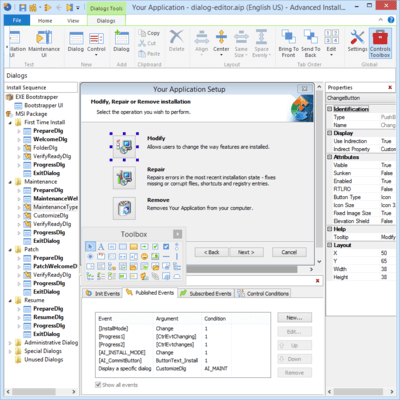
- Added a filter capability to simplify feature dialog navigation.
- Automatically add and remove the "UpgradeDlg" dialog.
- Predefined launch conditions for Windows 11 24H2.
- Added "Compact view" option to the Custom Actions view.
- Updated .NET Core 8 prerequisites to the latest version 8.0.12.
- Updated .NET Core 9 prerequisites to the latest version 9.0.1.
修補程式
- Fixed display issue with custom frame titles in WinUI.
- Fixed an issue with importing MSM into existing projects.
- Unlinked the "UpgradeDlg" options from the "Upgrades" page's options.
- Fixed an issue with crashing when scrolling in the notifications list.
- Entering key no longer worked in PowerShell Inline Script.
- Fixed MSIX elevation capability failures on Windows 11 24H2 and later.
- Verified and updated download links for prerequisites, remove outdated ones.
- Fixed an issue with importing MSIX packages preventing navigation from the Builds page.
- The "Uninstall previous version" custom action sets the new version to be installed per-user.
- Fixed access violation error in PowerShell Automation when setting MaxVersion for project updates.
- Fixed the registry which was incorrectly marked as 64-bit when importing a repackaging file.
- Updated documentation for "UpdatePrerequisite" to specify how to update the minimum version with a registry search.
- Fixed an issue where the Project Summary is not displayed after importing a .RPK.
- Fixed an issue with crashing in Translations view when editing an MSIX package.
- Evaluating any condition inside the Custom Action view after certain steps results in a Stack Trace.
- Fixed an issue where the second prerequisite runs in the background during pre-install.
- Fixed an issue where PowerShell Automation did not support PseudoFormatted data type properties in the Name field for Shortcuts.
- Fixed an issue where the reboot prompt message hangs at the end of the installation process.



 (2)
(2)