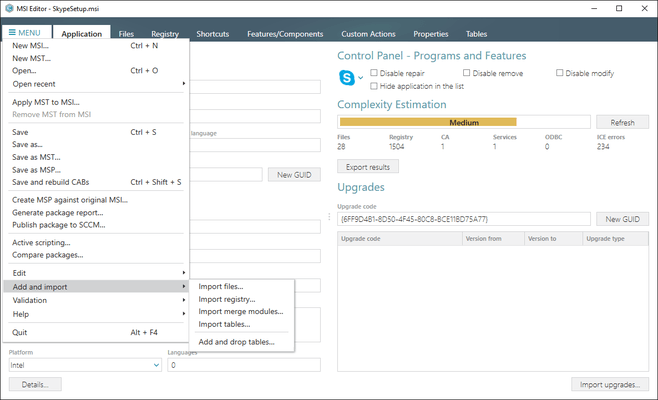
PACE Suite 新版本發表

Released: May 28, 2020

5.5.x 中的更新

v5.5.3

Updated Sep 30, 2020

Features

  • ARP setting management in MSI Generator. The user will be able to manage parameters directly in the MSI Generator. Previously it was available only in MSI Editor.
  • Automatic shortcut data filling in the MSI Generator and MSI Editor.
  • Improved readability UI: Increased font contrast, size, selections, etc.

Fixes

  • Fixes and improvements of the Pace Suite command line support.

v5.5.2

Updated Aug 27, 2020

Features

  • Introduces Subscription License options:
    • Flexibility...

Released: Feb 28, 2020

5.4 中的更新

特性

  • Launcher Tool - Launcher combines all PACE Suite tools in a single place and unifies accessing common functions. It groups the most-used packaging tasks with respect to the packaging lifecycle.
  • Setup Capture Tool - A capturing tool that runs repackaging on the local host and remote virtual machines. This is the small app that does not require PACE Suite license – simply copy and run it where you need to. Infopulse have reworked and significantly improved the capturing engine and capturing...

Released: Aug 19, 2019

5.3 中的更新

特性

  • New Quality Approver application
    • Designed to test your package safety, compatibility and deployment readiness.
    • Tests MSI package and its apps for compliance with the Desktop App Certification Program, as well as MSIX/APPX package and its apps against the Microsoft Store requirements.
    • Supports automated package testing locally and on multiple virtual machines, hosted on the VMware ESXi, Microsoft Hyper-V and Oracle VirtualBox hypervisors.
    • Smart, step-by-step Wizard guides you through the whole...

Released: May 22, 2019

5.2 中的更新

特性

  • New Files tab
    • Enjoy a user-friendly Tree List in the Files tab and find both included and excluded resources in a single view with description of each item’s type, size and state. This view makes it easier to see all captured and manually added files of a folder, especially for the deep folders tree. The highlighting rules and filters helps you to navigate faster and easily find the necessary resources.
    • Use this tab to quickly edit name, parent folder and manage permissions of the captured...

Released: Feb 19, 2019

5.1 中的更新

特性

  • Create MSIX packages in PACE Suite
    • Select MSIX/APPX output package format
    • Create main and modification packages
    • Declare app capabilities
    • Select package supported platforms
    • Generate packages for all of the specified processor architectures at once
    • Combine generated packages into the bundle
    • Manage signature settings for packages and bundle
    • Generate the AppInstaller file for the non-Store distribution and auto-update of your app
    • Edit Manifest manually during the package building
    • Control UWP apps...

Released: Dec 7, 2018

5.0 中的更新

特性

  • Re-engineered MSI Editor introduces new Package Designer - easy and comprehensive UI that helps users, who do not have advanced packaging knowledge, create high-quality, error-free packages.
  • New tabs for Shortcuts, Features and components, Properties, and Summary information - all with rich highlighting, validations rules to avoid errors, and easy-to-edit details displayed for each resource.
  • Improved editing mechanism that boosts the overall speed of saving packages.
  • Numerous small tweaks...

Released: Sep 27, 2018

4.7 中的更新

特性

  • A user-friendly tree list view which enables an easier review and management of Registry keys and values.
  • Automatic validation of all keys and values against the MSI rules.
  • Redesigned permission management for the Registry entries.
  • Moving the Registry entries to another keys/hives in just one click.
  • Improved management of media (CAB files) in MSI Generator.
  • Robust mechanism of creation of patch packages in MSI Editor.
  • Significantly better identification of package architecture (32-bit or...

Released: Jun 27, 2018

4.6 中的更新

特性

  • New Files tab in MSI Editor - Files tab now displays all files and folders in a tree list view that makes it easier to see all contents of all folders.
  • A quick way to find and fix errors - The tree list has a vast amount of validation rules so you can fix errors before testing or building your package.
  • Unique Details pane for each type of resources - MSI Editor's Files tab has four types of resources – folders, files, INI files, and duplicate files. The Details pane shows name, target and...

Released: Feb 23, 2018

4.5 中的更新

特性

New Wizard for adding Drivers

  • The new “Add Driver” Wizard guides you through every step of including drivers into your packages and saves you time with useful tricks like automatically detecting and displaying all files that are related to your driver.
  • The Wizard allows you to manage various aspects of driver files (for instance, their compression type), set driver installation options, conditions, and choose target architecture.

New Drivers Tab

  • There is now a separate tab for Device Drivers...

Released: Oct 10, 2017

4.4 中的更新

特性

  • Support of Universal Windows Platform: you can now create UWP app packages (APPX) and repackage any installation to APPX.
  • New Installation Capturing Wizard: Walks the user through each step of creating a package, from properly configuring a packaging environment to building a package, it is a unique wizard that both professional packagers and novice users will love.
  • Completely redesigned Undo/Redo mechanism: Experiment with your package and easily revert MSI database changes.
  • A new level of...