Xceed Toolkit Plus for WPF V3.2 released
Released: Nov 21, 2016
V3.2 中的更新
特性
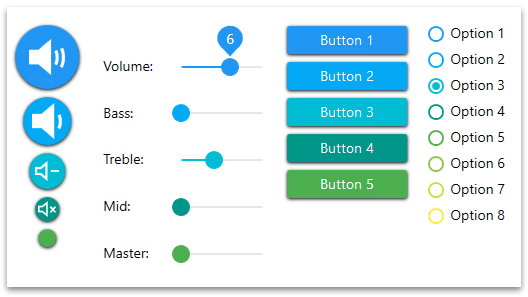
- New MaterialHamburger control lets you pop a side menu with animated items. Similar to what you find on mobile applications.
- New IconButton control lets you add an icon and some data to a button’s content. IconButton also makes it easier to customize the “Background”, “BorderBrush” and “Foreground” properties on “MouseOver” and “MousePressed” events.
修補程式
- In MaterialSwitch, when unchecked, the “CheckBackground” will no longer be visible behind the thumb.
- In Chart, when “loaded” and “displayed”, adding dataPoints will now correctly align the dataPoints and the grid lines.
- In AvalonDock, the MetroAccent theme can now be set from XAML.
- In ChildWindow, double-clicking on the caption bar will no longer maximize it when the “ResizeMode” is set to “NoResize” or “CanMinimize”.
- In MaterialToast, the MaterialToast defined in XAML will no longer throw an exception when its property “IsOpen” becomes true.
- In MaterialToast, if the MaterialToast is defined in XAML and its “IsOpen” property is changed while the sliding in/out animation is still active, the MaterialToast will no longer become invisible.
- In MaterialToast, calling the “HideToast()” and “ShowToast()” methods will no longer destroy a binding on the “IsOpen” property.
- In MaterialToast, the close button will now always be enabled when calling the default constructor.
- In MaterialToast, the new events “Showing” and “Hiding” are now raised when the control starts to show/hide.
- In DateTimeUpDown, DateTimePicker and TimePicker, an exception will now be raised to remind the user to set a “FormatString” when the format is set to custom.
- In MaterialToast, setting the “VerticalContentAlignment” and “HorizontalContentAlignment” properties are now templatebound properly.
- In MaterialTabControl, starting with a null “SelectedItem” and clicking on a new MaterialTabItem will no longer cause a crash.
- In MaterialTabControl, when the “SelectedItem” is null, the first MaterialTabItem will no longer have a null Foreground.
- In Magnifier, when the mouse is not moving, modifying the “ZoomFactor” property will now keep its content centered.
- In MaterialTextField, setting a “Text” without a “Watermark” will no longer cause a crash upon loading.
- In ChildWindow, MessageBox, StyleableWindow and WindowControl, the new event “Activated” will now be raised when the “IsActive” property becomes true.
- In Expander, when using with “ExpanderDirection” set to “Left” or “Right” under the Metro/Office2007 themes, the arrow and the text will now correctly be aligned.
- In TokenizedTextBox, using the “SelectedItemsOverride” property while the TokenizedTextBox is placed inside a DataTemplate will no longer crash.
- In TokenizedTextBox, when the “ItemsSource” is a CollectionViewSource and this CollectionViewSource is modified, typing(or removing text) in the TokenizedTextBox will no longer cause a crash.
- In DataGridControl, the DataGridCheckBoxes will no longer have a blue Background.
- In AvalonDock, dragging a FloatingWindow to the top of the screen will now maximize it.
- In all controls, when a ControlTemplate is redefined with a missing templated part name, the application will no longer cause a crash.
- In all UpDown controls, setting the “MouseWheelActiveTrigger” property to “MouseOver” will now work as expected.
- In ChildWindow, MessageBox, StyleableWindow and WindowControl, the new event “Activated” will now be raised when the “IsActive” property becomes true.
- In DateTimePicker, TimePicker and DateTimeUpDown, the modification of “UpdateValueOnEnterKey” property will no longer be supported. It will always be “True” to simplify input validation.
- In the TimeSpanUpDown, typing a large value for hours, minutes or seconds will no longer reset the “Value” property.
- In the Zoombox, when using the scrollBars, clicking on the scrollBar’s tracks will now scroll by a page.
- In AvalonDock, the new property “AllowDuplicateContent” will now prevent from having 2 identical LayoutDocuments/LayoutAnchorables in a single pane.
- In the PropertyGrid, using the property “PropertyDefinitions” on an expanded PropertyItem(to display specific sub-propertyItems) will now work properly.
- In AvalonDock, serializing a custom LayoutDocument (or LayoutAnchorable) in a LayoutFloatingWindow will now be possible.
- In DateTimePicker, when modifying the template of the DateTimePicker to use a MaskedTextBox as the “PART_TextBox” templated part, the caret position will now be correctly updated while typing.
- In PropertyGrid, a horizontal scrollBar will now be displayed when needed.
- In SplitButton and DropDownButton, the property “IsDefault” is now available.
- In PropertyGrid, defining a custom editor as an attribute in another assembly will now be found properly.
- In PropertyGrid, when using grouping, the outOfRangeException will no longer be thrown when typing text in the SearchTextBox.
- In SplitButton and DropDownButton, using an implicit style on type “Button” will no longer affect them.
- In PropertyGrid, the “DataContext” of a custom editor will no longer be overwritten.
- In PropertyGrid, the attribute “DefaultValue” will now set in bold the “Value” of the corresponding PropertyItem when equal.
- In PropertyGrid, the “Update()” method will no longer throw a null reference exception.
- In MaskedTextBox, if the “Mask” property is “>”( or “<“), all the input characters will be converted to upper case(or lower case).
- In PropertyGrid, the “DisplayName” attribute of a fake type, used by an ICustomTypeProvider, will now be displayed as the SelectedObject’s type.
- In PropertyGrid, the new property “IsVirtualizing” can now be used to virtualize the PropertyItems.
- In Zoombox, the property ViewFinder will now have a setter to add your own Zoombox’s ViewFinder.
- In ColorPicker, tabs are now used to switch from “standard” to “advanced” view.