Improved webpack support - Coding assistance in JavaScript files now respects webpack module resolution. Now when you’re using a complex webpack configuration with aliases and multiple modules, WebStorm will properly resolve paths in import statements and will suggest symbols to import.
Move symbol refactoring - With the new Move Symbol refactoring, you can now safely move classes, global functions or variables in ES6 modules from one JavaScript or TypeScript file to another. WebStorm will update all the imports and exports for you.
Parameter hints and type info in TypeScript - Parameter hints show the names of parameters in methods and functions to make your code easier to read. You can also see the inferred type for objects in TypeScript if you hold Cmd on macOS or Ctrl on Windows & Linux and hover over them.
Code style
Import code style from .eslintrc - You can now import some of the ESLint code style rules to the IDE’s JavaScript code style settings. Reply 'Yes' when prompted about this in the .eslintrc file, to apply the matched rules and make the IDE formatting more consistent with your ESLint configuration.
Code arrangement - The new Arrangement and Blank lines code style options allow you to configure how different blocks of code such as fields and methods are ordered and separated in your JavaScript and TypeScript classes. Call the Rearrange Code action or use it together with Reformat Code to make code more readable and consistent.
Frameworks
Support for Angular Material - Support for Angular Material has gotten better: you can now use code completion and navigation for Material attributes, in addition to completion for components that was available before.
Testing
Run single Karma test - You can now run or debug a single test or a suite with Karma right from WebStorm, as opposed to running them all. Simply click the icon next to the test in the editor and select Run or Debug. The icon will then show the test status.
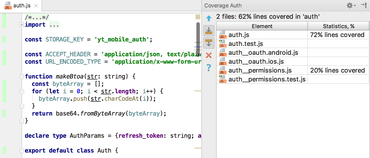
Code coverage for Mocha - Run Mocha tests with coverage and see the coverage reports created by Istanbul right in the IDE. The report shows how many files are covered with tests and the percentage of covered lines in them. From the report you can jump to the file and see which exact lines were covered and which weren’t.
Stylesheets
Support for CSS Modules - Using CSS Modules? Now after you’ve imported a CSS Module into the JavaScript file, you will get code completion and navigation to the definition for the class names in that module.
Improved support for Sass and SCSS - For Sass and SCSS selectors created using &, you can now use code completion in HTML files and navigate to the definition. For the nested selector, you can quickly jump to the definition with Cmd-click / Ctrl+click.
Tools
npm install notification - WebStorm helps you keep your project’s dependencies up-to-date. Now when you open a project, update it from the version control or edit package.json, the IDE will prompt you to run `npm install` or `npm update`.
Other improvements:
Imports are added automatically on completing JavaScript symbols defined and exported in the project.
Improved coding assistance for React stateless components and props.
File nesting settings in the Project view to configure what files are visually grouped.
Breadcrumbs in JavaScript and TypeScript files.
New code style options for HTML and JSX: New line before first attribute and New line after last attribute.
Quick-fix to convert module.exports into ES6 export.
Improved navigation in TypeScript: Go to definition will prefer .ts files to .d.ts files.
Create method quick-fix for Angular templates.
Improvements in Version Control: configuration for the commit message format, the Revert commit action for Git, and the new Reword action for commit messages.
Run Mocha tests with coverage and see the coverage reports created by Istanbul right in the IDE.