
Add-in Express Regions for Microsoft Outlook and VSTO
在 Outlook 流覽器和檢查器視窗上創建視圖和表單區域。
由以下開發商製作:Add-in Express
ComponentSource 開始代理銷售的日期:2006年
我們已經停止提供這種個產品。
在 Outlook 流覽器和檢查器視窗上創建視圖和表單區域。
由以下開發商製作:Add-in Express
ComponentSource 開始代理銷售的日期:2006年
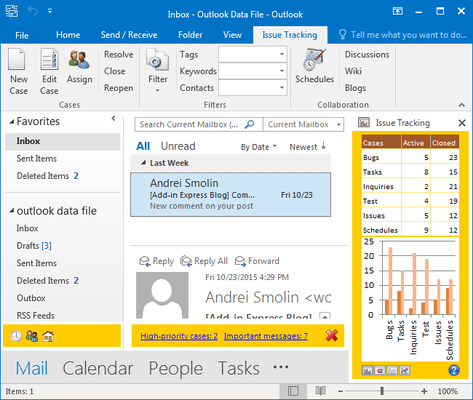
在 Outlook 流覽器和檢查器視窗上創建視圖和表單區域。
Add-in Express Regions for Microsoft Outlook and VSTO is an extension of Visual Studio Tools for Office that allows you to customize Outlook views and Outlook forms with any .NET control. Traditional COM Add-ins developed with VSTO limit developers to using very basic and restricted task panes, or using Outlook Form Regions that have quirky limitations. Add-in Express Regions offer many more features that can be implemented into existing VSTO Outlook COM Add-in projects. Regions can be resized, hidden, shared, dragged, docked and more.
Add-in Express Regions offer many features that can be implemented into existing VSTO Outlook COM Add-in projects:
Regions for your existing VSTO projects
This solution effectively allows you to continue designing your Outlook solutions using Visual Studio Tools for Office in Visual Studio. In other words, even if you have an Outlook Add-in project developed with VSTO, you can install Add-in Express Regions and immediately start taking advantage of the powerful Advanced Outlook View and Form Regions technology.
聯繫電話: (888) 850 9911
傳真: +1 770 250 6199


