
LINQ Insight
在設計時執行 LINQ。
由以下開發商製作:Devart
ComponentSource 開始代理銷售的日期:2005年
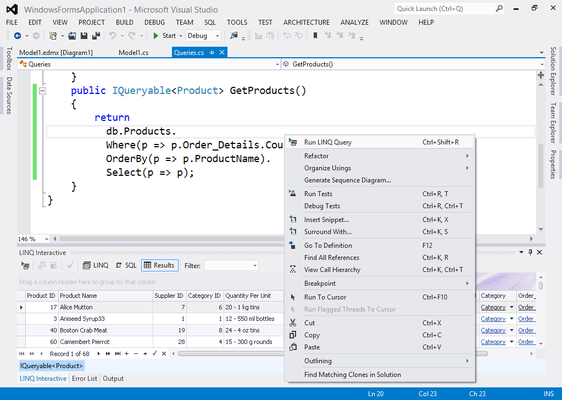


With LINQ Insight you can write your LINQ Queries in the Visual Studio code editor using all its features (syntax highlighting, intellisense, etc.) and then execute them right from your code with no preparation or query modification. All LINQ Insight requires is compilable code. The result is also displayed in a Visual Studio window.

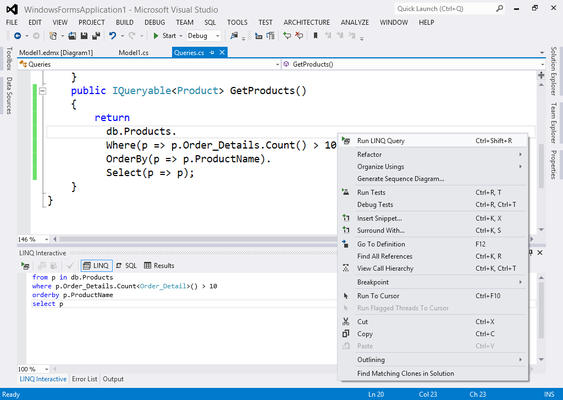
LINQ Insight executes LINQ queries and allows you to view the generated SQL and returned data at design-time. Unlike other LINQ debug visualizers it does not require you to start a debug session, and you don't need to make any changes to queries or context to execute the query.

圖像1/2
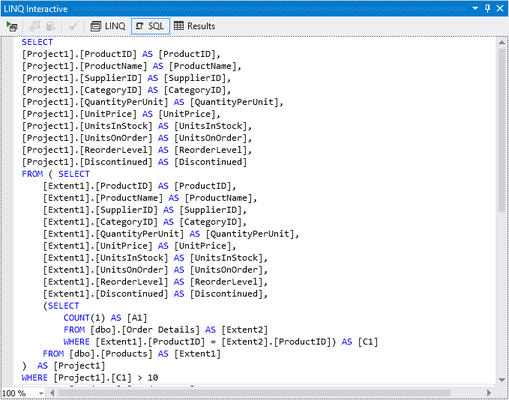
LINQ Insight allows you to view SQL, generated for LINQ to SQL, LINQ to Entities, LINQ to NHibernate, and LinqConnect queries at design-time.
The returned data is displayed in a grid, where you can sort and group, and filter this data. LINQ Insight returns data in object form, all queries are performed through the used ORM, no emulation is used. It provides convenient ways to browse data of associated objects. LINQ Insight even allows you to edit data for LINQ to SQL, LINQ to Entities, LINQ to NHibernate, and LinqConnect. Changes are applied to the database only after you click the 'Apply Changes' button. You can edit several objects and then apply changes or discard them.
圖像1/4
LINQ Insight supports LINQ to Entites (Entity Framework), LINQ to NHibernate, LINQ to SQL, LinqConnect, LINQ to XML, and LINQ to Objects. LINQ Insight can execute both usual LINQ queries and queries through extension methods. It also supports anonymous queries, for example, with immediate ToList calls.
圖像1/2
聯繫電話: (888) 850 9911
傳真: +1 770 250 6199


