
dbForge Studio for MySQL
用全面的 MySQL GUI 工具簡化您的日常工作流程,用於資料庫開發、經營管理和行政管理。
由以下開發商製作:Devart
ComponentSource 開始代理銷售的日期:2005年
用全面的 MySQL GUI 工具簡化您的日常工作流程,用於資料庫開發、經營管理和行政管理。
由以下開發商製作:Devart
ComponentSource 開始代理銷售的日期:2005年
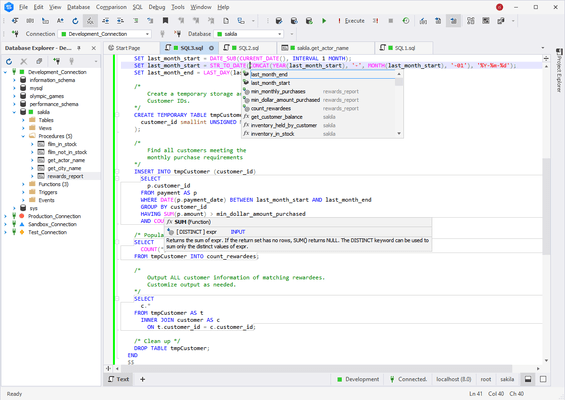
我們可以提供任何dbForge Studio for MySQL許可證,包括新訂閱和續訂。
請閱讀Devart授權合約以獲取許可資訊詳情。
dbForge Studio for MySQL 可作为免费 Express Edition 版和付费标准版、专业版和企业版提供。
| dbForge Studio for MySQL Express Edition | dbForge Studio for MySQL Standard Edition我們的最暢銷產品 | dbForge Studio for MySQL Professional Edition | dbForge Studio for MySQL Enterprise Edition | |
|---|---|---|---|---|
| FREE | 詢價 | 詢價 | 詢價 | |
| Pricing | ||||
| New License with 1 Year Subscription | ||||
| New License with 2 Year Subscription | ||||
| New License with 3 Year Subscription | ||||
| Subscription Renewal - 1 Year | ||||
| Licensing | ||||
| Perpetual License | ||||
| Install on Two Machines | ||||
| Transfer Licenses | ||||
| SQL Development | ||||
| SQL editor with syntax highlighting, bookmarks, and text search | ||||
| Visual Query Builder with support for SELECT statement | ||||
| Visual Query Builder with support for INSERT, UPDATE, and DELETE statements | ||||
| Visual Query Builder with support for sub-queries | ||||
| Quick INSERT statements generation from the data grid without opening the wizard | ||||
| MySQL stored procedure debugger | ||||
| Query Profiler | ||||
| Execution planning tool | ||||
| Execution warnings | ||||
| Execution notifications | ||||
| Transaction reminder | ||||
| Execution of scripts, selected SQL fragments, and statements | ||||
| Executed queries history | ||||
| Code snippets | ||||
| Context-sensitive code completion | ||||
| Phrase completion | ||||
| SQL refactoring | ||||
| Quick information about schema objects | ||||
| Parameter information for stored routines | ||||
| SQL code formatting | ||||
| Code formatting through the command line | ||||
| Automatic SQL syntax check | ||||
| One-step access to the schema object editor from the code (go to definition) | ||||
| Database Design | ||||
| Database Designer | ||||
| View database object dependencies | ||||
| Visual routine editors | ||||
| Flat table editor with heuristics support | ||||
| Partitioning support for table editor | ||||
| Object Viewer window for quick browsing of schema object properties | ||||
| Schema comparison and synchronization tool | ||||
| Command-line interface for schema comparison and synchronization | ||||
| Schema object search on a live database | ||||
| Database refactoring | ||||
| Database project framework | ||||
| CRUD generation | ||||
| Find invalid objects | ||||
| Comparison of script folder objects and data | ||||
| Documentation Generation | ||||
| Duplicate Object | ||||
| Administration | ||||
| Security Manager to administer user accounts and privileges | ||||
| Session manager | ||||
| Server Variables window | ||||
| Service control for starting and stopping MySQL servers | ||||
| Table maintenance wizard and flush dialog | ||||
| Copy databases | ||||
| Data Pump | ||||
| Database backup and restore wizards | ||||
| Command-line interface for database backup and restore | ||||
| Data export to 14+ file formats | ||||
| Data import from 10+ file formats | ||||
| Command-line interface for data import/export | ||||
| Data comparison and synchronization tool | ||||
| Command-line interface for data comparison and synchronization | ||||
| Data Generator with 200+ predefined meaningful data generators | ||||
| Data Analysis | ||||
| Enhanced visual data editor | ||||
| Pivot tables | ||||
| Data search on a live database | ||||
| Data reports | ||||
| Automated data report delivery | ||||
| Creating data reports from the command line | ||||
| Master-Detail Browser | ||||
| Generation of database documentation in HTML, PDF and Markdown file formats | ||||
| General | ||||
| Support for MySQL | ||||
| Support for MariaDB | ||||
| Support for Sphinx and Percona | ||||
| Support for SSL/SSH/HTTP connections | ||||
| MySQL pluggable authentication and Windows authentication on connecting to MySQL server | ||||
| Percona PAM Authentication for MySQL | ||||
| Works with MySQL on Amazon RDS and on Amazon Aurora | ||||
| Works with Google Cloud | ||||
| Works with Alibaba Cloud | ||||
| Works with Tencent Cloud | ||||
| Works with Azure for MySQL | ||||
| Works with Azure for MariaDB | ||||
| Works with MySQL embedded server | ||||
| Works with Galera Cluster | ||||
| Multiple database connections in Database Explorer window | ||||
| Connection coloring and document categories | ||||
| Full shortcut customization | ||||
| Rich user settings | ||||
| Wizards for exporting/importing user settings | ||||
| Support | ||||
| Community Support | ||||
| Priority Support | ||||
| N/A | 查看價格 | 查看價格 | 查看價格 | |
| 瞭解更多 | 瞭解更多 | 瞭解更多 | 瞭解更多 |
dbForge Studio for MySQL 許可證都是長久的。 訂閱期結束後,您能繼續使用所購買的產品。
您可以根據需要繼續使用您的訂閱中包含的產品。 訂閱到期意味著您將不再收到任何產品更新或新產品版本。 您可以按照比購買新許可證低的價格續訂您的訂閱。
可以 - ComponentSource 可以安排統一您的許可證期限,即使這些許可證最初不是透過我們購買的。 請致電我們或給我們發消息,討論您的需求。
可以 - 您可以將同一產品的新許可證或不同產品的新許可證添加到您現有 Devart 戶口。
Devart 不提供直接出售的舊版本。 但是,倘若您是許可使用者,可以從 Devart Registered User's Area(註冊使用者區)下載以前的任何版本。
是。 您可以在另外一台可擕式設備、筆記型電腦或家用電腦上安裝、啟動和使用額外副本,僅供同一人員專用。
許可證所有權可以轉讓給其他人或公司,但您必須聯絡 Devart 具體說明許可證新所有者的聯絡資訊。 有關完整資訊,請參閱授權合約。
擁有有效訂閱的使用者有權獲得優先支援,該支援透過電子郵件提供,回應時間為二個工作日。 沒有訂閱的使用者可以透過社區論壇獲得支援。
dbForge Studio for MySQL 需要許可證啟動。 啟動請登錄 Devart Registered User's Area(註冊使用者區)。
聯繫電話: (888) 850 9911
傳真: +1 770 250 6199


