Released: Mar 14, 2008
ComponentOne Doc-To-Help Enterprise 2012 中的更新
What's New in Doc-To-Help 2008?
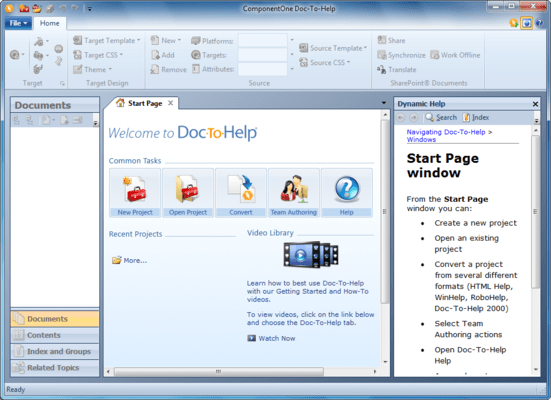
Doc-To-Help 2008 has a completely redesigned, contemporary user interface:
- Office 2007-style Ribbons have replaced menus.
- The Properties Panel is gone - all configuration and settings are managed with the ribbons or within dialog boxes.
- You can edit your source or target Cascading Style Sheets using the new Style Editor.
- Complex Conditions - You can assign three different conditions to a topic, document, or text: Platform, Target, or Attribute - giving you more single-sourcing options.
- The Topic Grid is significantly improved to allow you to see and edit many topic properties at once.
- Outlook-style Accordion tabs have replaced the Icon bar.
- The tabbed interface makes it possible to have multiple windows open and easily accessible at the same time.
- You can create custom topic relationships using the Related Topics Editor. This makes creating links to "See Also" topics quick and easy.
- The Dynamic Help window displays help topics automatically as you navigate the interface.