MadCap Doc-To-Help

使用 Microsoft Word 創作和發佈聯機幫助、政策和程式指引、電子書等。

由以下開發商製作:MadCap Software
ComponentSource 開始代理銷售的日期:2013年
價格從: US$ 1,175.02 版本: 6 更新: Aug 20, 2019 5.00 評價的平均星級5.00 評價的平均星級5.00 評價的平均星級5.00 評價的平均星級5.00 評價的平均星級 (1)

i

New licenses for MadCap Doc-To-Help are no longer available. However, existing customers can continue to renew their licenses.

MadCap Doc-To-Help 5

Released: Sep 12, 2017

5 中的更新

特性

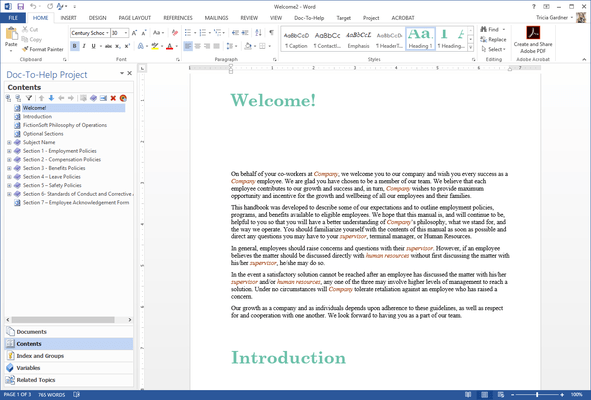
  • New Integration Adds a Doc-To-Help Menu Directly within Microsoft Word - You can now access the Doc-To-Help features menu directly within Microsoft Word. Menu categories include:
    • Getting Started: Open existing projects, create a new project or open a sample project. The Help section is also located here.
    • Project: Access the Common Tasks submenu to schedule builds or access the Reports submenu generate any number of reports available in Doc-To-Help.
    • Team Authoring: Access the Team Authoring submenu to connect to a team project, share a project or review and edit your web repository settings.
  • A Redesigned Doc-To-Help Ribbon in Word Makes Authoring Quick and Easy - The redesigned ribbon has been streamlined, making it easier to utilize commonly used features and commands from the toolbar within Word. Add and edit topics, insert headings, modify styles, add links and glossary terms, and more.
  • Access Project Settings with the New Project Ribbon - The new Project Ribbon gives you quick access to project settings and functions directly from the toolbar.
  • Add, Build or Publish Builds with the New Target Ribbon - With the new Target Ribbon, targets can be added, built, and published directly from the toolbar.
  • A New Project Panel in Word Allows You to Easily Manage Doc-To-Help Elements - The new project panel allows you to add or edit Documents, Contents, Index and Groups, Variables, and Related Topics. You can expand or collapse all of the elements within a specific tab, or you can create a filter within the tab.