FinalBuilder 7.0 features new IDE
Released: Aug 12, 2010
Updates in this release
Updates in 7.0
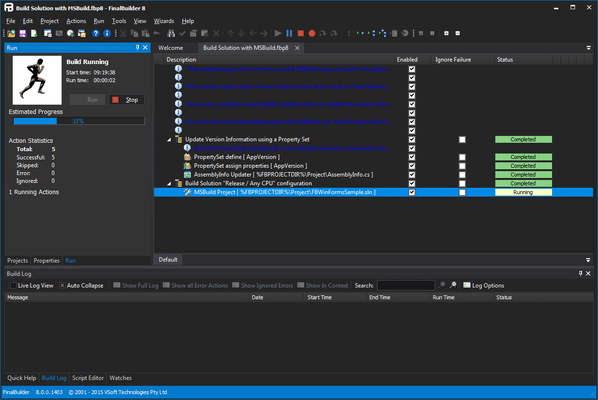
- NEW IDE - FinalBuilder 7 sports a new IDE. The FinalBuilder 7 IDE is capable of opening multiple projects (whereas FB6 only allows 1 at a time). The new IDE includes docking, something that has been requested many times over the years, so you can lay out the IDE to suite your taste. There are many little enhancements and tweaks in the IDE. The most requested feature that has been implemented is the renaming of variables. In FB6, when you rename a variable it does not rename references to it in the project. FB7 will attempt to find and rename all references
- Unicode Support - FinalBuilder is now compiled with a Unicode aware compiler. The native internal string type is UTF16, and VSoft Technologies have worked hard to ensure that all actions that work with files respect the original files encoding.
- Variable Types - In FinalBuilder 6 and earlier, all FinalBuilder variables are implemented as Variants. Those of you who have done some COM programming, or used Visual Basic 6 or earlier, or Delphi might be familiar with Variants. A Variant is a type that can store values of various types. Variants are very useful in many cases, but are not without their problems. For example, if you want to store a string "03" in a variant, you will have to put the double quotes around the 03, otherwise it is not known if it's not a number. To circumvent this problem, in FinalBuilder 7 you can specify the variable type. When you specify a variable type, that is how the variable will be treated, so for example if you attempt to assign a string value to an integer variable it will fail. Typed variables also allow you to specify a format string, which will be used when the variable is evaluated in an expression. For example, if you have a build number variable, that you always want to use as 4 digits, with zeros padding out the left, setting the format string to %.4d will do this.
- Local Variables - In addition to the existing variable scopes (environment, application,user, project) and action list parameters, FinalBuilder 7 includes a local variable scope. The Action Group Action has a new property page that allows you to define the local variables. These variables are only visible to child actions of the group. Since groups can be nested, this provides the ability to override variables locally, and define variables for temporary use. Local variables cannot be persisted and cannot be used as environment variables.
- New Actions - As with every new release there are a number of additional actions: NDepend Action, Git Actions, Plastic SCM Actions, Check If Host Exists Action, SetupBuilder Actions, SecureZIP Actions, Signtool Actions, Hyper V Actions, Mercurial Actions, SSH Actions, XML Node Exists Action.