
Liquid Studio Data Designer Edition
一種先進的 XML 開發人員工具組和 IDE。
由以下開發商製作:Liquid Technologies
ComponentSource 開始代理銷售的日期:2009年
一種先進的 XML 開發人員工具組和 IDE。
由以下開發商製作:Liquid Technologies
ComponentSource 開始代理銷售的日期:2009年
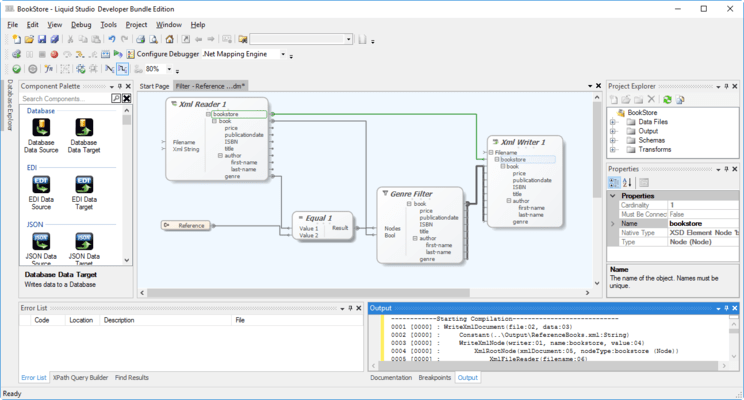
Liquid Studio Data Designer Edition is the new name for Liquid Studio Designer Edition.
| Features | Free Community Edition | JSON Editor Edition | XML Editor Edition | Data Designer Edition | Developer Bundle |
|---|---|---|---|---|---|
| XML Editor | |||||
| Diagram View - Split screen Diagram & Code views | • | • | • | ||
| Graphical View | • | • | • | ||
| Tree view with nested tabular child grids | • | • | • | ||
| Context menus | • | • | • | ||
| Multi-step undo / redo | • | • | • | ||
| Code View | • | • | • | • | • |
| Auto complete based on associated XML Schema | • | • | • | • | • |
| Colour coded text | • | • | • | • | • |
| Outline (collapsible sections) | • | • | • | • | • |
| Spell Checker | • | • | • | • | • |
| XML Tools | |||||
| Infer an XML Schema from an XML document | • | • | • | • | • |
| Validation based on selectable or associated XML Schema | • | • | • | ||
| Convert XML Documents to their Canonical form | • | • | • | ||
| Import & Export XML documents as compressed Fast Infoset files | • | • | • | ||
| Import & Export XML documents as JSON files | • | • | • | • | |
| Import & Export JSON files as XML documents | • | • | • | • | |
| WSDL Editor | |||||
| Diagram View - Split screen Diagram & Code views | • | • | • | ||
| Graphical View | • | • | • | ||
| Tree view with nested tabular child grids | • | • | • | ||
| Context menus | • | • | • | ||
| Multi-step undo / redo | • | • | • | ||
| Code View | • | • | • | • | • |
| Auto complete | • | • | • | • | • |
| Colour coded text | • | • | • | • | • |
| Outline (collapsible sections) | • | • | • | • | • |
| Spell Checker | • | • | • | • | • |
| Seamless Integration with Microsoft Visual Studio | • | • | • | ||
| Rest and SOAP Web Services Tools | |||||
| OpenAPI Web Services Graphical Browser | • | • | • | • | |
| WSDL Web Services Graphical Browser | • | • | • | • | |
| REST request message generation (including the message contents) | • | • | • | • | |
| SOAP request message generation (including the message contents) | • | • | • | • | |
| Execute web methods & view the results | • | • | • | • | |
| Seamless Integration with Microsoft Visual Studio | • | • | • | • | |
| XPath Tools | |||||
| Show results of XPath Expression in any XML window | • | • | • | ||
| Updated in real time as the XML or XPath expression change | • | • | • | ||
| Auto complete on XPath Expression | • | • | • | ||
| Create Code samples for C++, C#, VB.Net, Java & XSLT | • | • | • | ||
| Seamless Integration with Microsoft Visual Studio | • | • | • | ||
| Build XPath expression directly from the element within the XML document | • | • | • | ||
| XSLT Editor and Debugger | |||||
| Integrated Debugger | • | • | • | ||
| Step by Step Debugging | • | • | • | ||
| Breakpoints | • | • | • | ||
| Local Variables | • | • | • | ||
| Local Context | • | • | • | ||
| Watch Expressions | • | • | • | ||
| Call Stack | • | • | • | ||
| Execute the XSL transform and view results | • | • | • | • | • |
| Support for XSLT W3C standards | • | • | • | • | • |
| Auto complete | • | • | • | • | • |
| Colour coded text | • | • | • | • | • |
| Outline (collapsible sections) | • | • | • | • | • |
| Spell Checker | • | • | • | • | • |
| Validation | • | • | • | • | • |
| XQuery Editor and Debugger | |||||
| Integrated Debugger | • | • | • | ||
| Step by Step Debugging | • | • | • | ||
| Breakpoints | • | • | • | ||
| Local Variables | • | • | • | ||
| Local Context | • | • | • | ||
| Watch Expressions | • | • | • | ||
| Call Stack | • | • | • | ||
| Execute the XQuery and view results | • | • | • | • | • |
| Support for XQuery 1.0 W3C standard | • | • | • | • | • |
| Auto complete | • | • | • | • | • |
| Colour coded text | • | • | • | • | • |
| Outline (collapsible sections) | • | • | • | • | • |
| Spell Checker | • | • | • | • | • |
| Validation | • | • | • | • | • |
| DTD Editor | |||||
| Colour coded text | • | • | • | • | • |
| Spell Checker | • | • | • | • | • |
| Validation | • | • | • | • | • |
| CSS Editor | |||||
| Colour coded text | • | • | • | • | • |
| Spell Checker | • | • | • | • | • |
| Validation | • | • | • | • | • |
| XDR Editor | |||||
| Auto complete | • | • | • | • | • |
| Colour coded text | • | • | • | • | • |
| Outline (collapsible sections) | • | • | • | • | • |
| Spell Checker | • | • | • | • | • |
| Validation | • | • | • | • | • |
| XML Schema Editor (XSD) | |||||
| Split screen Diagram & Code views | • | • | • | ||
| Graphical View | • | • | • | ||
| In-place editing of properties | • | • | • | ||
| Properties window | • | • | • | ||
| Context menus | • | • | • | ||
| Advanced Printing & Preview scaling options | • | • | • | ||
| Find & Replace | • | • | • | ||
| Zoom scaling | • | • | • | ||
| Drag and Drop Nodes | • | • | • | ||
| Cut & Paste Nodes | • | • | • | ||
| Multi-step undo / redo | • | • | • | ||
| Code View | • | • | • | • | • |
| Auto complete | • | • | • | • | • |
| Colour coded text | • | • | • | • | • |
| Outline (collapsible sections) | • | • | • | • | • |
| Spell Checker | • | • | • | • | • |
| Multi-step undo / redo | • | • | • | • | • |
| Refactoring | • | • | • | ||
| Rename | • | • | • | ||
| Convert to global element | • | • | • | ||
| Convert to global complexType | • | • | • | ||
| Seamless Integration with Microsoft Visual Studio | • | • | • | ||
| XSD Tools | |||||
| Validation based on W3C XML Schema Standard | • | • | • | • | • |
| Component locator | • | • | • | ||
| Save Diagram as image (.png, .gif, .bmp) | • | • | • | ||
| Included / Imported Schema | • | • | • | ||
| Include / Import Wizard | • | • | • | ||
| DTD to XSD Conversion | • | • | • | ||
| View Dependencies | • | • | • | ||
| XML Schema Dependency Viewer | • | • | • | ||
| XML Schema Documentation Generator | |||||
| HTML Documentation Generation for XML Schema | • | • | • | ||
| PDF Documentation Generation for XML Schema | • | • | • | ||
| Hyperlinked Images | • | • | • | ||
| Full detail of each schema item including original code | • | • | • | ||
| Can be run from the Command Line | • | • | • | ||
| Generate XML Documents from XML Schemas | |||||
| Generate valid data values for the elements and attributes | • | • | • | ||
| Options for controlling size and complexity XML Document | • | • | • | ||
| XML Tools for Microsoft Visual Studio | |||||
| XML Schema Editor (XSD) Visual Studio Extension | • | • | • | ||
| XPath Tools Visual Studio Extension | • | • | • | ||
| Web Services Tools Visual Studio Extension | • | • | • | ||
| Liquid Studio stand alone IDE | |||||
| Printing | • | • | • | • | • |
| Projects | • | • | • | • | |
| Source control integration | • | • | • | • | |
| File change notification | • | • | • | • | • |
| XML Differencing | |||||
| XML Aware Differencing Engine | • | • | • | • | |
| Optionally ignore whitespace comments and processing instructions | • | • | • | • | |
| JSON Editor | |||||
| Validation based on JSON Schema (draft 4.0 & draft 6.0) | • | • | • | • | • |
| Intelliseense/Auto complete based on JSON Schema | • | • | • | • | • |
| Goto JSON schema definition | • | • | • | • | • |
| Infer a JSON Schema from a JSON document | • | • | • | • | |
| Generate JSON Documents from JSON Schemas | • | • | • | • | |
| JSON Schema Editor | |||||
| IETF draft 4 JSON Schema Standard Support | • | • | • | • | • |
| IETF draft 6 JSON Schema Standard Support | • | • | • | • | • |
| IETF draft 7 JSON Schema Standard Support | • | • | • | • | • |
| Split screen Diagram & Code views | • | • | • | • | |
| Graphical View | • | • | • | • | |
| In-place editing of properties | • | • | • | • | |
| Properties window | • | • | • | • | |
| Context menus | • | • | • | • | |
| Advanced Printing & Preview scaling options | • | • | • | • | |
| Find & Replace | • | • | • | • | |
| Zoom scaling | • | • | • | • | |
| Drag and Drop Nodes | • | • | • | • | |
| Cut & Paste Nodes | • | • | • | • | |
| Multi-step undo / redo | • | • | • | • | |
| Code View | • | • | • | • | • |
| Colour coded text | • | • | • | • | • |
| Outline (collapsible sections) | • | • | • | • | • |
| Spell Checker | • | • | • | • | • |
| Multi-step undo / redo | • | • | • | • | • |
| Save Diagram as image (.png, .gif, .bmp) | • | • | • | • | |
| Included / Imported Schema | • | • | • | • | |
| Include / Import Wizard | • | • | • | • | |
| Infer a JSON Schema from a JSON document | • | • | • | • | |
| Generate JSON Documents from JSON Schemas | • | • | • | • | |
| HTML Documentation Generation for JSON Schemas | • | • | • | • | |
| PDF Documentation Generation for JSON Schemas | • | • | • | • | |
| Seamless Integration with Microsoft Visual Studio | • | • | • | • | |
| Data Mapper | |||||
| Graphical mapping editor | • | • | |||
| Drag and Drop | • | • | |||
| Cut and paste | • | • | |||
| Multi step undo/redo | • | • | |||
| Context menus | • | • | |||
| Debugger | • | • | |||
| Inline Debugger | • | • | |||
| Single step through the transform | • | • | |||
| Local Variable View | • | • | |||
| Context View | • | • | |||
| Call stack View | • | • | |||
| Data Sources | • | • | |||
| XML (automatically inferring the structure from sample docs) | • | • | |||
| XML Schema | • | • | |||
| Database | • | • | |||
| EDI | • | • | |||
| JSON | • | • | |||
| Text File | • | • | |||
| Web Services | • | • | |||
| Data Targets | • | • | |||
| XML based on sample XML or XML Schema | • | • | |||
| Database | • | • | |||
| EDI | • | • | |||
| JSON | • | • | |||
| Text File | • | • | |||
| Web Services | • | • | |||
| Mapping | • | • | |||
| Function Library | • | • | |||
| Multi Source mappings | • | • | |||
| Multi Target Mappings | • | • | |||
| Data Validation | • | • | |||
| Sort and De-duplicate data | • | • | |||
| Source Control Integration | • | • | |||
| Execute the transform from within the designer | • | • | |||
| Generate XSLT or C# code to execute the transform within your own code | • | • | |||
| Liquid .Net Data Mapper Runtime Libraries | • | • | |||
聯繫電話: (888) 850 9911
傳真: +1 770 250 6199


