| |
Control Deliverables
Control deliverables are zip/jar archives expected to contain three top-level directories:
• controls - contains the control implementation jar, and any dependency jars
• help - documentation & javadoc around the control
• samples - samples that utilize the control
This ZIP file is the same as produced by starting with a Control Deliverable project, adding some help and samples content files to the appropriate directories in the tree, and using the Build Control Deliverable command. By default, any jars found in APP-INF/lib at build time are assumed to be required for the control and are bundled into the .zip.
Note that only a single control implementation jar can live in the controls folder of the ZIP file. Multiple controls, however, may be bundled into the control implementation jar. For each application, when a user first tries to install the 3rd-party control into it, the control implementation jar and all its dependency jars will be copied to the application's Libraries folder.
Help Directory
The help directory must be organized in the following format.
Please note that for each additional language, the directory name must be in the format of language_country (English is the only exception). The language code must be the official ISO 639-1 code, displayed in lowercase letters, followed by the “underscore” character and then the country code - which must be the official ISO 3166 code, displayed in UPPERCASE letters, as shown below:
help
-doc
--en
---partners
----<vendor name>
-----toc.xml
-----java-class
-----javadoc-tag
--ja_JP
---...
--es_MX
---...
--fr_FR
---...
For a complete list of the ISO language codes, click here:
http://www.loc.gov/standards/iso639-2/englangn.html
For a complete list of the ISO country codes, click here:
http://www.iso.org/iso/en/prods-services/iso3166ma/02iso-3166-code-lists/list-en1.html
Samples Directory
The samples directory must be organized in the following format:
samples
-partners
--<vendor name>
---sample 1
The first time a user tries to install the control into any application, the "help" and "samples" folders will be copied from the archive to the appropriate places. In particular, the contents of the "help" folder will be copied to $BEA_HOME/$WEBLOGIC_HOME/workshop/help/, and the contents of the "samples" folder will be copied to $BEA_HOME/$WEBLOGIC_HOME/samples/. This installation process will also rebuild the help index to incorporate the control's help content.
Code Signing
Control authors must use the JDK jar signing tools to ensure to users that the ZIP file has not been tampered with since the signing. Workshop looks for such a signature when downloading a control deliverable from a control stub, and prompts the user with the result.
More information on the keytool and jarsigner tools necessary to sign your control's ZIP file can be found at: http://java.sun.com/j2se/1.3/docs/tooldocs/win32/keytool.html.
Control Installation
Summary of Installation Requirements
Control installation files are free of viruses
All files - including .JAR files, help files, etc. - will be scanned for viruses prior to certification testing. This testing will be accomplished via "industry-standard" virus detection software utilizing updated virus definition files.
Do not replace BEA Platform default installation files
Installation of Controls must not overwrite any BEA default installation files.
Implement Help to Display within Workshop Help System
Controls must include help that displays properly within the WebLogic Workshop Help system. Help must be searchable, include a proper Table of Contents, as well as properly formatted HTML pages. For complete instruction on this topic, refer to the BEA Help Authoring Guide at: http://edocs.bea.com/workshop/docs81/doc/en/edk/guide/help/HelpAuthoringGuide.html.
Control Functionality
Exceptions
Any exceptions that the Control implements must be wrapped in ControlException.
Attributes and Tags
Every control must include the following jc-jar attributes
• label,
• description,
• version,
• icon-16
• icon-32
• Multiple controls must be grouped using the group-name attribute of the jc-jar tag.
• If the control uses tags, it must have a tag grammar file that describes them. It may optionally use validators or builders for custom attributes.
Miscellaneous
• If a control requires a JCX, it must include a ControlWizardSimple (or ControlWizard) that generates it.
• If the control has callback events, we encourage inclusion of a polling interface as well.
• The control should be tested in JWS, JPD, and JPF use cases. If it has a control wizard, it should be tested on the new file menu (create a JCX without inserting an instance) as well as the insert control (insert an instance and optionally create a JCX) menu.
Samples
1. At least one sample must be provided that can demonstrate the control running successfully in some container.
2. For controls that require access to 3rd party software and/or network resources, requirements must be clearly documented to the end user, and must be provided for certification along with telephone/email contact for assistance. Loopback -type simulation software that enables the control to run in a local standalone mode in lieu of a "real" back end is acceptable and is be the preferred approach for some controls.
3. Control samples must be associated with a description of what the sample does.
4. The sample should contain an adequate amount of javadoc explaining what the interfaces do.
Control Wizards
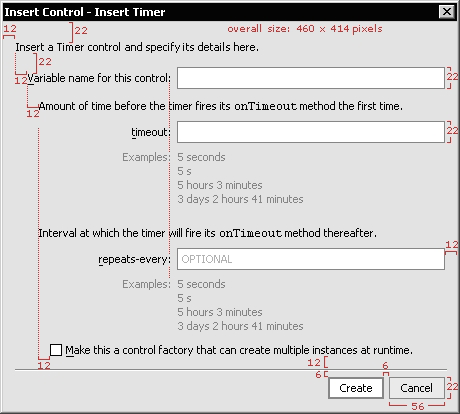
Wizards are dialogs with multiple steps (and usually multiple pages). Wizards have special cases but follow the dialog specifications for layout, spacing and placement of the various elements.
• Typical wizard size should be approximately 460 x 450 pixels. When less information is present, width remains 460.
• Overall size should not ever exceed 600 x 600 pixels.
• Wizard size should be determined by necessary text and controls, but kept to a minimum for readability and ease of use.
• Make dialogs that may grow or have large scrollable regions resizable.
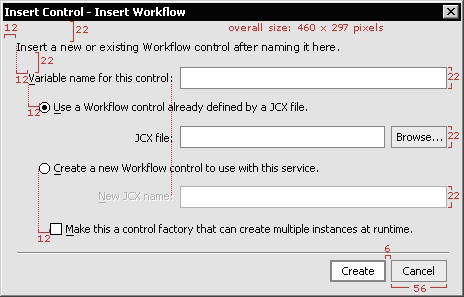
Control Wizard UI Guidelines
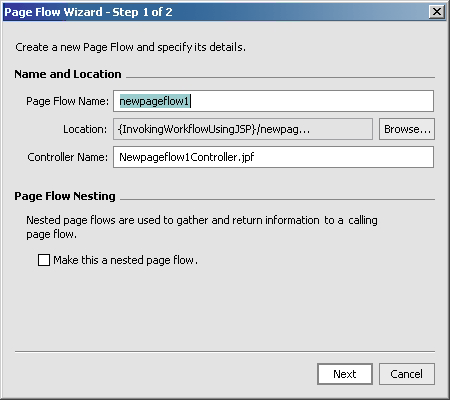
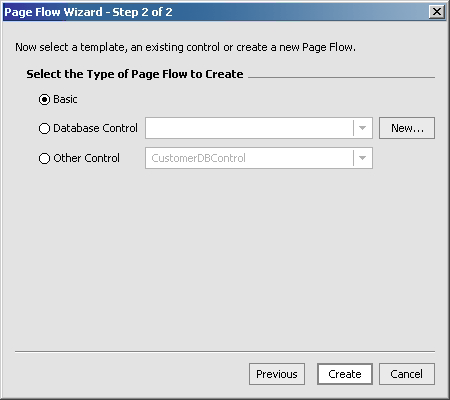
• The wizard's title/purpose should be stated in the titlebar with no icon. Multi-page wizards shall display place after the title, like so: "Wizard title - Step 1 of 3".
• There should be an opening 1-2 line sentence description on each page of the wizard. When tabs are present, this sentence should appear inside the tabbed area for each tab/screen. For examples, use gray #808080. If a field is optional, label it as such inside the control until user action is initiated.
Multi-Step Wizard Guidelines
• It is preferred not to use labels for Steps on a single page. When step-by-step user input is required, disable controls first then enable them consecutively as user input is received.
• Always show fields as completely as possible, as disabled or read-only. Disabling/enabling gives the user an expectation and establishes a predictable interface.
• Do not hide/show controls, as this may be jarring for the user experience. One exception includes hiding the previous button on the first screen of a multi-page wizard. Next button changes to Finish on the last page.
• Cancel is always on the far right.
• If fields are dependant on the input from other fields to display correctly, display a default scenario first then make changes as necessary.
Summary
If you follow the guidelines set forth in this validation specification, your WebLogic Workshop Controls should be ready for validation testing by ComponentSource. To avoid unnecessary and potentially costly re-testing, it is important for you to ensure that you have followed all required steps in preparing your control for testing.
Revision History:
V1.0.1 - Clarified requirements RE: Sample code; Exceptions
V1.0.2 - Changed help file format for SP3 RE: language_country codes
|