TX Text Control ActiveX Enterprise/XML X14

Adds zoom to page and zoom to text functionality, plus colored paragraph support.
December 1, 2016
New Version

Features

  • Colored Paragraphs - A complete paragraph and the paragraph frames can now be colored. The dialog box has been designed to adjust these settings using a flawless user experience.
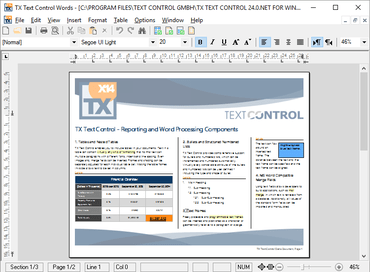
  • Zoom to Page, Zoom to Text - Zoom to whole page, zoom to text and zoom to page width are new out-of-the-box options when zooming in TX Text Control. The modernized status bar can be used to adjust the new zoom options.
  • Read-Only Toolbars - The TXButtonBar and TXRulerBar can be set to read only now. When such a tool bar is set to read only, it still shows all formatting attributes of the connected TXTextControl, but formatting attributes cannot be changed.
  • Built-in Dialog Boxes - The ParagraphDialog, TableAttrDialog and ObjectAttrDialog methods have got now an optional parameter that can be used to specify the tab which is shown when the dialog box is opened.
  • Text Fields - When a text field has a doubled input position at the beginning and at the end, each of these positions can be reached now with a mouse-click.
Zoom to whole page, zoom to text and zoom to page width are new out-of-the-box options when zooming in TX Text Control.

TX Text Control ActiveX Enterprise/XML

Comprehensive word processing and reporting for Visual Basic 6 and COM-based languages.

Got a Question?

Live Chat with our Text Control licensing specialists now.