MindFusion.Diagramming for Android 1.5

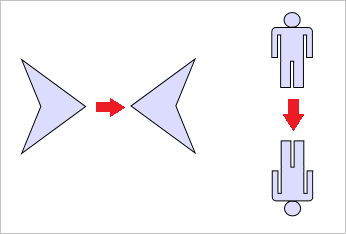
ShapeNodes can now be flipped horizontally or vertically.
August 10, 2017
New Version

Features

  • Flip shapes - ShapeNodes can now be flipped horizontally or vertically.
  • DiagramLink improvements
    • AllowSplitLinks now works for Bezier links too.
    • IntermediateShape shapes are now rendered at correct position for Spline links.
  • Miscellaneous
    • Behavior.PanAndModify lets you select and modify when touch gesture starts over an item, or pan the view otherwise.
    • Item texts are now rendered anti-aliased.
    • Zoom is now centered around touch position by default. The ZoomAtTopLeft Boolean property has been replaced by ZoomPivot property and respective enumeration, whose Center and TopLeft elements enable the old zoom behaviors.
    • Brush, Pen and DashStyle classes have been moved to com.mindfusion.drawing package.
ShapeNodes can now be flipped horizontally or vertically.

MindFusion.Diagramming for Android

Easily add flow diagrams to your Android apps.

Got a Question?

Live Chat with our MindFusion Group licensing specialists now.