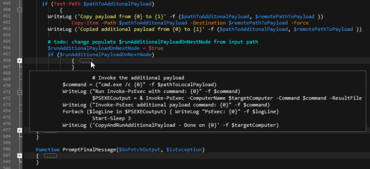
Adds code folding enhancements plus full Unicode support in wordfiles.
July 20, 2018
New Version
Features
- Code folding enhancements
- "Peek" at folded code (hover over "..." to see preview of collapsed text in a tooltip).
- Ctrl + Click on folding node to expand / collapse all sub-nodes of that node.
- Alt + Click on folding node to expand / collapse all folding nodes in the active file.
- Expand / collapse code from any line within folding section (not just first line).
- Full Unicode support in wordfiles
- Create wordfiles containing Unicode characters.
- Wordfiles can be saved as ANSI, UTF-8, or UTF-16, with or without BOM.
- Use Unicode characters in keywords, comment characters, indent/unindent strings, brace matching, more...
- New "/Word Select Include" wordfiles setting for overriding delimiters for navigating / selecting
- Allows you to set override default delimiters on a per-language basis.
- For example, /Word Select Include = $ would cause the "$" symbol to be included when double-clicking a word to select.
- This would also cause Ctrl + Left / Right Arrow to skip "$" (instead of stopping on it).
- Delimiter based sort
- Specify delimiter to sort by field (instead of specific column numbers).
- Makes IP address sort possible.
- Faster brace / tag matching in source with very long lines.
- "Filter on selection" switches to "Clear filter" when toggled on.
- Double-clicking soft wrapped word selects entire word (beyond soft wrap).
Create and modify content, collaborate on projects, manage change, perform power searches and securely transfer files.
Got a Question?
Live Chat with our UltraEdit licensing specialists now.

Official Distributor since 2013