PACE Suite 5.4

Adds new Launcher and Setup Capture tools, enhances Quality Approver, plus extends command line support.
March 3, 2020
New Version

Features

  • Launcher Tool - Launcher combines all PACE Suite tools in a single place and unifies accessing common functions. It groups the most-used packaging tasks with respect to the packaging lifecycle.
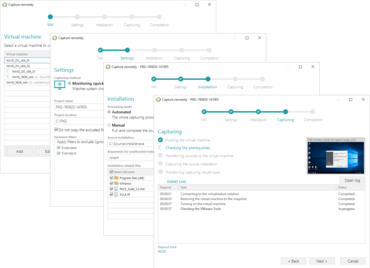
  • Setup Capture Tool - A capturing tool that runs repackaging on the local host and remote virtual machines. This is the small app that does not require PACE Suite license – simply copy and run it where you need to. Infopulse have reworked and significantly improved the capturing engine and capturing wizard, moved from MSI Generator. Setup Capture can perform fully automated and unattended capturing on a remote VM.
  • Command line support - It is now possible to repackage, build and text the package with the use of a simple script.
  • Search in MSI Generator - Quickly find the necessary captured/imported resources in a project.
  • Enhanced Quality Approver:
    • Re-connect to the virtual machine.
    • Copy long files in small parts to/from virtual machines.
    • Highlight the virtual machines, which are currently in use, in the list of configured ones.
    • Auto-upgrade previous versions of PACE Suite Tuner on a virtual machine.
    • Search for the VM in the list of configured ones.
New Setup Capture tool in PACE Suite 5.4.

PACE Suite

Inspired by packagers, designed for packagers.

Got a Question?

Live Chat with our Infopulse licensing specialists now.