Click for more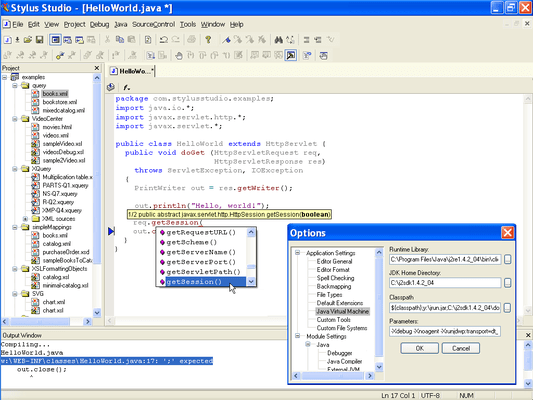
Java IDE
Stylus Studio's includes an integrated Java IDE that lets you edit, compile and work with any Java file directly within Stylus Studio. The Java editor provides enhanced java editing features such as Syntax coloring for reserved words (e.g: import, package, return, etc), Color coding that can differentiate between objects and methods, Java method sensing, including auto completion, and displaying the method signature for any Java function, Single click compile button (or type CTRL-F7), Real time Java syntax checking, inserting a red underline for any code that is deemed to be incorrect (eg: missing semi-colon, missing brace, etc.), Integrated JavaDoc Help (just put your cursor on a java method and press F1), An integrated Output window that displays java compiler errors or warning messages and support for backmapping, which means that if you click on the error message in the Output Window, Stylus Studio will highlight the line of code that generated the error.