About dbForge Data Generator for SQL Server

Generate instant realistic test data for databases.

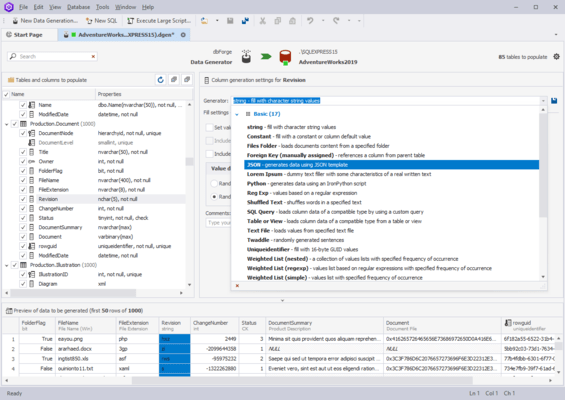
dbForge Data Generator for SQL Server allows you to implement new standards for the SQL tables population with test data. The visual data generation tool includes 200+ SQL data generators with flexible configuration. Adjusted to the users’ specific needs, the Data Generator allows for manual control over the creation of foreign key data. The column-intelligent data generation ensures that the data in one column are based on another column’s data.

dbForge Data Generator for SQL Server Feature Highlights:

  • Integrated AI Assistant - dbForge Data Generator includes an integrated AI Assistant that will completely reinvent your experience of SQL development with the following features.
    • Context-aware query generation
    • Conversion of natural language to SQL
    • Query optimization
    • SQL explanations and troubleshooting
    • Error analysis and clarifications
    • AI chat
    • Web search
  • Basic generators - dbForge Data Generator comprises a collection of 15+ basic random data generators that can be individually customized to match your requirements.
    • Check Constraint
    • Constant
    • Datetime
    • Foreign Key
    • JSON
    • Regular Expression
    • Shuffled Text
    • SQL Query
    • String
    • Table or View
    • Text File
    • Weighted List
  • Meaningful generators - If you need something more complex, you get 200+ meaningful generators that produce realistic data for your tables.
    • IDs
    • Postal codes
    • Phone numbers
    • Birth dates
    • Countries
    • Credit card numbers
    • Emails
    • Social insurance numbers
    • First & last names
    • Product categories
    • Random numbers
    • ...and more
  • User-defined generators - If you need even greater flexibility, you can easily create, save, and share custom-tailored generators that will perfectly meet your specific data generation tasks. Moreover, you won't need to reconfigure existing generators over and over again.
  • Support for all column data types - Data Generator supports a massive range of column data types, including but not limited to the following.
    • GEOGRAPHY
    • GEOMETRY
    • HIERARCHYID
    • DATETIME2
    • DATETIMEOFFSET
    • XML
  • Automation - If you want to have Data Generator as part of your database development process, you will definitely benefit from its automation features.
    • Save your data generation settings to reusable projects
    • Run data generation from the command line
    • Save your data population settings to command-line execution files (.bat) and run them whenever you need
    • Schedule the execution of .bat files with Windows Scheduler
    • Integrate Data Generator, along with other dbForge tools, into your database DevOps